마우스로 Volvo 주변을 직접 둘러보기
RGB 사진에서 복원한 하나의 3D 장면입니다. 버튼을 누른 뒤 장면·차량·인식 결과를 불러오며 RGB 미리보기는 선택한 카메라 한 프레임씩 읽습니다.
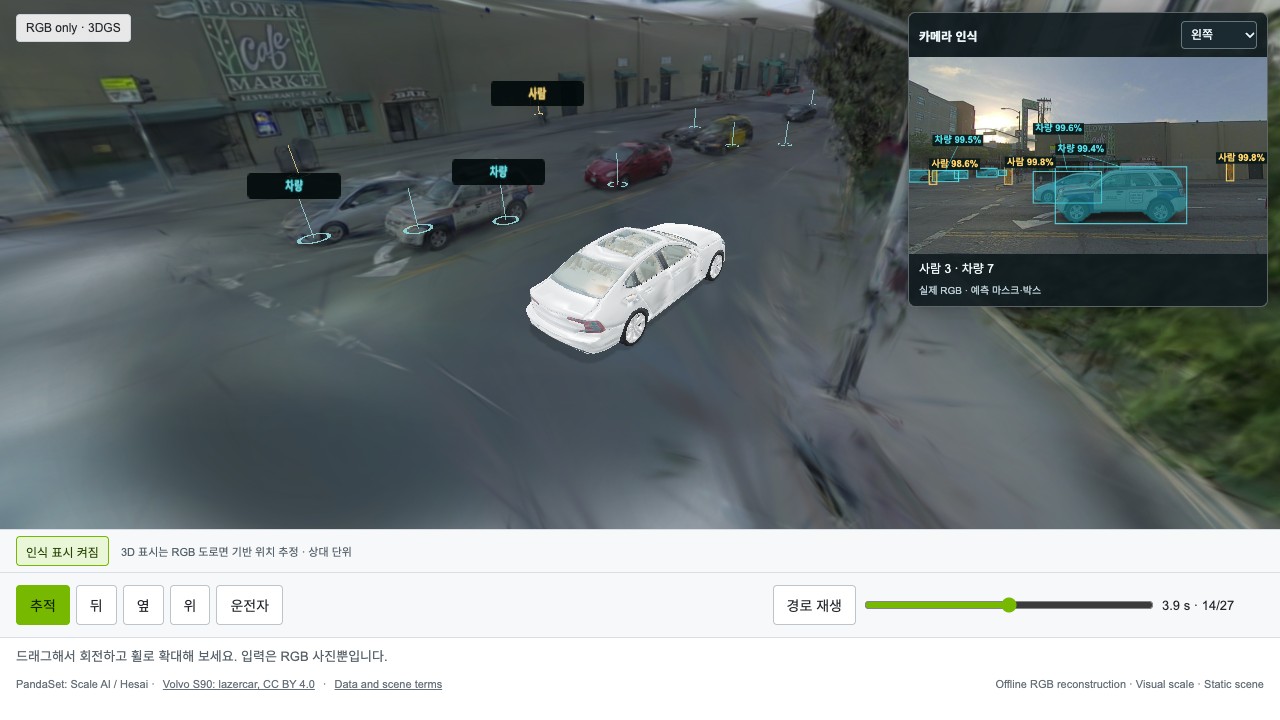 RGB only · 3DGS
드래그: 회전 · 휠/두 손가락: 확대 · 오른쪽 드래그: 이동
PandaSet: Scale AI / Hesai · Volvo S90: lazercar, CC BY 4.0 · 출처와 사용 조건
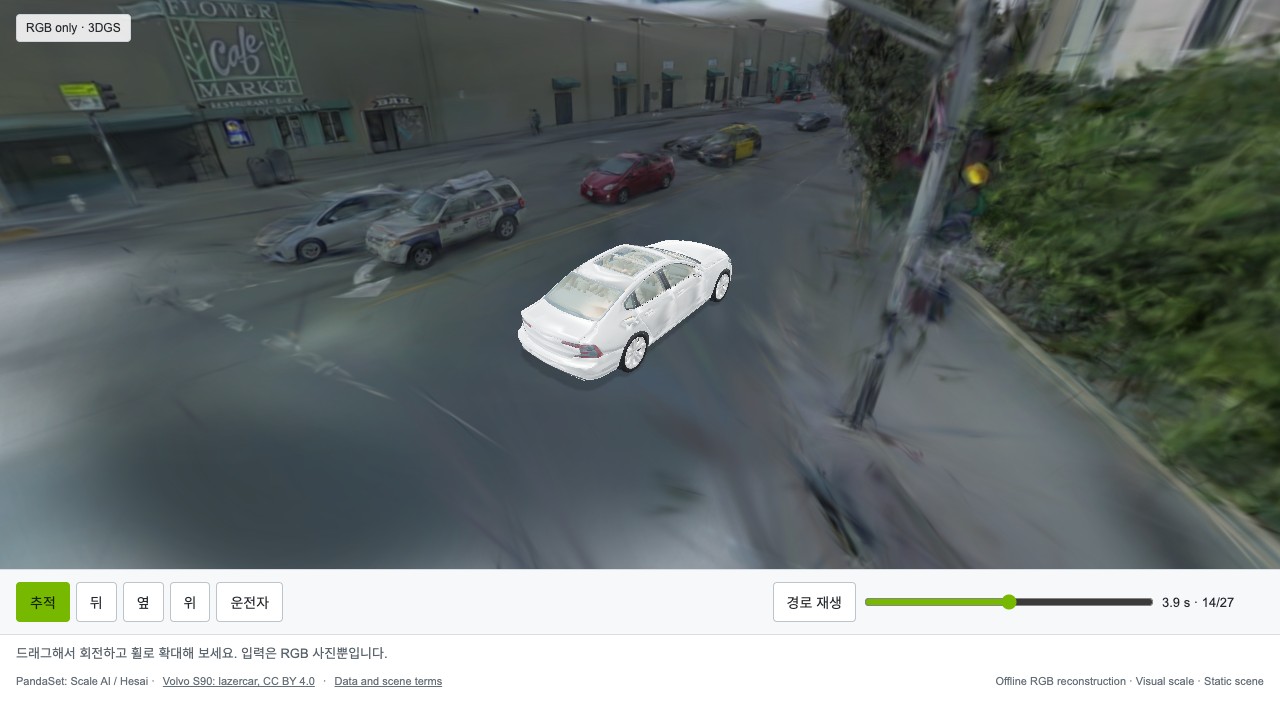
녹화한 RGB 클립을 먼저 복원하고 브라우저에서 시점을 움직입니다. 거리는 화면용 상대 단위이며 주변 차량은 정적 장면에 포함됩니다. Volvo는 전경에 따로 그리는 3D 위치 표시용 모델입니다.
카메라로 찍은 도로를 하나의 3D 장면으로 복원한 뒤, Volvo S90 주변을 마우스로 돌려봅니다. 먼저 뷰어와 조작 영상을 살펴보고, RTX 5090 한 장으로 같은 과정을 실행해 보세요. 입력은 RGB 픽셀뿐이며 카메라 정보와 촬영 위치, 3D 점을 모두 사진에서 추정합니다.
실행 구성: 이 실습은 NVIDIA 3DGRUT/3DGUT를 직접 실행하고, 원본 RGB 인식에 Mask R-CNN을 씁니다. NuRec·Harmonizer·Alpamayo 비교 실험과 RGB + LiDAR NuRec 실험은 별도 구성입니다. 현재 뷰어가 그 도구들을 호출한 결과로 설명하지 않습니다.
동작 원리
- 입력RGB 픽셀에서 시작
JPEG 162장 · uint8[H,W,3] → 특징점 매칭깊이·LiDAR·제공된 보정값·GPS·카메라 자세를 입력에서 제외합니다.
- 처리카메라와 장면 복원
COLMAP K[3,3] + 자세[4,4] + XYZ → Gaussian 40만 개RTX 5090 한 장에서 NVIDIA 3DGUT를 학습합니다. RGB만으로는 실제 길이 단위를 확정할 수 없습니다.
- 출력실제 주변 차량·사람 인식
RGB → 종류·점수·박스·마스크 → 도로면 접점 추정실사 사진에서 Mask R-CNN을 실행합니다. 3D 위치는 RGB 도로면 가정에 따른 추정이며 모델 점수는 실측 정확도가 아닙니다.
- 마우스로 관찰 시점 바꾸기
드래그 → 3D 카메라 이동 → 새 시점 RGBSpark가 같은 3D 장면을 그립니다. Volvo는 실제 메시이며 재생 경로는 사진에서 추정한 카메라 위치입니다.
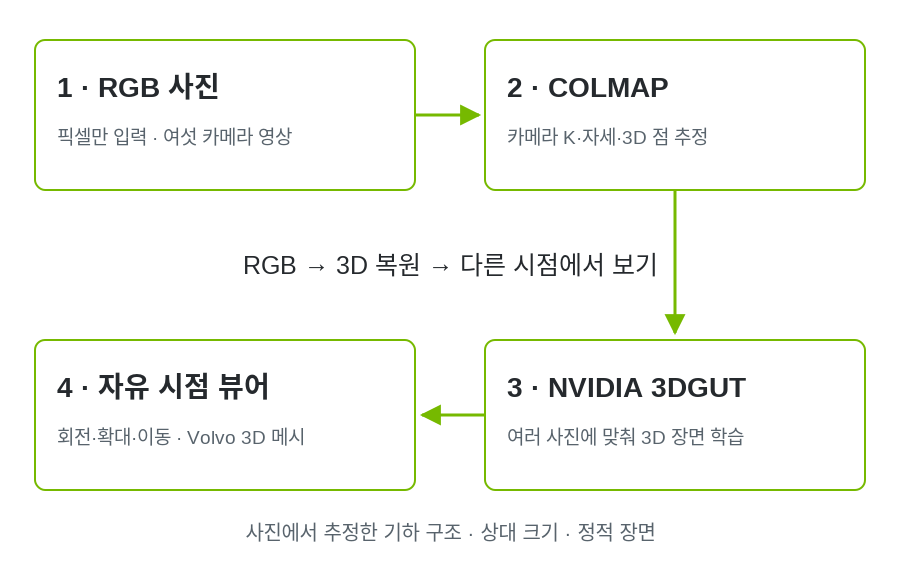
1. 사진에서 어떻게 3D 위치를 찾을까?
사진 한 장의 픽셀은 색을 알려주지만, 그 물체까지의 거리는 바로 알려주지 않습니다. COLMAP은 겹쳐 찍힌 사진에서 같은 무늬나 모서리 같은 특징점을 찾습니다. 여러 사진의 특징점이 같은 공간의 점을 가리키도록 카메라 위치와 3D 점을 함께 추정합니다. 그 점을 다시 사진에 투영했을 때 관측한 위치와 가까워지도록 다듬는 과정이 bundle adjustment입니다.
이 예제는 여섯 방향 카메라의 RGB 사진 162장을 사용합니다. 사진은 가로 최대 1024픽셀로 줄이고 원래 EXIF를 제거합니다. 데이터셋이 제공하는 카메라 K, 촬영 위치, 깊이, GPS, IMU, LiDAR는 입력에 넣지 않습니다. 예제 다운로더도 카메라 JPEG와 원본 약관만 선택해서 받습니다.
RGB 사진:             uint8[높이,너비,3]
사진 사이 특징점:      같은 점으로 추정한 픽셀 좌표 쌍
추정한 카메라 K:       float[3,3]
추정한 카메라 자세:    float[4,4]
삼각측량한 희소 점군:  float[N,3] + RGB
K에는 픽셀 단위 초점거리와 광학 중심이 들어 있습니다. 자세 행렬은 카메라의 위치와 방향을 표현합니다. 카메라는 오른쪽·아래·앞을 기준으로 하고, 뷰어는 복원한 도로가 위쪽 Z축을 향하도록 정렬합니다. 실제 값은 cameras.json에서 볼 수 있습니다.
실행 예제에서는 162장 모두를 연결하고 약 2만 9천 개의 3D 점을 찾았습니다. 재투영 오차는 사진 속 특징점이 얼마나 잘 맞는지를 나타냅니다. 실제 도로 좌표를 센티미터 단위로 측정했다는 뜻은 아닙니다. 촬영 위치도 정답 좌표를 복사한 값이 아니라 RGB에서 추정한 결과입니다.
아래는 실제로 추정한 정면 카메라 한 프레임입니다. K는 픽셀 단위이고 camera_position은 뷰어의 상대 단위입니다. x·y가 거의 0인 것은 중간 촬영 위치를 화면 원점으로 삼았기 때문이며 GPS 값이 아닙니다. 높이 0.9482는 카메라 높이의 중앙값을 1로 맞춘 상대값입니다.
{
  "image": "front_camera/39.jpg",
  "time_seconds": 3.9,
  "K": [
    [
      1055.495,
      0.0,
      512.0
    ],
    [
      0.0,
      1056.31,
      284.5
    ],
    [
      0.0,
      0.0,
      1.0
    ]
  ],
  "image_size": [
    1024,
    569
  ],
  "camera_position": [
    -0.0,
    0.0,
    0.9482
  ]
}
2. NVIDIA 3DGUT은 무엇을 학습할까?
NVIDIA가 공개한 3DGRUT에서 3DGUT 렌더러와 학습 코드를 사용합니다. COLMAP 점군을 초기값으로 삼아 색과 불투명도를 가진 작은 3D 타원체, Gaussian을 배치합니다. 이 타원체를 카메라에서 보았을 때 원래 사진과 비슷해지도록 위치·크기·회전·색을 조정합니다.
이 설정은 16,000단계를 학습하고 Gaussian 400,000개를 유지합니다. 전체 PLY에는 3차 spherical harmonics 색 계수가 들어 있습니다. 브라우저용 SPZ는 Gaussian을 모두 유지하고 색 계수를 1차로 줄여 약 7.8MB로 압축했습니다. 여러 각도의 영상을 미리 저장해 둔 파일이 아니라 계속 다른 시점에서 그릴 수 있는 3D 장면입니다. 사전학습 깊이 모델이나 승인이 필요한 모델 가중치를 받는 단계는 없습니다.
카메라 위치를 추정할 때는 모든 사진을 씁니다. 3DGRUT 내부에는 사진을 나누는 학습·검사 설정이 있지만, 이 예제를 독립적인 새 시점 정확도 벤치마크로 해석하면 안 됩니다. 움직이는 차도 하나의 정적 장면에 들어가므로 잔상이나 늘어난 형상이 생깁니다. 가려졌거나 촬영하지 못한 면은 불완전할 수 있습니다.
3. 마우스를 움직이면 무엇이 바뀔까?
Spark가 같은 Gaussian 장면을 현재 브라우저 카메라에서 투영해 그립니다. 드래그하면 카메라가 회전하고, 확대하면 대상과의 거리가 달라집니다. 옆으로 이동하면 가까운 물체와 먼 물체의 움직임 차이인 시차도 나타납니다. 화면은 매번 같은 3D 데이터에서 렌더링됩니다.
Volvo S90 Recharge는 lazercar의 실제 차량 메시를 약 1MB GLB로 단순화한 것입니다. CC BY 4.0에 따라 출처와 수정 내용을 표시했습니다. 차체도 3D여서 보는 방향에 따라 옆면·앞면·뒷면이 달라집니다. 원래 촬영한 차종을 뜻하지는 않습니다. 위치를 알기 쉽게 전경에 따로 그리는 참조 모델이며, 주변 물체와의 정확한 가림이나 차량 동역학을 검증한 결과는 아닙니다.
경로 슬라이더는 COLMAP이 추정한 카메라 이동을 따라갑니다. 주행 정책이 새 경로를 계획하거나 조향 명령을 보내는 단계가 아닙니다. ‘운전자’를 누르면 참조 차량을 숨기고, 추정한 전방 카메라의 위치와 화각으로 전환합니다.
외부 크기 기준이 없는 RGB 복원에는 전체 크기가 정해지지 않는 문제가 있습니다. 뷰어는 추정한 카메라와 도로 사이 높이를 1로 맞추고 차량을 상대 비율로 배치합니다. 도로 평면도 RGB 특징점으로 만든 3D 점에서 추정합니다. 화면의 단위는 실측 미터가 아닙니다.
4. 실사 RGB에서 주변 차량과 사람 인식하기
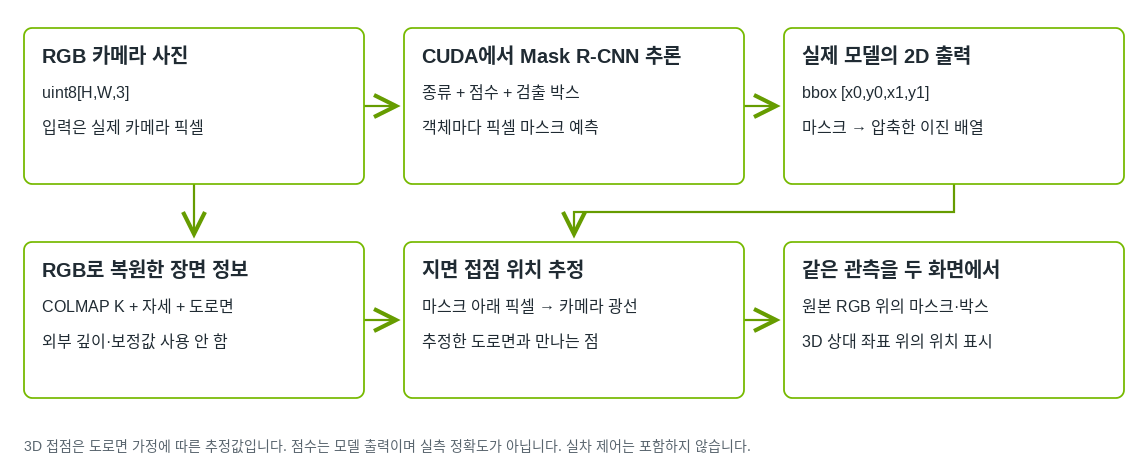
추가한 인식 단계는 TorchVision Mask R-CNN ResNet50 FPN v2, COCO_V1을 왜곡 보정한 실제 카메라 사진에 실행합니다. 먼저 이미지의 특징을 추출하고 객체가 있을 법한 영역을 찾습니다. 각 영역에서 객체 종류·점수·검출 박스를 예측하고, 해당 객체에 속하는 픽셀을 마스크로 구분합니다. 데이터셋의 정답 라벨은 읽지 않습니다.
RGB uint8[H,W,3] → float32[3,H,W], 값 범위 [0,1] → CUDA 추론
boxes:  float[N,4]       왜곡 보정한 원본 이미지의 픽셀 좌표
labels: int64[N]         사람·차량 등의 클래스 번호
scores: float[N]         모델 점수이며 실측 정확도를 뜻하지 않음
masks:  float[N,1,H,W] → 0.5 기준 이진화 → 객체 영역만 자르기 → RLE
화면에는 점수 0.8 이상인 사람·차량·트럭·버스·자전거·이륜차를 표시합니다. 다음은 왼쪽 카메라에서 실제로 예측한 보행자 한 명의 출력입니다.
{
  "image": "left_camera/39.jpg",
  "class": "person",
  "score": 0.9982,
  "bbox_xyxy": [
    274.1,
    316.64,
    294.92,
    364.5
  ],
  "cropped_mask_size": [
    21,
    49
  ],
  "contact_pixel": [
    280.0,
    363.0
  ],
  "estimated_ground_xyz": [
    -5.95426,
    11.1151,
    0.0
  ]
}
이 박스의 크기는 약 21×48픽셀입니다. 저장한 마스크는 전체 이미지 크기가 아니라 객체 주변을 자른 21×49 이진 배열입니다. 0과 1이 몇 번 연속되는지 기록하는 RLE로 압축해 브라우저에 전달합니다. 점수 0.9982가 나왔더라도 정답으로 검증된 것은 아닙니다. 오검출과 누락이 생길 수 있습니다.
이 결과를 어떻게 3D 화면에 놓을까요? 예측 마스크 아래쪽의 픽셀을 고르고, COLMAP이 추정한 K와 카메라 자세로 광선을 만듭니다. 그 광선이 RGB로 추정한 도로면과 만나는 곳을 접점으로 삼습니다. 이 값은 도로면 가정에 따른 상대 위치 추정이며, 3D 검출 박스나 실측 거리·객체 자세가 아닙니다. 수평선 부근, 너무 먼 교점, 화면 가장자리에서 잘린 객체는 2D 결과만 남깁니다. 보도 높이·경사·가림·마스크 오차가 있으면 위치가 어긋날 수 있습니다.
여섯 카메라는 같은 프레임 번호끼리 연결합니다. 데이터셋이 제공하는 센서 시각과 보정값은 쓰지 않습니다. 카메라 간 가까운 위치 추정은 합치고, 짧은 클립에서 종류와 위치를 비교해 임시 ID를 붙입니다. ID가 바뀔 수 있으므로 사람의 신원이나 실제 속도, 고유 객체 수로 해석하면 안 됩니다. 화면에는 가까운 표식을 최대 24개 그리며 선택한 카메라에 보이는 객체의 이름을 강조합니다. 표식의 가림 관계는 물리적으로 검증하지 않습니다.
인식 표시를 껐다 켜며 원본과 예측을 비교하고, 카메라 방향을 바꿔 실제 입력을 확인하세요. 차량은 청록색, 사람은 노란색, 자전거·이륜차는 보라색으로 표시합니다. RGB 패널과 3D 표식은 같은 촬영 프레임으로 갱신됩니다. 배경은 하나의 정적 Gaussian 장면이므로 인식 시점을 바꿔도 움직이는 차량의 잔상이 사라지지는 않습니다.
자차를 중심에 두고 주변 도로와 객체를 살펴보는 표현은 Tesla 공식 주행 시각화 설명을 참고했습니다. 이 실습은 복원과 인식을 각각 살펴볼 수 있는 공개 도구로 구성했으며, Tesla의 비공개 신경망·Reality View 내부 구조·주행 제어를 재현한 결과로 설명하지 않습니다.
처음이면 실습 파일부터 받기
GPU 실습은 필요한 NVIDIA GPU가 있는 머신에서 터미널을 엽니다. CPU 실습은 지금 쓰는 컴퓨터에서 해도 됩니다. 아래 명령은 한 줄씩 입력하고 Enter를 누르세요. 여러 줄짜리 명령 블록은 통째로 복사해도 됩니다.
cd "$HOME"
git clone https://github.com/james-joobs/awesome-nvidia-physical-ai.git
cd awesome-nvidia-physical-ai
pwd
홈 폴더에 받는 예입니다. 이미 내려받았다면 git clone은 건너뛰고 내 실습 폴더로 이동합니다. 새 터미널을 열 때마다 pwd의 출력 끝이 awesome-nvidia-physical-ai인지 확인하세요. 그래야 labs/로 시작하는 파일을 찾을 수 있습니다.
따라 하기
1. NVIDIA GPU 없이 저장된 결과 보기
이 페이지의 3D 뷰어나 한국어 조작 영상을 열어보세요. 회전·확대·이동, 운전자 시점, 경로 재생을 확인할 수 있습니다. 3D에는 WebGL2를 지원하는 브라우저가 필요합니다. MP4 재생과 결과 파일 검사에는 NVIDIA GPU가 필요하지 않습니다.
python3 labs/rgb-reality-view/check.py
RGB 전용 입력 기록, Gaussian 개수, 좌표 변환, 실제 마우스 조작 기록과 파일 해시를 검사합니다. FFmpeg가 있으면 --decode-video를 붙여 두 영상의 전체 프레임도 읽어볼 수 있습니다.
학습 없이 저장된 3D 장면부터 열 수도 있습니다. 저장소 폴더에서 아래 명령을 실행하고 **http://127.0.0.1:8090/**에 접속하세요. 뷰어가 지정된 버전의 공개 JavaScript 모듈을 불러오므로 인터넷 연결이 필요합니다.
python3 labs/rgb-reality-view/serve.py --root site/public/showcase/rgb-reality-view
2. GPU 머신 준비하기
검증한 환경은 Linux x86_64, RTX 5090 32GB 한 장, 시스템 RAM 약 32GB입니다. NVIDIA 드라이버, CUDA 12.8 또는 12.9 개발 도구, Python, C++ 컴파일러, uv, Git, Node.js/npm을 준비합니다. 설치 스크립트는 별도 Python 환경을 만들고 compute capability 12.0용 확장을 빌드합니다. 시스템 CUDA나 다른 서비스를 교체하지 않습니다.
처음이라면 NVIDIA 머신 환경 설정과 uv 공식 설치 안내부터 확인하세요. 레포 폴더에서 터미널을 열고 각 줄이 끝나면 다음 줄을 입력합니다.
nvidia-smi
export RGB_VIEW_ROOT="$HOME/physical-ai-labs/rgb-road"
python3 labs/rgb-reality-view/pipeline.py --root "$RGB_VIEW_ROOT" setup
처음에는 몇 GB의 패키지를 받고 C++·CUDA 확장을 컴파일합니다. 핵심 패키지 버전과 소스 커밋은 고정했습니다. CUDA가 여러 개 있으면 호환되는 12.8/12.9 폴더를 고릅니다. 직접 지정하려면 명령에 --cuda-home /path/to/cuda-12.9를 추가하세요. 터미널에서 먼저 잡히는 오래된 nvcc와 실제 사용할 개발 도구가 다를 수 있습니다.
3. 공개 RGB 예제 복원하기
데이터·차량 모델의 출처와 사용 조건을 먼저 확인합니다. 예제는 고정된 비공식 커뮤니티 미러의 PandaSet 001번 장면입니다. 원본 파일의 약관과 CC BY-SA로 표기한 제작사 안내의 차이를 보존했습니다. 새 장면·영상에는 CC BY-SA 4.0과 원래 데이터 약관을 적용하며, 코드의 MIT 라이선스와 구분합니다.
전체 과정을 이어서 실행하려면 다음 한 줄을 사용합니다.
python3 labs/rgb-reality-view/pipeline.py --root "$RGB_VIEW_ROOT" all
각 단계의 출력을 먼저 확인하려면 나눠서 실행할 수도 있습니다.
python3 labs/rgb-reality-view/pipeline.py --root "$RGB_VIEW_ROOT" example
python3 labs/rgb-reality-view/pipeline.py --root "$RGB_VIEW_ROOT" sfm
python3 labs/rgb-reality-view/pipeline.py --root "$RGB_VIEW_ROOT" train
python3 labs/rgb-reality-view/pipeline.py --root "$RGB_VIEW_ROOT" export
python3 labs/rgb-reality-view/pipeline.py --root "$RGB_VIEW_ROOT" perceive
python3 labs/rgb-reality-view/pipeline.py --root "$RGB_VIEW_ROOT" serve
실행한 머신에서 http://127.0.0.1:8090/ 를 엽니다. 원격 GPU 머신을 쓴다면 내 컴퓨터에서 ssh -L 8090:127.0.0.1:8090 your-gpu-host로 포트를 연결한 뒤 같은 주소를 여세요. your-gpu-host는 자신이 사용하는 SSH 별칭으로 바꿉니다.
| 단계 | 생성되는 파일 | 확인할 내용 |
|---|---|---|
| RGB 예제 받기 / 내 영상 준비 | work/images/, input-manifest.json |
JPEG만 있는지, 제공된 카메라 정보나 센서 데이터가 없는지 |
| COLMAP 복원 | sfm-result.json, sfm-selected/, undistorted/sparse/0/ |
선택한 장면과 왜곡 보정 후의 연결 이미지 수가 같은지 |
| 3DGUT 학습 | training-result.json, train/.../export_last.ply |
완료 단계 수, 실제 시간, 측정한 GPU 메모리 |
| 뷰어 내보내기 | viewer/road.spz, cameras.json, volvo-s90.glb |
하나의 3D 장면, RGB에서 추정한 카메라 경로, 별도 차량 메시 |
다른 촬영본은 새 출력 폴더에서 시작합니다. 다른 실습의 점군을 이 폴더에 덮어쓰지 마세요. 입력 검사는 이미지 폴더에 다른 파일이 섞였거나 파일이 바뀌었을 때, 또는 기록에 RGB 이외의 센서를 사용했다고 표시되었을 때 실행을 중단합니다.
4. 내가 찍은 RGB 영상으로 실행하기
RGB 영상 하나를 넣으면 FFmpeg로 프레임을 추출하고 같은 복원 과정을 진행합니다. 서로 겹치는 장면과 카메라의 이동이 있어야 합니다. 제자리 회전만 있거나 무늬가 거의 없는 표면은 3D 위치를 찾기 어렵습니다.
python3 labs/rgb-reality-view/pipeline.py \
  --root "$HOME/physical-ai-labs/my-road" \
  --video "/absolute/path/to/road.mp4" --sample-fps 3 all
주변을 보는 여러 RGB 카메라가 있다면 카메라별 폴더로 이미지를 나눠 --input /path/to/rgb-folders --front-folder front_camera all을 사용합니다. 폴더 이름으로 같은 렌즈의 이미지를 묶으며 외부 보정값은 요구하지 않습니다. 전방 카메라 하나로는 실제로 본 영역을 복원할 수 있습니다. 뒤쪽이나 가려진 면을 보려면 그 부분을 담은 관측이 더 필요합니다.
결과 확인
기록한 예제는 RGB 162장, RTX 5090 한 장, 학습 16,000단계, Gaussian 400,000개를 사용했습니다. 사진 매칭과 촬영 위치 추정은 약 1분, 기준 실행의 학습 루프는 약 2분 걸렸습니다. 설치·첫 컴파일·압축·브라우저 로딩 시간은 별도입니다. 정확한 측정값과 범위는 실행 기록에 있습니다.
python3 labs/rgb-reality-view/check.py --decode-video
마우스 조작 전후의 카메라 위치도 저장했습니다. 실제 드래그로 3D 카메라가 바뀌었는지, 경로 재생으로 추정 프레임이 이동했는지 확인합니다. 복원과 학습은 NVIDIA GPU 한 장에서 실행하고, 뷰어는 보고 있는 브라우저에서 렌더링합니다.
이 실습은 RGB 클립을 미리 복원한 뒤 자유 시점으로 보는 파이프라인입니다. 실차의 실시간 인지나 폐루프 자율주행을 구현한 결과와는 구분합니다. 카메라만으로 기하 구조를 찾고, 신경 렌더링으로 표현하고, 자차 중심으로 살펴보는 과정을 직접 재현하는 데 초점을 둡니다.
실행 영상과 기록
실습 소스 코드
pipeline.py
GitHub에서 파일 보기"""Reproduce an RGB-only driving-scene reconstruction on one RTX 5090.
All outputs stay local. Model/scene/data rights are separate from this MIT code.
Use --help; the bilingual guide explains setup, own videos, and source licenses.
"""
import argparse,hashlib,json,os,platform,re,shutil,subprocess,time
from pathlib import Path
from input_guard import verify_rgb_inputs
LAB=Path(__file__).resolve().parent
PIN='dfd3d54c8c612003fb7948443edf7778f2bcd5ec'
p=argparse.ArgumentParser();p.add_argument('--root',type=Path,default=Path(os.environ.get('RGB_VIEW_ROOT',str(Path.home()/'physical-ai-labs/rgb-road'))));p.add_argument('--input',type=Path,help='Your RGB image folder, optionally one subfolder per camera');p.add_argument('--video',type=Path,help='Your RGB video, extracted locally with FFmpeg');p.add_argument('--sample-fps',type=float,default=3);p.add_argument('--capture-fps',type=float,default=10);p.add_argument('--front-folder',default='front_camera');p.add_argument('--cuda-home',type=Path);p.add_argument('--iterations',type=int,default=16000);p.add_argument('--port',type=int,default=8090);p.add_argument('stage',choices=['setup','example','ingest','sfm','train','export','serve','perceive','all']);a=p.parse_args();root=a.root.expanduser().resolve();root.mkdir(parents=True,exist_ok=True);sfm_py=root/'.venv/bin/python';source=root/'3dgrut';gpu_py=source/'.venv/bin/python'
def run(args,**kwargs):return subprocess.run([str(x) for x in args],check=True,**kwargs)
def uv_path():
uv=shutil.which('uv') or str(Path.home()/'.local/bin/uv')
if not Path(uv).is_file():raise SystemExit('Install uv first: https://docs.astral.sh/uv/getting-started/installation/')
return uv
def cuda_home():
candidates=[a.cuda_home] if a.cuda_home else [Path('/usr/local/cuda'),*Path('/usr/local').glob('cuda-*')]
valid=[]
for d in candidates:
if not d or not (d/'bin/nvcc').is_file():continue
text=subprocess.check_output([str(d/'bin/nvcc'),'--version'],text=True);m=re.search(r'release (\d+)\.(\d+)',text)
if m and (int(m[1]),int(m[2])) in [(12,8),(12,9)]:valid.append((int(m[2]),d.resolve()))
if not valid:raise SystemExit('This preset needs a CUDA 12.8/12.9 toolkit. Pass --cuda-home /path/to/cuda; CUDA 12.0 cannot compile for RTX 5090.')
return max(valid,key=lambda pair:pair[0])[1]
def gpu_env():
cuda=cuda_home();return {**os.environ,'CUDA_HOME':str(cuda),'PATH':f'{cuda}/bin:{os.environ.get("PATH","")}','TORCH_CUDA_ARCH_LIST':'12.0','MAX_JOBS':'2','OMP_NUM_THREADS':'8','CUDA_VISIBLE_DEVICES':'0','WANDB_MODE':'disabled','UV_INDEX':'pytorch=https://download.pytorch.org/whl/cu128'}
def setup():
if platform.system()!='Linux' or platform.machine() not in {'x86_64','AMD64'}:raise SystemExit('GPU reconstruction preset: Linux x86_64. The viewer and saved-result checks also run on Mac/Windows.')
uv=uv_path();env=gpu_env()
if not sfm_py.exists():run([uv,'venv','--python','3.11',sfm_py.parent.parent])
run([uv,'pip','install','--python',sfm_py,'pycolmap-cuda12==3.13.0','Pillow==13.0.0','numpy==2.4.6','scipy==1.17.1','plyfile==1.1.5','imageio-ffmpeg==0.6.0'])
if not source.exists():run(['git','clone','--recursive','https://github.com/nv-tlabs/3dgrut.git',source])
head=subprocess.check_output(['git','-C',str(source),'rev-parse','HEAD'],text=True).strip()
if head!=PIN:
if subprocess.check_output(['git','-C',str(source),'status','--porcelain'],text=True).strip():raise SystemExit('The 3DGRUT checkout has edits. Use a fresh output folder; your changes were preserved.')
run(['git','-C',source,'checkout',PIN]);run(['git','-C',source,'submodule','update','--init','--recursive'])
if not gpu_py.exists():run([uv,'venv','--python','3.11',gpu_py.parent.parent])
run([uv,'pip','install','--python',gpu_py,'torch==2.8.0','torchvision==0.23.0','--index-url','https://download.pytorch.org/whl/cu128'])
run([uv,'pip','install','--python',gpu_py,'-c',LAB/'constraints.txt','-e',str(source)+'[gui]'],env=env)
installed=subprocess.run([str(gpu_py),'-c','import tinycudann'],env=env,capture_output=True)
if installed.returncode:run([uv,'pip','install','--python',gpu_py,'--no-build-isolation',source/'thirdparty/tiny-cuda-nn/bindings/torch'],env=env)
run([uv,'pip','install','--python',gpu_py,'kaolin==0.18.0','-f','https://nvidia-kaolin.s3.us-east-2.amazonaws.com/torch-2.8.0_cu128.html'],env=env)
run([uv,'pip','install','--python',gpu_py,'--no-build-isolation','-r',source/'requirements_extra.txt','slangtorch==1.3.18','pycolmap-cuda12==3.13.0'],env=env)
run([gpu_py,'-c','import torch,tinycudann,kaolin,ppisp,slangtorch;from fused_ssim import fused_ssim;assert torch.cuda.is_available();print("GPU environment ready:",torch.cuda.get_device_name(0))'],env=env)
(root/'setup.done.json').write_text(json.dumps({'3dgrut_commit':PIN,'torch':'2.8.0+cu128','sfm':'pycolmap-cuda12 3.13.0','cuda_toolkit':str(cuda_home().name),'arch':'12.0','reconstruction_pretrained_weights_required':False,'perception_weights':'public TorchVision COCO_V1; downloaded on first perception run'},indent=2)+'\n')
def ingest():
if a.video:
ffmpeg=shutil.which('ffmpeg')
if not ffmpeg:ffmpeg=subprocess.check_output([str(sfm_py),'-c','import imageio_ffmpeg;print(imageio_ffmpeg.get_ffmpeg_exe())'],text=True).strip()
frames=root/'video-rgb/camera';frames.mkdir(parents=True,exist_ok=True);run([ffmpeg,'-v','error','-i',a.video,'-vf',f'fps={a.sample_fps}','-q:v','2',frames/'%06d.jpg']);src=frames.parent
elif a.input:src=a.input
else:raise SystemExit('Use --input /path/to/RGB or --video /path/to/clip.mp4; omit both for the public example in stage all.')
run([sfm_py,LAB/'prepare_images.py','--input',src,'--output',root/'work'])
(root/'ingest.json').write_text(json.dumps({'kind':'video' if a.video else 'images','sample_fps':a.sample_fps if a.video else a.capture_fps,'front_folder':'camera' if a.video else a.front_folder},indent=2)+'\n')
def sfm():
verify_rgb_inputs(root/'work');run([sfm_py,LAB/'sfm.py','--root',root/'work','--device','cuda'],env=gpu_env())
def train():
verify_rgb_inputs(root/'work')
expected=json.loads((root/'work/sfm-result.json').read_text())['registered_images']
count=int(subprocess.check_output([str(sfm_py),'-c','import sys,pycolmap as c;print(c.Reconstruction(sys.argv[1]).num_reg_images())',str(root/'work/undistorted/sparse/0')],text=True).strip())
if count!=expected:raise RuntimeError('The selected and undistorted RGB model have different image counts; rerun the sfm stage.')
env=gpu_env();out=root/'train';args=[gpu_py,source/'train.py','--config-name','apps/colmap_3dgut_mcmc.yaml',f'path={root}/work/undistorted',f'out_dir={out}','experiment_name=rgb-only',f'n_iterations={a.iterations}','num_workers=2','strategy.add.max_n_gaussians=400000','export_ply.enabled=true','export_usd.enabled=false','test_last=false','with_gui=false','with_viser_gui=false','compute_extra_metrics=false','enable_frame_timings=true','log_frequency=100','enable_writer=false','dataset.load_exif=false']
start=time.perf_counter();samples=[]
import fcntl
with open(os.environ.get('GPU_LOCK','/tmp/rgb-reality-view.gpu.lock'),'w') as lock:
fcntl.flock(lock,fcntl.LOCK_EX)
with (root/'train.log').open('w') as log:
child=subprocess.Popen([str(x) for x in args],cwd=source,env=env,stdout=log,stderr=subprocess.STDOUT)
while child.poll() is None:
try:
values=subprocess.check_output(['nvidia-smi','--query-gpu=memory.used,utilization.gpu','--format=csv,noheader,nounits'],text=True).splitlines()[0].split(',');samples.append({'t_seconds':time.perf_counter()-start,'gpu_memory_mib':int(values[0]),'utilization_percent':int(values[1])})
except (subprocess.SubprocessError,ValueError):pass
time.sleep(1)
if child.returncode:raise SystemExit(f'Training failed. Inspect {root/"train.log"}; raw logs stay in your output folder.')
log=(root/'train.log').read_text(errors='replace');tables=re.findall(r'│\s*(\d+)\s*│\s*(\d+)\s*│\s*([\d.]+)\s*s\s*│',log);models=list(out.rglob('export_last.ply'))
if not models or not tables:raise RuntimeError('No completed model and observed training summary were found')
artifact=max(models,key=lambda p:p.stat().st_mtime);steps,epochs,seconds=tables[-1]
report={'3dgrut_commit':PIN,'training_steps':int(steps),'epochs':int(epochs),'training_loop_seconds':float(seconds),'wall_seconds_including_compile':time.perf_counter()-start,'gpu_count':1,'gpu_memory_mib_sampled_total_peak':max((s['gpu_memory_mib'] for s in samples),default=0),'memory_scope':'nvidia-smi total GPU usage sampled each second; includes display/background allocations','input_manifest_sha256':hashlib.sha256((root/'work/input-manifest.json').read_bytes()).hexdigest(),'dataset_type':'COLMAP estimated from RGB','test_last':False,'evaluation_scope':'No independent novel-view accuracy claim. All images inform SfM; photometric train/validation split is not a sensor-exclusion benchmark.','ply':str(artifact.relative_to(root))}
(root/'training-result.json').write_text(json.dumps(report,indent=2)+'\n');print('TRAIN_COMPLETE',json.dumps(report),flush=True)
def perceive():
verify_rgb_inputs(root/'work')
# Older local installs may predate the perception extension.
run([uv_path(),'pip','install','--python',gpu_py,'pycolmap-cuda12==3.13.0'])
import fcntl
with open(os.environ.get('GPU_LOCK','/tmp/rgb-reality-view.gpu.lock'),'w') as lock:
fcntl.flock(lock,fcntl.LOCK_EX);run([gpu_py,LAB/'perceive.py','--root',root],env=gpu_env())
def export():
verify_rgb_inputs(root/'work');report=json.loads((root/'training-result.json').read_text());folder=a.front_folder
ingest=json.loads((root/'ingest.json').read_text()) if (root/'ingest.json').exists() else {}
if ingest.get('kind')=='video':folder='camera'
if folder=='front_camera':
groups={row['image'].split('/')[0] for row in verify_rgb_inputs(root/'work')['images']}
if folder not in groups and len(groups)==1:folder=next(iter(groups))
out=root/'viewer';run([sfm_py,LAB/'prepare_viewer.py','--root',root/'work','--output',out,'--front-folder',folder,'--capture-fps',ingest.get('sample_fps',a.capture_fps)])
npm=shutil.which('npm')
if not npm:raise SystemExit('Install Node.js/npm to create the compressed browser model; the full RGB-only PLY has already been saved.')
run([npm,'exec','--yes','--package=@playcanvas/splat-transform@3.12.0','--','splat-transform','-w',root/report['ply'],'--filter-harmonics','1',out/'road.spz','--spz-version','3'])
shutil.copy2(LAB/'assets/volvo-s90.glb',out/'volvo-s90.glb')
for name in ['viewer.html','viewer.js','viewer.css','perception-view.js','policy-view.js']:shutil.copy2(LAB/name,out/name)
shutil.copy2(LAB/'assets/VEHICLE-LICENSE.txt',out/'VEHICLE-LICENSE.txt')
if (root/'PANDASET-DATA-LICENSE.txt').exists():shutil.copy2(root/'PANDASET-DATA-LICENSE.txt',out/'PANDASET-DATA-LICENSE.txt');credits=(LAB/'assets/EXAMPLE-ATTRIBUTION.txt').read_text()
else:credits='Scene: user-provided RGB images; preserve their original rights.\n'+(LAB/'assets/VEHICLE-LICENSE.txt').read_text()
(out/'ATTRIBUTION.txt').write_text(credits);print('VIEWER_READY',str(out),flush=True)
if a.stage=='setup':setup()
elif a.stage=='example':run([sfm_py,LAB/'fetch_example.py','--root',root])
elif a.stage=='ingest':ingest()
elif a.stage=='sfm':sfm()
elif a.stage=='train':train()
elif a.stage=='export':export()
elif a.stage=='perceive':perceive()
elif a.stage=='serve':run(['python3',LAB/'serve.py','--root',root/'viewer','--port',a.port])
else:
if not (root/'setup.done.json').exists():setup()
if a.input or a.video:ingest()
else:run([sfm_py,LAB/'fetch_example.py','--root',root])
sfm();train();export();perceive();run(['python3',LAB/'serve.py','--root',root/'viewer','--port',a.port])
prepare_images.py
GitHub에서 파일 보기"""Create a pixel-only input folder. Never read depth, poses, GPS or LiDAR files."""
import argparse,hashlib,json
from pathlib import Path
from PIL import Image,ImageOps
EXTENSIONS={'.jpg','.jpeg','.png','.webp'}
def prepare(source,output,stride=1,max_side=1024):
source=Path(source);output=Path(output);images=output/'images'
if images.exists() and any(images.rglob('*')):raise ValueError('Use a fresh output folder to prevent mixing RGB and previous reconstruction inputs')
images.mkdir(parents=True,exist_ok=True);rows=[]
folders=sorted({p.parent for p in source.rglob('*') if p.is_file() and p.suffix.lower() in EXTENSIONS})
for folder in folders:
files=sorted(p for p in folder.iterdir() if p.is_file() and p.suffix.lower() in EXTENSIONS)[::stride]
camera=folder.relative_to(source).as_posix().replace('/','_') if folder!=source else 'camera'
for i,p in enumerate(files):
im=ImageOps.exif_transpose(Image.open(p)).convert('RGB');im.thumbnail((max_side,max_side),Image.Resampling.LANCZOS)
target=images/camera/f'{p.stem}.jpg';target.parent.mkdir(parents=True,exist_ok=True)
# Fresh RGB pixels: do not copy EXIF, GPS, camera K, ICC or other sidecars.
im.info.clear();im.save(target,format='JPEG',quality=96)
rows.append({'image':target.relative_to(images).as_posix(),'width':im.width,'height':im.height,'sha256':hashlib.sha256(target.read_bytes()).hexdigest()})
if len(rows)<8:raise ValueError('At least eight overlapping RGB frames are needed')
manifest={'schema':1,'input':'RGB pixels only','external_sensor_inputs':[],'supplied_camera_poses':False,'supplied_intrinsics':False,'supplied_depth':False,'supplied_ground_plane':False,'stride':stride,'max_side':max_side,'images':rows}
(output/'input-manifest.json').write_text(json.dumps(manifest,indent=2)+'\n');print('RGB_ONLY_INPUT',len(rows),'images',flush=True)
return manifest
if __name__=='__main__':
p=argparse.ArgumentParser();p.add_argument('--input',type=Path,required=True);p.add_argument('--output',type=Path,required=True);p.add_argument('--stride',type=int,default=1);p.add_argument('--max-side',type=int,default=1024);a=p.parse_args();prepare(a.input,a.output,a.stride,a.max_side)
input_guard.py
GitHub에서 파일 보기"""Enforce the RGB-only contract before feature matching or training."""
import hashlib,json
from pathlib import Path
def verify_rgb_inputs(root):
root=Path(root);manifest=json.loads((root/'input-manifest.json').read_text());images=root/'images';listed={row['image'] for row in manifest['images']};actual={p.relative_to(images).as_posix() for p in images.rglob('*') if p.is_file()}
if actual!=listed or any(Path(p).suffix.lower() not in {'.jpg','.jpeg','.png'} for p in actual):raise ValueError('RGB input directory contains unexpected files; reconstruction stopped')
if len(listed)!=len(manifest['images']):raise ValueError('Duplicate RGB input names')
for row in manifest['images']:
path=images/row['image']
if not path.resolve().is_relative_to(images.resolve()):raise ValueError('RGB path leaves the image folder')
if hashlib.sha256(path.read_bytes()).hexdigest()!=row['sha256']:raise ValueError('RGB input hash changed')
if manifest['external_sensor_inputs'] or any(manifest[k] for k in ['supplied_camera_poses','supplied_intrinsics','supplied_depth','supplied_ground_plane']):raise ValueError('This pipeline accepts RGB pixels only')
return manifest
fetch_example.py
GitHub에서 파일 보기"""Fetch only PandaSet JPEG RGB frames and original terms from a pinned mirror.
No intrinsics, poses, timestamps, LiDAR, depth or annotation files are fetched.
The community mirror is not an official publisher; original terms are preserved.
"""
import argparse,hashlib,json,struct,time,zlib
from concurrent.futures import ThreadPoolExecutor
from pathlib import Path,PurePosixPath
from urllib.request import Request,urlopen
from index_zip import RemoteZip,REVISION,SIZE
from prepare_images import prepare
import zipfile
p=argparse.ArgumentParser();p.add_argument('--root',type=Path,required=True);p.add_argument('--scene',default='001');p.add_argument('--stride',type=int,default=3);a=p.parse_args();root=a.root;root.mkdir(parents=True,exist_ok=True)
with zipfile.ZipFile(RemoteZip()) as z:infos=z.infolist()
url=f'https://huggingface.co/datasets/georghess/pandaset/resolve/{REVISION}/pandaset.zip?download=true&rgb={int(time.time())}'
cameras={'front_camera','front_left_camera','front_right_camera','left_camera','right_camera','back_camera'}
selected=[]
for i in infos:
parts=PurePosixPath(i.filename).parts
if len(parts)==5 and parts[:3]==('pandaset',a.scene,'camera') and parts[3] in cameras and parts[4].endswith('.jpg') and int(Path(parts[4]).stem)%a.stride==0:selected.append(i)
license_info=next(i for i in infos if i.filename==f'pandaset/{a.scene}/LICENSE.txt')
def fetch(start,end):
for retry in range(5):
try:
with urlopen(Request(url,headers={'Range':f'bytes={start}-{end}'}),timeout=120) as res:
if res.status!=206 or res.headers.get('Content-Range')!=f'bytes {start}-{end}/{SIZE}':raise ValueError('Wrong archive byte range')
data=res.read(end-start+2)
if len(data)!=end-start+1:raise ValueError('Truncated archive member')
return data
except Exception:
if retry==4:raise
time.sleep(1+retry)
def read_member(i):
fields=struct.unpack('<4s5H3L2H',fetch(i.header_offset,i.header_offset+29))
if fields[0]!=b'PK\x03\x04':raise ValueError('Invalid ZIP header')
start=i.header_offset+30+fields[-2]+fields[-1];data=fetch(start,start+i.compress_size-1)
data=zlib.decompress(data,-15) if i.compress_type==8 else data if i.compress_type==0 else None
if data is None or len(data)!=i.file_size or zlib.crc32(data)!=i.CRC:raise ValueError('ZIP CRC/size mismatch')
return data
terms=read_member(license_info);(root/'PANDASET-DATA-LICENSE.txt').write_bytes(terms)
def save(i):
relative=PurePosixPath(i.filename).relative_to(f'pandaset/{a.scene}/camera');target=root/'downloaded-rgb'/str(relative);target.parent.mkdir(parents=True,exist_ok=True);data=read_member(i);target.write_bytes(data);return {'file':str(relative),'bytes':len(data),'zip_crc32':i.CRC,'sha256':hashlib.sha256(data).hexdigest()}
with ThreadPoolExecutor(max_workers=8) as pool:receipt=list(pool.map(save,selected))
(root/'download-result.json').write_text(json.dumps({'source':'PandaSet by Scale AI and Hesai','mirror':'https://huggingface.co/datasets/georghess/pandaset','mirror_status':'unofficial community mirror','revision':REVISION,'files':receipt,'downloaded_modalities':['RGB JPEG'],'did_not_download':['LiDAR','depth','poses','intrinsics','GPS','IMU','timestamps','annotations'],'verification':'Per-file CRC and size checked, per-file SHA-256 recorded; full archive SHA-256 not checked for range download'},indent=2)+'\n')
prepare(root/'downloaded-rgb',root/'work',stride=1)
print('RGB_EXAMPLE_COMPLETE',len(receipt),'RGB frames; original terms retained',flush=True)
sfm.py
GitHub에서 파일 보기"""Recover intrinsics, camera poses and sparse 3D using only RGB image matches."""
import argparse,hashlib,json,time
from pathlib import Path
import pycolmap as c
p=argparse.ArgumentParser();p.add_argument('--root',type=Path,required=True);p.add_argument('--features',type=int,default=4096);p.add_argument('--device',choices=['auto','cpu','cuda'],default='auto');a=p.parse_args();r=a.root;start=time.perf_counter()
from input_guard import verify_rgb_inputs
manifest=verify_rgb_inputs(r);listed={row['image'] for row in manifest['images']}
db=r/'database.db';device=getattr(c.Device,a.device);ex=c.FeatureExtractionOptions();ex.max_image_size=1024;ex.num_threads=8;ex.sift.max_num_features=a.features
c.extract_features(str(db),str(r/'images'),camera_mode=c.CameraMode.PER_FOLDER,camera_model='SIMPLE_RADIAL',extraction_options=ex,device=device)
print('SIFT_COMPLETE',round(time.perf_counter()-start,2),flush=True)
mt=c.FeatureMatchingOptions();mt.num_threads=8;mt.max_num_matches=8192;mt.guided_matching=True
c.match_exhaustive(str(db),matching_options=mt,device=device)
print('MATCHING_COMPLETE',round(time.perf_counter()-start,2),flush=True)
options=c.IncrementalPipelineOptions();options.num_threads=8;options.ba_refine_focal_length=True;options.ba_refine_extra_params=True
(r/'sparse').mkdir(exist_ok=True)
models=c.incremental_mapping(str(db),str(r/'images'),str(r/'sparse'),options=options)
if not models:raise RuntimeError('RGB-only SfM could not register a connected scene; capture more overlapping views')
model=max(models.values(),key=lambda m:m.num_reg_images())
if model.num_reg_images()<len(listed)*.8:raise RuntimeError('Fewer than 80% of RGB images registered in one scene. Capture more overlap.')
# Returned model IDs need not match the output directory ordering. Export the
# selected in-memory reconstruction to an independent folder in binary AND text.
selected=r/'sfm-selected';selected.mkdir(exist_ok=True);model.write(str(selected));model.write_text(str(selected))
report={'pycolmap':c.__version__,'cuda_build':bool(c.has_cuda),'device':a.device,'input_images':len(listed),'registered_images':model.num_reg_images(),'sparse_points':model.num_points3D(),'mean_reprojection_error_px':model.compute_mean_reprojection_error(),'elapsed_seconds':time.perf_counter()-start,'selected_model':'sfm-selected','intrinsics':'estimated from RGB, SIMPLE_RADIAL shared per image folder','camera_poses':'estimated by COLMAP SfM; no dataset poses, GPS, IMU or LiDAR','scale':'arbitrary SfM units before explicitly labeled display normalization'}
(r/'sfm-result.json').write_text(json.dumps(report,indent=2)+'\n');print('SFM_COMPLETE',report,flush=True)
und=c.UndistortCameraOptions();und.max_image_size=1024
c.undistort_images(str(r/'undistorted'),str(selected),str(r/'images'),undistort_options=und)
# 3DGRUT expects the COLMAP sparse/0 layout; keep the MVS root model too.
normalized=r/'undistorted/sparse/0';normalized.mkdir(exist_ok=True);undistorted=c.Reconstruction(str(r/'undistorted/sparse'))
if undistorted.num_reg_images()!=model.num_reg_images():raise RuntimeError('Undistorted model does not match the selected RGB reconstruction')
undistorted.write(str(normalized))
print('UNDISTORTED',flush=True)
prepare_viewer.py
GitHub에서 파일 보기"""Create viewer alignment and an ego path from RGB-derived COLMAP geometry.
No original sensor poses or depth are read. Metric scale is not observable from
uncalibrated RGB alone. We normalize the estimated camera-to-road distance to
one viewer unit; the car's relative size is a display convention, not metrology.
"""
import argparse,hashlib,json,math
from pathlib import Path
import numpy as np
import pycolmap as c
p=argparse.ArgumentParser();p.add_argument('--root',type=Path,required=True);p.add_argument('--output',type=Path,required=True);p.add_argument('--front-folder',default='front_camera');p.add_argument('--capture-fps',type=float,default=10);a=p.parse_args();r=a.root;out=a.output;out.mkdir(parents=True,exist_ok=True)
model=c.Reconstruction(str(r/'undistorted/sparse/0'));front=sorted([im for im in model.images.values() if im.name.split('/')[0]==a.front_folder],key=lambda im:im.name)
if len(front)<3:raise ValueError('Choose a front-facing image folder with at least three registered frames')
def pose(im):
m=np.eye(4);m[:3]=im.cam_from_world().matrix();return np.linalg.inv(m)
C=np.array([pose(im) for im in front]);up=np.median(-C[:,:3,1],axis=0);up/=np.linalg.norm(up);forward=np.median(C[:,:3,2],axis=0);forward-=up*forward.dot(up);forward/=np.linalg.norm(forward);left=np.cross(up,forward);left/=np.linalg.norm(left)
# Candidate road correspondences are actual triangulated points observed in the
# central lower part of the front RGB images; no provided road plane is loaded.
ids=set()
for im in front:
cam=model.cameras[im.camera_id]
for pt in im.points2D:
x,y=pt.xy
if .15*cam.width<x<.85*cam.width and .60*cam.height<y<.95*cam.height and pt.point3D_id in model.points3D:
point=model.points3D[pt.point3D_id]
if point.error<2 and point.track.length()>=3:ids.add(pt.point3D_id)
if len(ids)<30:raise ValueError('Not enough RGB-derived road features to align a ground plane; capture textured road or choose another clip')
P=np.array([model.points3D[i].xyz for i in ids]);center=np.median(C[:,:3,3],axis=0);depth=np.median(np.linalg.norm(P-center,axis=1));threshold=max(depth*.004,1e-5);rng=np.random.default_rng(17);best=None
for _ in range(1600):
q=P[rng.choice(len(P),3,replace=False)];n=np.cross(q[1]-q[0],q[2]-q[0]);length=np.linalg.norm(n)
if length<1e-10:continue
n/=length
if abs(n.dot(up))<math.cos(math.radians(18)):continue
if n.dot(up)<0:n=-n
d=-n.dot(q[0]);inside=np.abs(P@n+d)<threshold;score=int(inside.sum())
if best is None or score>best[0]:best=(score,n,d,inside)
if best is None or best[0]<25:raise ValueError('Could not fit a defensible road plane from RGB features')
Q=P[best[3]];mean=Q.mean(axis=0);_,_,vh=np.linalg.svd(Q-mean,full_matrices=False);n=vh[-1]
if n.dot(up)<0:n=-n
d=-n.dot(mean);heights=C[:,:3,3]@n+d;height=float(np.median(heights))
if height<=0:raise ValueError('Estimated road plane lies above the camera')
forward-=n*forward.dot(n);forward/=np.linalg.norm(forward);left=np.cross(n,forward);left/=np.linalg.norm(left);R=np.stack([forward,left,n]);origin=C[len(C)//2,:3,3]-n*heights[len(C)//2];scale=1/height
T=np.eye(4);T[:3,:3]=R*scale;T[:3,3]=-R@origin*scale
rows=[]
for im,M,h in zip(front,C,heights):
position=(R@(M[:3,3]-origin))*scale;ground=position.copy();ground[2]-=h*scale;direction=R@M[:3,2];yaw=math.atan2(direction[1],direction[0]);rot=R@M[:3,:3];cam=model.cameras[im.camera_id];K=cam.calibration_matrix()
try:seconds=int(Path(im.name).stem)/a.capture_fps
except ValueError:seconds=len(rows)/a.capture_fps
rows.append({'image':im.name,'time_seconds':seconds,'camera_position':position.tolist(),'camera_rotation_opencv':rot.tolist(),'ground_position':ground.tolist(),'yaw_radians':yaw,'K':K.tolist(),'image_size':[cam.width,cam.height]})
geometry={'schema':1,'world_to_viewer':T.tolist(),'up_axis':'Z','units':'normalized camera-height units; not measured meters','scale_assumption':'RGB/SfM scale is ambiguous. Median estimated camera-to-road distance is normalized to 1. Vehicle scale 1/1.8 is a display proportion, not a measurement.','road_plane_source':'RANSAC + least-squares on triangulated RGB feature tracks in lower front-camera image regions','road_plane_candidates':len(P),'road_plane_inliers':len(Q),'road_plane_rms_viewer_units':float(np.sqrt(np.mean((Q@n+d)**2))*scale),'source_camera':'COLMAP estimated intrinsics and camera poses; no source dataset calibration or poses','frames':rows,'vehicle':{'file':'volvo-s90.glb','scale':1/1.8,'model_axis':'glTF Y-up, nose +X; rotate +90 degrees around X into viewer Z-up','role':'added ego-position reference; not the original capture vehicle or an OEM dynamics model'},'default_frame':len(rows)//2}
(out/'cameras.json').write_text(json.dumps(geometry,indent=2)+'\n');print('VIEWER_GEOMETRY',len(rows),'front poses; plane',len(Q),'inliers; RMS',geometry['road_plane_rms_viewer_units'],flush=True)
perceive.py
GitHub에서 파일 보기"""Detect/segment real RGB road users and project approximate ground contacts.
Runs on the same single GPU after reconstruction. Reads only reconstructed RGB
images/cameras; never imports PandaSet annotations, LiDAR or sensor metadata.
"""
import argparse
from collections import Counter
import hashlib,json,math,time
from pathlib import Path
import numpy as np
from PIL import Image
import pycolmap
import torch
from torchvision.models.detection import maskrcnn_resnet50_fpn_v2, MaskRCNN_ResNet50_FPN_V2_Weights
from torchvision.transforms.functional import pil_to_tensor
from input_guard import verify_rgb_inputs
from perception_geometry import ground_contact,rle_encode,associate
p=argparse.ArgumentParser();p.add_argument('--root',type=Path,required=True);p.add_argument('--score',type=float,default=.8);a=p.parse_args();root=a.root;work=root/'work';out=root/'viewer';verify_rgb_inputs(work)
if not 0<a.score<1:raise ValueError('Score must be between 0 and 1')
geometry=json.loads((out/'cameras.json').read_text());T=np.array(geometry['world_to_viewer']);scale=np.linalg.norm(T[0,:3]);R=T[:3,:3]/scale
model=pycolmap.Reconstruction(str(work/'undistorted/sparse/0'));images={im.name:im for im in model.images.values()};cams=sorted({Path(n).parts[0] for n in images});frames=[]
weights=MaskRCNN_ResNet50_FPN_V2_Weights.COCO_V1
checkpoint=Path(torch.hub.get_dir())/'checkpoints'/Path(weights.url).name
expected_sha256='73cbd0190fcbe3ba339921fbce2c3a0b6bb9126c9a133c85e43a2a8e060a109e'
if not checkpoint.exists():
checkpoint.parent.mkdir(parents=True,exist_ok=True);torch.hub.download_url_to_file(weights.url,str(checkpoint),hash_prefix=expected_sha256)
if hashlib.sha256(checkpoint.read_bytes()).hexdigest()!=expected_sha256:raise ValueError('Detector checkpoint hash differs from the pinned public weights')
categories=weights.meta['categories'];keep={'person','car','truck','bus','bicycle','motorcycle'}
torch.set_num_threads(8);torch.backends.cuda.matmul.allow_tf32=True;torch.cuda.reset_peak_memory_stats();start=time.perf_counter();net=maskrcnn_resnet50_fpn_v2(weights=weights,min_size=640,max_size=1024,box_score_thresh=a.score).eval().cuda();timings=[];counts=Counter();localized=0;file_hashes={}
with torch.inference_mode():
for fi,front in enumerate(geometry['frames']):
stem=Path(front['image']).stem;frame={'index':fi,'time_seconds':front['time_seconds'],'views':{}}
for camera in cams:
name=f'{camera}/{stem}.jpg'
if name not in images:continue
im=images[name];cam=model.cameras[im.camera_id];M=np.eye(4);M[:3]=im.cam_from_world().matrix();C=np.linalg.inv(M);position=(T@np.r_[C[:3,3],1])[:3];rotation=R@C[:3,:3];K=cam.calibration_matrix()
path=work/'undistorted/images'/name;rgb=Image.open(path).convert('RGB');tensor=pil_to_tensor(rgb).float().cuda()/255;torch.cuda.synchronize();before=time.perf_counter();pred=net([tensor])[0];torch.cuda.synchronize();timings.append(time.perf_counter()-before)
boxes=pred['boxes'].cpu().numpy();scores=pred['scores'].cpu().numpy();labels=pred['labels'].cpu().numpy();masks=pred['masks'].cpu().numpy();rows=[]
for bi,(box,score,label) in enumerate(zip(boxes,scores,labels)):
cls=categories[int(label)]
if cls not in keep or score<a.score:continue
x0=max(0,int(math.floor(box[0])));y0=max(0,int(math.floor(box[1])));x1=min(rgb.width,int(math.ceil(box[2])));y1=min(rgb.height,int(math.ceil(box[3])))
if x1-x0<8 or y1-y0<8:continue
mask=masks[bi,0]>.5;yy,xx=np.where(mask)
if len(xx)<15:continue
bottom=np.quantile(yy,.98);band=yy>=bottom;pixel=[float(np.median(xx[band])),float(np.median(yy[band]))]
contact=ground_contact(pixel,K.tolist(),rotation.tolist(),position.tolist())
# Edge-truncated objects have an unreliable ground-contact pixel.
if y1>=rgb.height-2 or x0<=1 or x1>=rgb.width-1:contact=None
tiny=Image.fromarray((mask[y0:y1,x0:x1]*255).astype('uint8'));tiny.thumbnail((96,160),Image.Resampling.NEAREST);bits=np.asarray(tiny)>0
row={'class':cls,'score':round(float(score),4),'bbox':[round(float(x),2) for x in box],'camera':camera,'mask':{'origin':[x0,y0],'extent':[x1-x0,y1-y0],'size':list(tiny.size),'counts':rle_encode(bits.ravel())},'contact_pixel':[round(x,2) for x in pixel],'ground_position':contact,'track_id':None};rows.append(row);counts[cls]+=1;localized+=contact is not None
target=out/'camera'/camera/f'{stem}.jpg';target.parent.mkdir(parents=True,exist_ok=True);rgb.thumbnail((640,640),Image.Resampling.LANCZOS);rgb.info.clear();rgb.save(target,quality=84);relative=target.relative_to(out).as_posix();file_hashes[relative]=hashlib.sha256(target.read_bytes()).hexdigest()
frame['views'][camera]={'image':relative,'image_size':[cam.width,cam.height],'detections':rows}
frames.append(frame)
print('PERCEPTION_FRAME',fi+1,'/',len(geometry['frames']),sum(len(v['detections']) for v in frame['views'].values()),flush=True)
tracks=associate(frames);checkpoint=Path(torch.hub.get_dir())/'checkpoints'/Path(weights.url).name
payload={'schema':1,'detector':'TorchVision Mask R-CNN ResNet50 FPN v2 / COCO_V1','score_threshold':a.score,'mask_threshold':.5,'classes':sorted(keep),'camera_names':cams,'default_camera':'left_camera' if 'left_camera' in cams else cams[0],'localization':'RGB-derived estimated K/poses + mask contact ray intersected with an RGB-derived road plane; relative units, not 3D ground truth','association':'Greedy class/position association over this short clip; IDs may switch, no identity or velocity claim','frames':frames}
(out/'perception.json').write_text(json.dumps(payload,separators=(',',':'))+'\n')
geometry['perception_file']='perception.json';(out/'cameras.json').write_text(json.dumps(geometry,indent=2)+'\n')
receipt={'recorded_date':'2026-11-23','inputs':['undistorted RGB pixels','COLMAP cameras estimated only from RGB','road plane estimated only from RGB feature tracks'],'uses_source_annotations':False,'uses_lidar':False,'uses_supplied_calibration':False,'torch':torch.__version__,'torchvision':'0.23.0','gpu':'NVIDIA GeForce RTX 5090','gpu_count':1,'weights_url':weights.url,'weights_sha256':hashlib.sha256(checkpoint.read_bytes()).hexdigest(),'weights_distribution':'public upstream download; not bundled','code_license':'TorchVision BSD-3-Clause; model-specific weights terms not separately stated on the upstream model page; training-data rights remain separate','camera_images':len(timings),'frames':len(frames),'detections_by_class':dict(counts),'localized_detection_observations':localized,'unlocalized_detection_observations':sum(counts.values())-localized,'short_clip_track_ids':tracks,'wall_seconds':time.perf_counter()-start,'cuda_forward_seconds_first':timings[0],'cuda_forward_seconds_mean_after_first':float(np.mean(timings[1:])),'timing_scope':'CUDA forward only excludes image decode, transfer and output packaging. Full wall time includes model load and packaging; not a real-time end-to-end FPS claim.','torch_peak_allocated_mib':torch.cuda.max_memory_allocated()/2**20,'torch_peak_reserved_mib':torch.cuda.max_memory_reserved()/2**20,'perception_sha256':hashlib.sha256((out/'perception.json').read_bytes()).hexdigest(),'rgb_preview_sha256':file_hashes}
(root/'perception-result.json').write_text(json.dumps(receipt,indent=2)+'\n');print('PERCEPTION_COMPLETE',json.dumps({k:v for k,v in receipt.items() if k!='rgb_preview_sha256'}),flush=True)
perception_geometry.py
GitHub에서 파일 보기"""RGB road-plane projection and short-clip association, in relative viewer units.
This is an explicit ground-contact assumption, not a learned 3D detector.
"""
import math
VEHICLES = {'car', 'truck', 'bus'}
def family(label):
return 'vehicle' if label in VEHICLES else label
def ground_contact(pixel, K, rotation, position, max_range=45):
"""Intersect a pinhole RGB ray with z=0. Reject horizon/behind/far rays."""
u, v = pixel
ray = [(u-K[0][2])/K[0][0], (v-K[1][2])/K[1][1], 1]
direction = [sum(rotation[i][j]*ray[j] for j in range(3)) for i in range(3)]
if not all(math.isfinite(x) for x in direction+list(position)) or direction[2] >= -1e-4:
return None
t = -position[2]/direction[2]
if t <= 0:
return None
point = [position[i]+t*direction[i] for i in range(3)]
if math.dist(point[:2], position[:2]) > max_range:
return None
return [round(point[0], 5), round(point[1], 5), 0.0]
def rle_encode(values):
counts=[]; previous=0; length=0
for bit in values:
bit=int(bool(bit))
if bit==previous:length+=1
else:counts.append(length);length=1;previous=bit
counts.append(length)
return counts
def associate(frames):
"""Merge nearby cross-camera estimates, then associate by class/position.
No source annotations or identity labels. IDs may switch; missing objects are
not extrapolated. A merge is deliberately forbidden within the same camera.
"""
active={}; next_id=1
for fi, frame in enumerate(frames):
detections=[d for v in frame['views'].values() for d in v['detections'] if d['ground_position'] is not None]
clusters=[]
for d in sorted(detections, key=lambda d:-d['score']):
radius=.65 if family(d['class'])=='vehicle' else .25
candidates=[c for c in clusters if family(c['class'])==family(d['class']) and d['camera'] not in c['cameras'] and math.dist(c['position'][:2],d['ground_position'][:2])<radius]
if candidates:
c=min(candidates,key=lambda c:math.dist(c['position'][:2],d['ground_position'][:2]))
c['members'].append(d);c['cameras'].append(d['camera'])
else:
clusters.append({'class':d['class'],'score':d['score'],'position':d['ground_position'],'cameras':[d['camera']],'members':[d]})
used=set(); objects=[]
for c in clusters:
gate=2.0 if family(c['class'])=='vehicle' else .6
candidates=[(math.dist(t['position'][:2],c['position'][:2]),tid) for tid,t in active.items() if tid not in used and fi-t['frame']<=2 and family(t['class'])==family(c['class'])]
distance,tid=min(candidates,default=(float('inf'),None))
if distance>gate:tid=next_id;next_id+=1
used.add(tid);active[tid]={'position':c['position'],'class':c['class'],'frame':fi}
for d in c['members']:d['track_id']=tid
objects.append({'id':tid,'class':c['class'],'score':c['score'],'ground_position':c['position'],'cameras':c['cameras']})
frame['objects']=objects
active={tid:t for tid,t in active.items() if fi-t['frame']<=2}
return next_id-1
perception-view.js
GitHub에서 파일 보기// Real detector output on source RGB + approximate contacts in the reconstructed world.
// This overlay is diagnostic; it does not supply vehicle controls or metric depth.
import * as T from 'three';
const COLORS={person:'#ffd369',car:'#56e2ed',truck:'#56e2ed',bus:'#56e2ed',bicycle:'#ba9cff',motorcycle:'#ba9cff'};
const NAMES={person:'사람',car:'차량',truck:'트럭',bus:'버스',bicycle:'자전거',motorcycle:'이륜차'};
const CAMERA_NAMES={front_camera:['Front','정면'],front_left_camera:['Front left','왼쪽 앞'],front_right_camera:['Front right','오른쪽 앞'],left_camera:['Left','왼쪽'],right_camera:['Right','오른쪽'],back_camera:['Rear','후면']};
export async function mountPerception({root,stage,scene,base,ko,config}) {
if(!config.perception_file)return {setFrame(){},state:()=>null,dispose(){}};
const response=await fetch(base+config.perception_file);if(!response.ok)throw new Error('Missing RGB perception outputs');const data=await response.json();
const visuals=document.createElement('div');visuals.className='rgb-visuals';stage.before(visuals);visuals.append(stage);
const panel=document.createElement('aside');panel.className='rgb-perception';panel.setAttribute('aria-label',ko?'실제 RGB 객체 인식 결과':'Actual RGB object detections');
const heading=document.createElement('div');heading.className='rgb-perception-heading';const title=document.createElement('strong');title.textContent=ko?'카메라 인식':'Camera perception';
const select=document.createElement('select');select.dataset.rgbCamera='';select.setAttribute('aria-label',ko?'인식 결과 카메라':'Detection camera');
for(const name of data.camera_names){const o=document.createElement('option');o.value=name;o.textContent=(CAMERA_NAMES[name]??[name,name])[ko?1:0];select.append(o);}select.value=data.default_camera;
heading.append(title,select);const canvas=document.createElement('canvas');canvas.dataset.rgbDetections='';canvas.setAttribute('aria-label',ko?'원본 RGB 위의 예측 마스크와 검출 박스':'Predicted masks and bounding boxes on original RGB');
const count=document.createElement('p');count.className='rgb-perception-count';count.dataset.rgbCounts='';const note=document.createElement('small');note.textContent=ko?'실제 RGB · 예측 마스크·박스':'Actual RGB · predicted masks and boxes';
panel.append(heading,canvas,count,note);visuals.append(panel);
const toolbar=document.createElement('div');toolbar.className='rgb-perception-tools';const toggle=document.createElement('button');toggle.type='button';toggle.dataset.rgbRecognition='';toggle.setAttribute('aria-pressed','true');toggle.textContent=ko?'인식 표시 켜짐':'Recognition on';
const explanation=document.createElement('span');explanation.textContent=ko?'3D 표시는 RGB 도로면 기반 위치 추정 · 상대 단위':'3D markers: RGB road-plane estimates · relative units';toolbar.append(toggle,explanation);visuals.after(toolbar);
const layer=new T.Group();scene.add(layer);let index=config.default_frame,enabled=true,serial=0,disposed=false,shown=0,viewCount=0;let currentObjects=[];const sprites=[],meshes=[];const cached=new Map();
const ringGeometry=new T.RingGeometry(.17,.22,32),poleGeometry=new T.BufferGeometry().setFromPoints([new T.Vector3(0,0,.03),new T.Vector3(0,0,.7)]);
const getImage=path=>{if(!cached.has(path)){cached.set(path,new Promise((resolve,reject)=>{const image=new Image();image.onload=()=>resolve(image);image.onerror=()=>reject(new Error('Missing RGB preview'));image.src=base+path;}));}return cached.get(path);};
function clear(){while(layer.children.length)layer.remove(layer.children[0]);for(const s of sprites){s.material.map.dispose();s.material.dispose();}sprites.length=0;for(const m of meshes)m.dispose();meshes.length=0;}
function tag(text,color){const c=document.createElement('canvas');c.width=224;c.height=46;const ctx=c.getContext('2d');ctx.fillStyle='#09191be6';ctx.beginPath();ctx.roundRect(0,0,224,46,8);ctx.fill();ctx.font='600 23px Arial,"Noto Sans KR",sans-serif';ctx.fillStyle=color;ctx.textAlign='center';ctx.fillText(text,112,31);const texture=new T.CanvasTexture(c);texture.colorSpace=T.SRGBColorSpace;const sprite=new T.Sprite(new T.SpriteMaterial({map:texture,transparent:true,depthTest:false,depthWrite:false,sizeAttenuation:false}));sprite.scale.set(.22,.06,1);sprites.push(sprite);return sprite;}
function drawMarkers(frame){clear();const ego=config.frames[index].ground_position;const objects=frame.objects.map(o=>({...o,distance:Math.hypot(o.ground_position[0]-ego[0],o.ground_position[1]-ego[1])})).filter(o=>o.distance<22).sort((a,b)=>a.distance-b.distance).slice(0,24);shown=objects.length;currentObjects=objects;
objects.forEach((o,i)=>{const color=COLORS[o.class]??'#56e2ed',group=new T.Group();group.position.set(...o.ground_position);const ringMaterial=new T.MeshBasicMaterial({color,transparent:true,opacity:.9,side:T.DoubleSide,depthTest:false,depthWrite:false});meshes.push(ringMaterial);const ring=new T.Mesh(ringGeometry,ringMaterial);ring.position.z=.025;group.add(ring);const lineMaterial=new T.LineBasicMaterial({color,transparent:true,opacity:.8,depthTest:false,depthWrite:false});meshes.push(lineMaterial);group.add(new T.Line(poleGeometry,lineMaterial));if(o.cameras.includes(select.value)&&(i<12||o.class==='person')){const label=tag(`${ko?NAMES[o.class]:o.class.toUpperCase()}`,color);label.position.z=.85;group.add(label);}group.traverse(node=>node.layers.set(1));layer.add(group);});layer.visible=enabled;
}
function maskCanvas(mask,color){const c=document.createElement('canvas');[c.width,c.height]=mask.size;const ctx=c.getContext('2d'),im=ctx.createImageData(c.width,c.height);const rgb=new T.Color(color);let pos=0;mask.counts.forEach((n,i)=>{for(let j=0;j<n;j++,pos++){if(i%2){const k=pos*4;im.data[k]=Math.round(rgb.r*255);im.data[k+1]=Math.round(rgb.g*255);im.data[k+2]=Math.round(rgb.b*255);im.data[k+3]=102;}}});ctx.putImageData(im,0,0);return c;}
async function drawRgb(frame){const key=select.value,view=frame.views[key];if(!view)return;const ticket=++serial;viewCount=view.detections.length;const tally={};for(const d of view.detections)tally[d.class]=(tally[d.class]??0)+1;count.textContent=Object.entries(tally).map(([name,n])=>`${ko?NAMES[name]:name} ${n}`).join(' · ')||(ko?'이 프레임에서 기준 이상 검출 없음':'No detections above threshold in this frame');
const image=await getImage(view.image);if(disposed||ticket!==serial)return;const [w,h]=view.image_size;canvas.width=640;canvas.height=Math.round(640*h/w);const ctx=canvas.getContext('2d');ctx.scale(640/w,640/w);ctx.drawImage(image,0,0,w,h);
if(enabled){
for(const d of view.detections){const color=COLORS[d.class]??'#56e2ed';ctx.drawImage(maskCanvas(d.mask,color),...d.mask.origin,...d.mask.extent);const [x0,y0,x1,y1]=d.bbox;ctx.strokeStyle=color;ctx.lineWidth=2.7;ctx.strokeRect(x0,y0,x1-x0,y1-y0);}
const people=view.detections.filter(d=>d.class==='person'),vehicles=view.detections.filter(d=>d.class!=='person').sort((a,b)=>(b.bbox[2]-b.bbox[0])*(b.bbox[3]-b.bbox[1])-(a.bbox[2]-a.bbox[0])*(a.bbox[3]-a.bbox[1])).slice(0,3),placed=[];
for(const d of [...people,...vehicles]){const color=COLORS[d.class]??'#56e2ed',[x0,y0,x1]=d.bbox;const text=`${ko?NAMES[d.class]:d.class} ${(d.score*100).toFixed(1)}%`;ctx.font='600 27px Arial,"Noto Sans KR",sans-serif';const tw=ctx.measureText(text).width+12;let x=Math.max(0,Math.min(w-tw,x0)),y=Math.max(31,y0);
for(let tries=0;tries<12&&placed.some(p=>x<p.x+p.w+5&&x+tw>p.x-5&&y-31<p.y+5&&y>p.y-31-5);tries++){y-=36;if(y<32){y=Math.max(31,y0);x=Math.min(w-tw,x+tw+6);}}
placed.push({x,y,w:tw});ctx.strokeStyle=color;ctx.lineWidth=1.4;ctx.beginPath();ctx.moveTo(x+tw/2,y);ctx.lineTo((x0+x1)/2,y0);ctx.stroke();ctx.fillStyle='#081819ec';ctx.fillRect(x,y-31,tw,33);ctx.fillStyle=color;ctx.fillText(text,x+6,y-7);
}
}
root.dataset.rgbPerceptionFrame=String(index);root.dataset.rgbPerceptionReady='true';
}
const onCamera=()=>{drawMarkers(data.frames[index]);drawRgb(data.frames[index]).catch(e=>{count.textContent=ko?'RGB 프레임을 불러오지 못했습니다.':'Could not load the RGB frame.';console.error(e);});};select.addEventListener('change',onCamera);
const onToggle=()=>{enabled=!enabled;layer.visible=enabled;toggle.setAttribute('aria-pressed',String(enabled));toggle.textContent=enabled?(ko?'인식 표시 켜짐':'Recognition on'):(ko?'인식 표시 꺼짐':'Recognition off');onCamera();};toggle.addEventListener('click',onToggle);
async function setFrame(i){index=i;const frame=data.frames[i];drawMarkers(frame);await drawRgb(frame);}
await setFrame(index);
return {annotations:()=>enabled?currentObjects.map(o=>({class:o.class,point:[o.ground_position[0],o.ground_position[1],o.ground_position[2]+.25]})):[],setFrame:i=>{setFrame(i).catch(console.error);},state:()=>({enabled,frame:index,camera:select.value,detections_in_camera:viewCount,markers:shown,people_in_camera:data.frames[index].views[select.value]?.detections.filter(d=>d.class==='person').length??0}),dispose(){disposed=true;serial++;select.removeEventListener('change',onCamera);toggle.removeEventListener('click',onToggle);clear();scene.remove(layer);ringGeometry.dispose();poleGeometry.dispose();cached.clear();toolbar.remove();panel.remove();}};
}
record_perception.mjs
GitHub에서 파일 보기// Record actual RGB detections, segmentation and 3D marker interactions.
// Optional dependency: Playwright 1.60.0. No pre-rendered camera sweep is used.
import fs from 'node:fs';
import path from 'node:path';
import {pathToFileURL} from 'node:url';
const args=Object.fromEntries(process.argv.slice(2).reduce((pairs,s,i,all)=>{if(s.startsWith('--'))pairs.push([s.slice(2),all[i+1]]);return pairs;},[]));
const locale=args.language??'en',url=args.url??`http://127.0.0.1:8091/?lang=${locale}`,out=path.resolve(args.output??'rgb-perception-recording');fs.mkdirSync(out,{recursive:true});
const modulePath=process.env.PLAYWRIGHT_MODULE;const {chromium}=await import(modulePath?(path.isAbsolute(modulePath)?pathToFileURL(modulePath).href:modulePath):'playwright');
const browser=await chromium.launch({headless:true,channel:'chrome',args:process.platform==='darwin'?['--use-angle=metal']:[]});
const context=await browser.newContext({viewport:{width:1280,height:720},deviceScaleFactor:1,recordVideo:{dir:out,size:{width:1280,height:720}}});const page=await context.newPage(),born=Date.now(),video=page.video(),events=[],errors=[];
page.on('pageerror',e=>errors.push(e.message));page.on('console',m=>{if(m.type()==='error')errors.push(m.text());});
try{
await page.goto(url);await page.locator('[data-rgb-load]').click();await page.waitForSelector('[data-rgb-ready=true]',{timeout:120000});await page.waitForTimeout(1000);const trimStart=(Date.now()-born)/1000;
const root=page.locator('[data-rgb-viewer]'),stage=page.locator('[data-rgb-stage]'),box=await stage.boundingBox();
const snapshot=async action=>events.push({action,time_seconds:(Date.now()-born)/1000-trimStart,...await root.evaluate(r=>r.rgbViewerState())});
const drag=async(dx,dy,button='left')=>{const x=box.x+box.width*.43,y=box.y+box.height*.57;await page.mouse.move(x,y);await page.mouse.down({button});for(let i=1;i<=50;i++){await page.mouse.move(x+dx*i/50,y+dy*i/50);await page.waitForTimeout(32);}await page.mouse.up({button});await page.waitForTimeout(400);};
const initial=await root.evaluate(r=>r.rgbViewerState());if(!initial.perception||initial.perception.people_in_camera<1)throw new Error('Expected actual pedestrian detections in the selected RGB camera');
await snapshot('initial');await page.screenshot({path:path.join(out,`rgb-perception.${locale}.jpg`),type:'jpeg',quality:90});await page.waitForTimeout(2200);
await page.locator('[data-rgb-recognition]').click();await page.waitForTimeout(1600);await snapshot('recognition_off');
await page.locator('[data-rgb-recognition]').click();await page.waitForTimeout(1800);await snapshot('recognition_on');
await page.locator('[data-rgb-camera]').selectOption('front_camera');await page.waitForTimeout(1700);await snapshot('front_camera');
await page.locator('[data-rgb-camera]').selectOption('left_camera');await page.waitForTimeout(1700);await snapshot('left_camera');
await drag(-box.height*.45,0);await snapshot('orbit');await page.waitForTimeout(1300);
await page.locator('[data-rgb-preset=overhead]').click();await page.waitForTimeout(2200);await snapshot('overhead');
await page.locator('[data-rgb-preset=driver]').click();await page.locator('[data-rgb-camera]').selectOption('front_camera');await page.waitForTimeout(2400);await snapshot('driver');
await page.locator('[data-rgb-preset=chase]').click();await page.locator('[data-rgb-camera]').selectOption('left_camera');await page.locator('[data-rgb-play]').click();await page.waitForTimeout(4300);await page.locator('[data-rgb-play]').click();await snapshot('perception_replay');await page.waitForTimeout(1800);
if(events[0].camera.every((v,i)=>Math.abs(v-events.find(e=>e.action==='orbit').camera[i])<.01))throw new Error('Drag did not change camera pose');
if(events.at(-1).frame===events[0].frame)throw new Error('Path playback did not change the estimated frame');
if(events.find(e=>e.action==='recognition_off').perception.enabled||!events.find(e=>e.action==='recognition_on').perception.enabled)throw new Error('Recognition toggle failed');
if(errors.length)throw new Error('Viewer errors: '+errors.join('; '));
const duration=(Date.now()-born)/1000-trimStart;await context.close();const file=await video.path();const raw=path.join(out,`raw-perception.${locale}.webm`);fs.renameSync(file,raw);
fs.writeFileSync(path.join(out,`perception-interaction.${locale}.json`),JSON.stringify({language:locale,recording:'Actual browser viewport, driven by Playwright mouse/scroll/buttons',trim_start_seconds:trimStart,content_seconds:duration,viewport:[1280,720],events,errors,raw_file:path.basename(raw)},null,2));console.log('RECORDED',locale,duration.toFixed(2),'seconds,',events.length,'interaction checks');
}finally{await browser.close();}
viewer.js
GitHub에서 파일 보기// RGB-only reconstruction viewer. MIT; upstream model/vehicle licenses separate.
import * as T from 'three';
import { mountPolicy } from './policy-view.js';
import { mountPerception } from './perception-view.js';
import { mountEnhancement } from './enhancement-view.js';
import { SparkRenderer, SplatMesh } from '@sparkjsdev/spark';
import { OrbitControls } from 'three/addons/controls/OrbitControls.js';
import { GLTFLoader } from 'three/addons/loaders/GLTFLoader.js';
import { RoomEnvironment } from 'three/addons/environments/RoomEnvironment.js';
import { MeshoptDecoder } from 'three/addons/libs/meshopt_decoder.module.js';
export async function mountRgbViewer(root) {
const ko=root.dataset.locale==='ko', base=root.dataset.root.replace(/\/$/,'')+'/';
const stage=root.querySelector('[data-rgb-stage]'), status=root.querySelector('[data-rgb-status]');
const config=await fetch(base+'cameras.json').then(r=>{if(!r.ok)throw new Error('Missing camera reconstruction');return r.json();});
const guidanceFile=root.dataset.rgbGuidance??config.guidance_file;
const guidance=guidanceFile?await fetch(base+guidanceFile).then(r=>{if(!r.ok)throw new Error('Missing guidance manifest');return r.json();}):null;
const variants=guidance?.variants??[];let variant=variants.find(v=>v.id===guidance?.default)??null;
if(guidance&&!root.querySelector('[data-rgb-variant]')){
const wrapper=document.createElement('div');wrapper.className='rgb-variants';const label=document.createElement('label');label.textContent=ko?'복원 모델 비교':'Compare reconstruction models';
const select=document.createElement('select');select.dataset.rgbVariant='';select.disabled=true;label.append(select);const note=document.createElement('p');note.dataset.rgbVariantNote='';wrapper.append(label,note);(root.querySelector('.rgb-toolbar')??stage).after(wrapper);
}
root.dataset.rgbBackend=config.backend??'standalone-3dgut';if(config.reconstruction_title){const chip=root.querySelector('.rgb-chip');if(chip)chip.textContent=config.reconstruction_title;}
const renderer=new T.WebGLRenderer({antialias:false,alpha:false,powerPreference:'high-performance'});
renderer.setPixelRatio(Math.min(devicePixelRatio,1.5));renderer.setClearColor('#ccd3d9');renderer.toneMapping=T.ACESFilmicToneMapping;renderer.toneMappingExposure=1.0;renderer.shadowMap.enabled=true;renderer.shadowMap.type=T.PCFSoftShadowMap;
const canvas=renderer.domElement;canvas.tabIndex=0;canvas.setAttribute('aria-label',ko?'RGB로 복원한 도로와 Volvo의 3D 장면':'3D road reconstructed from RGB, with a Volvo reference');stage.append(canvas);
const scene=new T.Scene(),referenceScene=new T.Scene();renderer.autoClear=false;
const pmrem=new T.PMREMGenerator(renderer),room=new RoomEnvironment();const environment=pmrem.fromScene(room,.04);referenceScene.environment=environment.texture;room.dispose();pmrem.dispose();
referenceScene.add(new T.HemisphereLight(0xe4f0ff,0x66645d,2.5));
const sun=new T.DirectionalLight(0xfff7eb,3.1);sun.position.set(-3,-4,9);sun.castShadow=true;sun.shadow.mapSize.set(1024,1024);sun.shadow.camera.left=-8;sun.shadow.camera.right=8;sun.shadow.camera.top=8;sun.shadow.camera.bottom=-8;sun.shadow.normalBias=.025;referenceScene.add(sun);referenceScene.add(sun.target);
const shadow=new T.Mesh(new T.PlaneGeometry(150,150),new T.ShadowMaterial({opacity:.16,depthWrite:false}));shadow.receiveShadow=true;shadow.position.z=-.015;referenceScene.add(shadow);
const camera=new T.PerspectiveCamera(64,16/9,.025,250);camera.up.set(0,0,1);camera.layers.enable(1);
const controls=new OrbitControls(camera,canvas);controls.enableDamping=true;controls.dampingFactor=.12;controls.minDistance=1.2;controls.maxDistance=24;controls.maxPolarAngle=Math.PI*.49;controls.screenSpacePanning=true;
const spark=new SparkRenderer({renderer});scene.add(spark);
let splats=new SplatMesh({url:base+(variant?.file??'road.spz')});scene.add(splats);
const placeSplats=mesh=>new T.Matrix4().set(...config.world_to_viewer.flat()).decompose(mesh.position,mesh.quaternion,mesh.scale);
placeSplats(splats);
const gltf=await new GLTFLoader().setMeshoptDecoder(MeshoptDecoder).loadAsync(base+config.vehicle.file);
const car=new T.Group();const vehicle=gltf.scene;vehicle.rotation.x=Math.PI/2;vehicle.scale.setScalar(config.vehicle.scale);car.add(vehicle);referenceScene.add(car);
vehicle.traverse(o=>{if(o.isMesh){o.castShadow=true;o.receiveShadow=false;}});
const slider=root.querySelector('[data-rgb-frame]'), play=root.querySelector('[data-rgb-play]'), frameLabel=root.querySelector('[data-rgb-time]');
slider.max=String(config.frames.length-1);slider.value=String(config.default_frame);let index=config.default_frame,playing=false,clock=0,view='chase',visible=true,disposed=false;
const offset=new T.Vector3(-4.3,-3.1,2.8), lastGround=new T.Vector3(), carTarget=new T.Vector3();
let perception,policy,enhancement,capturePending;
const framePosition=(frame)=>new T.Vector3(...frame.ground_position);
function setFrame(value,{initial=false}={}) {
index=Math.max(0,Math.min(config.frames.length-1,Number(value)));const frame=config.frames[index];const p=framePosition(frame);const delta=p.clone().sub(lastGround);car.position.copy(p);car.rotation.z=frame.yaw_radians;carTarget.copy(p).add(new T.Vector3(0,0,.43));
if(!initial){camera.position.add(delta);controls.target.add(delta);}lastGround.copy(p);slider.value=String(index);frameLabel.textContent=`${frame.time_seconds.toFixed(1)} s · ${index+1}/${config.frames.length}`;
shadow.position.set(p.x,p.y,-.015);sun.position.copy(p).add(new T.Vector3(-3,-4,9));sun.target.position.copy(p);
if(view==='driver')setPreset('driver');perception?.setFrame(index);policy?.setFrame(index);root.dataset.frame=String(index);
}
function setPreset(name) {
view=name;car.visible=name!=='driver';const frame=config.frames[index];const yaw=frame.yaw_radians;const q=new T.Quaternion().setFromAxisAngle(new T.Vector3(0,0,1),yaw);
if(name==='driver'){
camera.position.set(...frame.camera_position);const R=frame.camera_rotation_opencv;
const forward=new T.Vector3(R[0][2],R[1][2],R[2][2]);controls.target.copy(camera.position).addScaledVector(forward,5);camera.fov=2*Math.atan(frame.image_size[1]/(2*frame.K[1][1]))*180/Math.PI;
}else {
const offsets={chase:guidance?.chase_offset??[-3.4,-2.6,2.2],rear:[-5.2,0,1.8],side:[0,-5.2,2.0],overhead:[-.4,0,6.5]};offset.set(...(offsets[name]||offsets.chase)).applyQuaternion(q);camera.position.copy(carTarget).add(offset);controls.target.copy(carTarget);camera.fov=64;
}
camera.updateProjectionMatrix();controls.update();root.dataset.view=name;
root.querySelectorAll('[data-rgb-preset]').forEach(b=>b.setAttribute('aria-pressed',String(b.dataset.rgbPreset===name)));
}
setFrame(index,{initial:true});setPreset('chase');
const onInput=()=>{playing=false;play.textContent=ko?'경로 재생':'Play path';setFrame(slider.value);};slider.addEventListener('input',onInput);
const onPlay=()=>{playing=!playing;clock=0;play.textContent=playing?(ko?'일시 정지':'Pause'):(ko?'경로 재생':'Play path');};play.addEventListener('click',onPlay);
const presetHandlers=[];root.querySelectorAll('[data-rgb-preset]').forEach(b=>{const handler=()=>setPreset(b.dataset.rgbPreset);b.addEventListener('click',handler);presetHandlers.push([b,handler]);});
// Real pointer events drive OrbitControls. A small cursor ring also makes
// recorded tutorials readable; it never changes the camera or rendered scene.
const cursor=root.querySelector('[data-rgb-cursor]');
const pointer=e=>{if(cursor){const b=stage.getBoundingClientRect();cursor.style.transform=`translate(${e.clientX-b.left}px,${e.clientY-b.top}px)`;cursor.hidden=false;}};
const leave=()=>{if(cursor)cursor.hidden=true;};canvas.addEventListener('pointermove',pointer);canvas.addEventListener('pointerleave',leave);
const orbit=()=>{if(view==='driver'){view='free';root.dataset.view='free';}};controls.addEventListener('start',orbit);
const resize=new ResizeObserver(()=>{camera.aspect=stage.clientWidth/stage.clientHeight;camera.updateProjectionMatrix();renderer.setSize(stage.clientWidth,stage.clientHeight);});resize.observe(stage);
const observer=new IntersectionObserver(([entry])=>{visible=entry.isIntersecting;});observer.observe(stage);
let last=performance.now();renderer.setAnimationLoop(()=>{const now=performance.now(),dt=Math.min((now-last)/1000,.08);last=now;if(disposed||(!visible&&!capturePending)||document.hidden)return;
if(playing){clock+=dt;const step=config.frames[Math.min(index+1,config.frames.length-1)].time_seconds-config.frames[index].time_seconds||.3;if(clock>=step){clock=0;setFrame((index+1)%config.frames.length);}}
controls.update();const captureLayers=camera.layers.mask;if(capturePending)camera.layers.disable(1);renderer.clear();renderer.render(scene,camera);renderer.clearDepth();renderer.render(referenceScene,camera);
if(capturePending){
const request=capturePending;capturePending=null;clearTimeout(request.timer);
try{
const w=canvas.width,h=canvas.height;let cw=w,ch=h;
if(w/h>16/9)cw=h*16/9;else ch=w*9/16;
const output=document.createElement('canvas');output.width=1024;output.height=576;const context=output.getContext('2d');context.drawImage(canvas,(w-cw)/2,(h-ch)/2,cw,ch,0,0,1024,576);
const direction=camera.getWorldDirection(new T.Vector3());const state=root.rgbViewerState();
const project=point=>{const v=new T.Vector3(...point).project(camera);const x=((v.x+1)*w/2-(w-cw)/2)/cw*1024,y=((1-v.y)*h/2-(h-ch)/2)/ch*576;return v.z>-1&&v.z<1&&x>=0&&x<=1024&&y>=0&&y<=576?[x,y]:null;};
const annotations=(perception?.annotations?.()??[]).slice(0,24).map(o=>({class:o.class,point:project(o.point)})).filter(o=>o.point);const path=(policy?.annotations?.()??[]).map(project);
request.resolve({image:output.toDataURL('image/png').split(',')[1],view:{camera:camera.position.toArray(),forward:direction.toArray(),frame:index,time_seconds:config.frames[index].time_seconds,preset:view,variant:state.variant,crop_xywh:[(w-cw)/2,(h-ch)/2,cw,ch],source_canvas:[w,h],output_size:[1024,576],projection:[camera.fov,camera.aspect,cw/w,ch/h],annotations,path}});
}catch(error){request.reject(error);}
finally{camera.layers.mask=captureLayers;renderer.clear();renderer.render(scene,camera);renderer.clearDepth();renderer.render(referenceScene,camera);}
}
});
await splats.initialized;perception=await mountPerception({root,stage,scene:referenceScene,base,ko,config});policy=await mountPolicy({root,scene:referenceScene,base,config,ko});root.querySelector('.rgb-poster')?.remove();root.dataset.rgbReady='true';status.textContent=ko?'드래그해서 회전하고 휠로 확대해 보세요. 입력은 RGB 사진뿐입니다.':'Drag to orbit and scroll to zoom. Reconstruction inputs are RGB images only.';
const variantSelect=root.querySelector('[data-rgb-variant]'),variantNote=root.querySelector('[data-rgb-variant-note]');
const updateVariantNote=()=>{if(variantNote)variantNote.textContent=variant?.[ko?'note_ko':'note_en']??'';root.dataset.rgbModel=variant?.id??'original';};
if(variantSelect&&variants.length){
for(const v of variants){const option=document.createElement('option');option.value=v.id;option.textContent=v[ko?'label_ko':'label_en'];variantSelect.append(option);}
variantSelect.value=variant.id;variantSelect.disabled=false;updateVariantNote();
}
const changeVariant=async()=>{
const selected=variants.find(v=>v.id===variantSelect.value);if(!selected||selected===variant)return;
variantSelect.disabled=true;status.textContent=ko?'같은 시점에서 비교할 모델을 불러오는 중…':'Loading the comparison model at the same viewpoint…';
let next;
try{
next=new SplatMesh({url:base+selected.file});placeSplats(next);await next.initialized;
if(disposed){next.dispose();return;}
scene.remove(splats);splats.dispose();splats=next;scene.add(splats);variant=selected;updateVariantNote();
status.textContent=ko?'모델을 바꿨습니다. 카메라 시점과 프레임은 유지됩니다.':'Model changed. Camera viewpoint and frame are unchanged.';
}catch(error){next?.dispose();variantSelect.value=variant.id;status.textContent=ko?'비교 모델을 열지 못했습니다. 현재 장면을 유지합니다.':'Could not load this model. The current scene is preserved.';console.error(error);}
finally{if(!disposed)variantSelect.disabled=false;}
};
variantSelect?.addEventListener('change',changeVariant);
root.querySelectorAll('[data-rgb-frame],[data-rgb-play],[data-rgb-preset]').forEach(el=>el.disabled=false);
// Read-only debug state supports automated interaction checks without replacing
// real pointer/scroll events with a pre-rendered video or camera animation.
root.rgbViewerState=()=>({frame:index,view,variant:variant?.id??'original',camera:camera.position.toArray(),target:controls.target.toArray(),gaussians:splats.packedSplats?.numSplats??null,perception:perception?.state()??null,policy:policy?.state()??null});
root.rgbViewerCapture=()=>new Promise((resolve,reject)=>{
if(disposed||capturePending){reject(new Error('A capture is already pending or the viewer is closed'));return;}
const request={resolve,reject};request.timer=setTimeout(()=>{if(capturePending===request){capturePending=null;reject(new Error('The3Dviewer is not rendering; bring it into view'));}},5000);capturePending=request;
});
enhancement=mountEnhancement({root,config,ko});
return ()=>{enhancement?.();if(capturePending){clearTimeout(capturePending.timer);capturePending.reject(new Error('Viewer closed'));capturePending=null;}delete root.rgbViewerCapture;policy?.dispose();perception?.dispose();disposed=true;variantSelect?.removeEventListener('change',changeVariant);renderer.setAnimationLoop(null);resize.disconnect();observer.disconnect();slider.removeEventListener('input',onInput);play.removeEventListener('click',onPlay);presetHandlers.forEach(([b,h])=>b.removeEventListener('click',h));canvas.removeEventListener('pointermove',pointer);canvas.removeEventListener('pointerleave',leave);controls.removeEventListener('start',orbit);controls.dispose();splats.dispose();spark.dispose();vehicle.traverse(o=>{if(o.geometry)o.geometry.dispose();if(o.material){for(const m of Array.isArray(o.material)?o.material:[o.material])m.dispose();}});environment.dispose();shadow.geometry.dispose();shadow.material.dispose();renderer.dispose();renderer.forceContextLoss();canvas.remove();delete root.dataset.rgbReady;delete root.rgbViewerState;};
}
record_tour.mjs
GitHub에서 파일 보기// Record real pointer/scroll/button interactions with the RGB 3D viewer.
// Optional dependency: Playwright 1.60.0. No pre-rendered camera sweep is used.
import fs from 'node:fs';
import path from 'node:path';
import {pathToFileURL} from 'node:url';
const args=Object.fromEntries(process.argv.slice(2).reduce((pairs,s,i,all)=>{if(s.startsWith('--'))pairs.push([s.slice(2),all[i+1]]);return pairs;},[]));
const locale=args.language??'en',url=args.url??`http://127.0.0.1:8090/?lang=${locale}`,out=path.resolve(args.output??'rgb-viewer-recording');fs.mkdirSync(out,{recursive:true});
const modulePath=process.env.PLAYWRIGHT_MODULE;const {chromium}=await import(modulePath?(path.isAbsolute(modulePath)?pathToFileURL(modulePath).href:modulePath):'playwright');
const browser=await chromium.launch({headless:true,channel:'chrome',args:process.platform==='darwin'?['--use-angle=metal']:[]});
const context=await browser.newContext({viewport:{width:1280,height:720},deviceScaleFactor:1,recordVideo:{dir:out,size:{width:1280,height:720}}});const page=await context.newPage(),born=Date.now(),video=page.video(),events=[],errors=[];
page.on('pageerror',e=>errors.push(e.message));page.on('console',m=>{if(m.type()==='error')errors.push(m.text());});
try{
await page.goto(url);await page.locator('[data-rgb-load]').click();await page.waitForSelector('[data-rgb-ready=true]',{timeout:120000});await page.waitForTimeout(1000);const trimStart=(Date.now()-born)/1000;
const root=page.locator('[data-rgb-viewer]'),stage=page.locator('[data-rgb-stage]'),box=await stage.boundingBox();
const snapshot=async action=>events.push({action,time_seconds:(Date.now()-born)/1000-trimStart,...await root.evaluate(r=>r.rgbViewerState())});
const drag=async(dx,dy,button='left')=>{const x=box.x+box.width*.72,y=box.y+box.height*.48;await page.mouse.move(x,y);await page.mouse.down({button});for(let i=1;i<=50;i++){await page.mouse.move(x+dx*i/50,y+dy*i/50);await page.waitForTimeout(32);}await page.mouse.up({button});await page.waitForTimeout(400);};
await snapshot('initial');await page.screenshot({path:path.join(out,`rgb-reality-view.${locale}.jpg`),type:'jpeg',quality:90});await page.waitForTimeout(1700);
await drag(-box.height*.48,0);await snapshot('orbit_first_half');await page.waitForTimeout(1100);
await drag(-box.height*.48,0);await snapshot('orbit_second_half');await page.waitForTimeout(1100);
await drag(0,-box.height*.08);await snapshot('tilt');await page.mouse.wheel(0,-220);await page.waitForTimeout(1300);await snapshot('zoom');
await drag(75,-10,'right');await snapshot('pan');await page.waitForTimeout(800);
await page.locator('[data-rgb-preset=driver]').click();await page.waitForTimeout(2400);await snapshot('driver');
await page.locator('[data-rgb-preset=side]').click();await page.waitForTimeout(1500);await snapshot('side');
await page.locator('[data-rgb-preset=chase]').click();await page.locator('[data-rgb-play]').click();await page.waitForTimeout(3500);await page.locator('[data-rgb-play]').click();await snapshot('path_replay');await page.waitForTimeout(1600);
if(events[0].camera.every((v,i)=>Math.abs(v-events[1].camera[i])<.01))throw new Error('Drag did not change camera pose');
if(events.at(-1).frame===events[0].frame)throw new Error('Path playback did not change the estimated frame');
if(errors.length)throw new Error('Viewer errors: '+errors.join('; '));
const duration=(Date.now()-born)/1000-trimStart;await context.close();const file=await video.path();const raw=path.join(out,`raw-tour.${locale}.webm`);fs.renameSync(file,raw);
fs.writeFileSync(path.join(out,`interaction.${locale}.json`),JSON.stringify({language:locale,recording:'Actual browser viewport, driven by Playwright mouse/scroll/buttons',trim_start_seconds:trimStart,content_seconds:duration,viewport:[1280,720],events,errors,raw_file:path.basename(raw)},null,2));console.log('RECORDED',locale,duration.toFixed(2),'seconds,',events.length,'interaction checks');
}finally{await browser.close();}
check.py
GitHub에서 파일 보기"""Check published RGB provenance, model geometry and actual browser interactions.
CPU only, standard library. --decode-video additionally needs FFmpeg on PATH.
This checks integrity and observed execution, not autonomous-driving accuracy.
"""
import argparse
import gzip
import hashlib
import json
import math
from pathlib import Path
import struct
import subprocess
LAB = Path(__file__).resolve().parent
REPO = LAB.parents[1]
def read(name):
return json.loads((LAB / name).read_text())
def matrix_ok(matrix):
assert len(matrix) == 3 and all(len(row) == 3 for row in matrix)
assert all(math.isfinite(x) for row in matrix for x in row)
for i in range(3):
for j in range(3):
assert abs(sum(matrix[k][i] * matrix[k][j] for k in range(3)) - (i == j)) < 1e-6
det = sum(matrix[0][i] * (matrix[1][(i+1)%3] * matrix[2][(i+2)%3] - matrix[1][(i+2)%3] * matrix[2][(i+1)%3]) for i in range(3))
assert abs(det - 1) < 1e-6
def main(decode=False):
report = read('recorded.json')
assert report['pipeline']['inputs'] == ['RGB pixels']
manifest = read('evidence/input-manifest.json')
assert len(manifest['images']) == 162
assert manifest['external_sensor_inputs'] == []
assert not any(manifest[k] for k in ['supplied_camera_poses', 'supplied_intrinsics', 'supplied_depth', 'supplied_ground_plane'])
assert hashlib.sha256((LAB / 'evidence/input-manifest.json').read_bytes()).hexdigest() == report['training']['input_manifest_sha256']
download = read('evidence/download-result.json')
assert download['downloaded_modalities'] == ['RGB JPEG'] and len(download['files']) == 162
assert all(Path(row['file']).suffix == '.jpg' for row in download['files'])
assert {row['file'] for row in download['files']} == {row['image'] for row in manifest['images']}
sfm = read('evidence/sfm-result.json')
assert sfm['registered_images'] == sfm['input_images'] == 162
assert sfm['sparse_points'] > 20000 and sfm['mean_reprojection_error_px'] < 2
assert sfm['selected_model'] == 'sfm-selected'
assert report['training']['training_steps'] == 16000
assert report['training']['training_loop_seconds'] > 0 and report['training']['gpu_count'] == 1
scene = REPO / 'site/public/showcase/rgb-reality-view'
with gzip.open(scene / 'road.spz', 'rb') as f:
header = f.read(16)
magic, version, count = struct.unpack('<III', header[:12])
assert magic == 0x5053474E and version == 3 and count == report['viewer']['gaussians'] == 400000
assert header[12] == 1 # retained spherical-harmonics degree
car = (scene / 'volvo-s90.glb').read_bytes()
assert car[:4] == b'glTF' and struct.unpack('<I', car[4:8])[0] == 2
assert struct.unpack('<I', car[8:12])[0] == len(car)
geometry = json.loads((scene / 'cameras.json').read_text())
assert len(geometry['frames']) == 27 and geometry['road_plane_inliers'] >= 25
assert 'RGB' in geometry['road_plane_source'] and 'not measured meters' in geometry['units']
T = geometry['world_to_viewer']
assert len(T) == 4 and T[3] == [0, 0, 0, 1]
scale = math.sqrt(sum(T[0][j]**2 for j in range(3)))
assert scale > 0
matrix_ok([[T[i][j] / scale for j in range(3)] for i in range(3)])
last = -1
for frame in geometry['frames']:
assert frame['time_seconds'] > last
last = frame['time_seconds']
matrix_ok(frame['camera_rotation_opencv'])
assert frame['K'][0][0] > 0 and frame['K'][1][1] > 0
assert all(math.isfinite(x) for x in frame['camera_position'] + frame['ground_position'])
for lang in ['en', 'ko']:
trace = read(f'evidence/interaction.{lang}.json')
assert trace['errors'] == [] and len(trace['events']) == 9
events = {e['action']: e for e in trace['events']}
assert all(e['gaussians'] == count for e in events.values())
assert math.dist(events['initial']['camera'], events['orbit_first_half']['camera']) > .1
assert events['path_replay']['frame'] != events['initial']['frame']
assert events['driver']['view'] == 'driver' and events['side']['view'] == 'side'
for name, expected in report['files'].items():
path = REPO / name
assert path.resolve().is_relative_to(REPO.resolve())
assert path.stat().st_size == expected['bytes'], name
assert hashlib.sha256(path.read_bytes()).hexdigest() == expected['sha256'], name
if decode and path.suffix == '.mp4':
subprocess.run(['ffmpeg', '-v', 'error', '-i', str(path), '-f', 'null', '-'], check=True)
import runpy
runpy.run_path(str(LAB/'check_perception.py'))['main'](decode=decode)
print('Verified 162 RGB-only inputs, estimated cameras, 400k Gaussians, 27 poses, bilingual mouse traces and artifact hashes.')
if __name__ == '__main__':
parser = argparse.ArgumentParser()
parser.add_argument('--decode-video', action='store_true')
main(parser.parse_args().decode_video)