어떻게 동작하나요?
- 입력연결된 점과 재료 설정
메시의 점 + 물성 + 고정점천은 격자로, 케이블은 강성과 관절을 가진 몸체로 표현합니다.
- 처리움직임 계산
힘과 접촉 → 새 XYZ 좌표Newton이 다음 상태를 구합니다. 공식 예제의 테스트로 계산 결과를 검사합니다.
- 출력시간별 상태 확인
USD · result.json · GUI 녹화Isaac Sim에서 계산 결과를 재생하고 좌표와 변형을 확인합니다.
잘 휘어지는 물체는 어떻게 표현할까요?
단단한 상자는 위치와 회전으로 움직임을 나타낼 수 있습니다. 천은 서로 연결된 많은 점이 각자 움직여야 합니다. Newton은 힘을 받아 변하는 점의 위치를 계산하고, 천이 늘어나거나 구부러지는 정도와 바닥 접촉 등을 반영합니다. XPBD와 VBD는 이를 푸는 방식이 다릅니다. 공식 예제의 재료 설정과 세부 계산 횟수도 달라서, 여기서는 움직임을 비교하고 솔버의 성능 순위를 매기지는 않습니다. 공식 천 예제 · 케이블 예제
| 데이터 | 이번 실험의 예 | 무엇을 뜻하나요? |
|---|---|---|
| 천 격자 설정 | --width 64 --height 32 |
공식 예제에 전달하는 격자 해상도 설정입니다. |
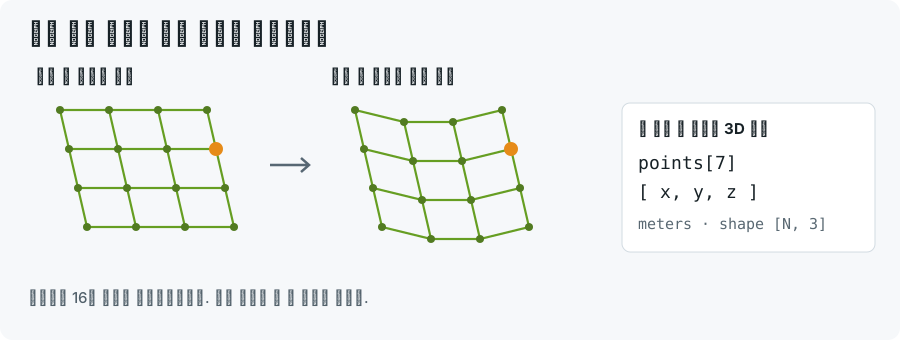
| 화면에 그릴 메시의 점 | points.shape = [2145, 3] |
점마다 미터 단위 XYZ 좌표가 3개씩 있습니다. |
| 움직이는 입자의 위치 | positions.shape = [2112, 3] |
내보낸 입자 배열입니다. 전체 렌더링 메시와 점의 수가 다릅니다. |
| 애니메이션 | 4초에 걸친 240개 시점 |
시간별 계산 결과를 저장해 다시 볼 수 있습니다. |
| 케이블 몸체의 중심 위치 | [192, 3] |
케이블을 이루는 몸체들의 질량 중심 좌표입니다. |
가령 한 행이 [0.2, 1.3, 0.8]이면 X로 0.2m, Y로 1.3m 떨어져 있고 Z 원점보다 0.8m 높은 점이라는 뜻입니다. 다음 시점에서 이 좌표가 바뀌면 천의 해당 부분이 움직입니다. 색상이나 로봇 제어 명령을 나타내는 값은 아닙니다. 이 행은 좌표를 설명하기 위한 예이며, 실제 측정 결과는 recorded.json에서 볼 수 있습니다.
영상에서는 무엇을 보나요?
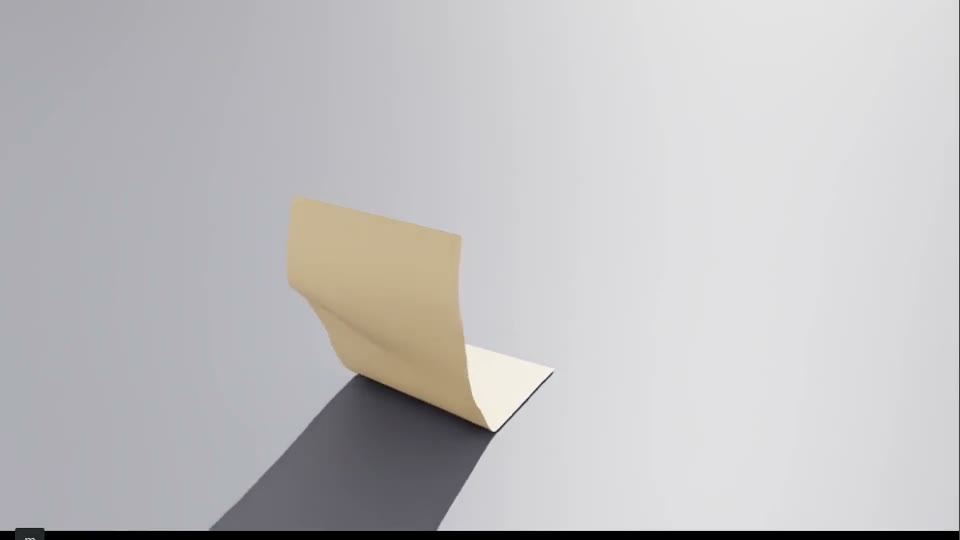
Newton이 GPU에서 움직임을 계산하고, 시간별 상태를 OpenUSD로 저장합니다. Isaac Sim에서 그 파일을 열어 계산된 움직임을 보여 줍니다. 실제 프로그램 창에서 뷰포트 부분을 잘라 담았으며, 물리 계산은 Newton, GUI에서는 저장된 결과 재생입니다. XPBD 천, VBD 천, 케이블 비틀림 순서로 재생합니다. 속도는 0.65배이고 끝부분을 잠시 멈춰 보여 줍니다. 케이블 세 개는 공식 예제에서 정한 강성 값이 다릅니다.
처음이면 실습 파일부터 받기
GPU 실습은 Isaac Sim을 실행할 머신에서 터미널을 엽니다. CPU 실습은 지금 쓰는 컴퓨터에서 해도 됩니다. 아래 명령은 한 줄씩 입력하고 Enter를 누르세요. 여러 줄짜리 명령 블록은 통째로 복사해도 됩니다.
cd "$HOME"
git clone https://github.com/james-joobs/awesome-nvidia-physical-ai.git
cd awesome-nvidia-physical-ai
pwd
홈 폴더에 받는 예입니다. 이미 내려받았다면 git clone은 건너뛰고 내 실습 폴더로 이동합니다. 새 터미널을 열 때마다 pwd의 출력 끝이 awesome-nvidia-physical-ai인지 확인하세요. 그래야 labs/로 시작하는 파일을 찾을 수 있습니다.
직접 실행하기
계산할 Python 환경 준비하기
NVIDIA GPU가 있는 Linux 머신에서 Newton 예제 의존성, NumPy, usd-core를 준비합니다. 촬영에 쓴 계산 환경은 Newton 1.9.0.dev0, Warp 1.17.0입니다. 버전에 따라 API가 바뀔 수 있으므로 먼저 python -m newton.examples cloth_hanging --help가 실행되는지 확인하세요. Newton 공식 예제 안내
터미널에서 이 저장소 폴더로 이동합니다. 아래 Python 경로를 내 Newton 가상환경의 Python으로 바꿔 넣으세요. 첫 명령은 환경을 검사하고, 두 번째 명령은 세 실험을 계산해 새 폴더에 저장합니다.
python3 labs/cli.py --json doctor newton-materials --python /path/to/newton-env/bin/python
python3 labs/cli.py --json run newton-materials \
  --python /path/to/newton-env/bin/python --output ./runs/newton-materials-001
python3 labs/cli.py --json verify ./runs/newton-materials-001
Isaac Sim에서 움직임 보기
File → Open으로 결과 폴더의 *-review.usda를 엽니다. 참조하는 .usd도 같은 폴더에 두세요. 뷰포트에서 FilmCamera를 선택한 뒤 타임라인을 움직이면 천이 변형되는 과정을 볼 수 있습니다. Linux X11 데스크톱에서 아래 명령으로 실제 프로그램 창을 녹화할 수 있습니다. 이때 python은 Isaac Lab 환경의 Python이며, Newton을 실행한 환경과 달라도 됩니다.
python labs/physics/capture_gui.py ./runs/newton-materials-001 ./runs/newton-gui-001 \
  /path/to/ffmpeg --plan ./runs/newton-materials-001/takes.json --viz kit
녹화에 사용한 GUI는 Isaac Lab으로 실행한 Isaac Sim 6.1.0.0입니다. GUI 사용 준비 · 실습 CLI 안내
결과 확인하기
공식 예제의 --test가 실패하거나, 점 좌표에 NaN·Inf가 있거나, 시간에 따라 변하는 점이 없으면 실행을 실패로 처리합니다. result.json에서 공식 예제 소스 해시, 배열 크기, 이동량과 시간 범위를 확인할 수 있습니다. 이번 설정에서 저장된 점의 최대 이동량은 XPBD 천 약 5.06m, VBD 천 약 4.28m였습니다. 변형이 일어났다는 측정값이며 정확도 점수는 아닙니다.
run.json에는 명령어와 결과 파일의 해시가 들어가고, verify가 다시 검사합니다. 별도 capture.json에는 GUI 버전과 촬영한 장면을 남깁니다. 물리 계산 성공과 GUI 녹화 성공은 각각 확인하세요. 접촉·마찰·반발 실험 · Newton 동작 원리
실행 영상과 기록
실습 소스 코드
run.py
GitHub에서 파일 보기"""Run official Newton material examples and prepare USD scenes for GUI review.
Requires Newton's example dependencies, numpy and usd-core in this interpreter.
The generated USD contains recorded solver states; Isaac Sim displays a replay.
"""
import argparse
import hashlib
import importlib
import json
from pathlib import Path
import subprocess
import sys
import time
import newton
import numpy as np
import warp
from pxr import Gf, Usd, UsdGeom, UsdLux
CASES = {
"cloth-xpbd": ("cloth_hanging", ["--solver", "xpbd", "--width", "64", "--height", "32"],
"newton.examples.cloth.example_cloth_hanging"),
"cloth-vbd": ("cloth_hanging", ["--solver", "vbd", "--width", "64", "--height", "32"],
"newton.examples.cloth.example_cloth_hanging"),
"cable-twist": ("cable_twist", [], "newton.examples.cable.example_cable_twist"),
}
def inspect_and_frame(path, name):
stage = Usd.Stage.Open(str(path))
if not stage or stage.GetEndTimeCode() <= stage.GetStartTimeCode():
raise RuntimeError(f"No animated USD: {path}")
low, high = np.full(3, np.inf), np.full(3, -np.inf)
animated = []
for prim in stage.Traverse():
for attribute_name in ("points", "positions"):
attribute = prim.GetAttribute(attribute_name)
if not attribute or len(attribute.GetTimeSamples()) < 2:
continue
times = attribute.GetTimeSamples()
samples = [np.asarray(attribute.Get(t), dtype=float) for t in (times[0], times[len(times)//2], times[-1])]
if not all(array.ndim == 2 and array.shape[1] == 3 and np.isfinite(array).all() for array in samples):
raise RuntimeError(f"Invalid point data: {prim.GetPath()}")
nonempty = [array for array in samples if len(array)]
if not nonempty:
continue
low = np.minimum(low, np.concatenate(nonempty).min(axis=0))
high = np.maximum(high, np.concatenate(nonempty).max(axis=0))
same_shape = samples[0].shape == samples[-1].shape
displacement = float(np.max(np.linalg.norm(samples[-1] - samples[0], axis=1))) if same_shape and len(samples[0]) else None
animated.append({"prim": str(prim.GetPath()), "attribute": attribute_name,
"first_shape": list(samples[0].shape), "time_samples": len(times),
"max_displacement_m": displacement})
if not animated or not np.isfinite(low).all():
raise RuntimeError("No animated point arrays to verify")
# A separate camera layer leaves the official solver output intact.
review = Usd.Stage.CreateNew(str(path.parent / f"{name}-review.usda"))
review.GetRootLayer().subLayerPaths = [path.name]
review.SetStartTimeCode(stage.GetStartTimeCode())
review.SetEndTimeCode(stage.GetEndTimeCode())
review.SetTimeCodesPerSecond(stage.GetTimeCodesPerSecond())
UsdGeom.SetStageUpAxis(review, UsdGeom.Tokens.z)
UsdGeom.SetStageMetersPerUnit(review, 1.0)
world = UsdGeom.Xform.Define(review, "/World")
review.SetDefaultPrim(world.GetPrim())
center = (low + high)/2
radius = max(1.0, float(np.linalg.norm(high-low)))
eye = center + np.array([0.8, -1.25, 0.65])*radius*1.3
camera = UsdGeom.Camera.Define(review, "/World/FilmCamera")
look = Gf.Matrix4d().SetLookAt(Gf.Vec3d(*eye), Gf.Vec3d(*center), Gf.Vec3d(0,0,1))
UsdGeom.Xformable(camera).AddTransformOp().Set(look.GetInverse())
camera.CreateFocalLengthAttr(36)
camera.CreateHorizontalApertureAttr(36)
camera.CreateVerticalApertureAttr(20.25)
camera.CreateClippingRangeAttr(Gf.Vec2f(0.01, radius*100))
dome = UsdLux.DomeLight.Define(review, "/World/DomeLight")
dome.CreateIntensityAttr(650)
sun = UsdLux.DistantLight.Define(review, "/World/Sun")
sun.CreateIntensityAttr(2000)
UsdGeom.Xformable(sun).AddRotateXYZOp().Set(Gf.Vec3f(315, 20, 35))
review.GetRootLayer().Save()
return {"animated_arrays": animated, "bounds_m": [low.tolist(), high.tolist()],
"simulated_seconds": (stage.GetEndTimeCode()-stage.GetStartTimeCode()) / stage.GetTimeCodesPerSecond(),
"review_scene": f"{name}-review.usda"}
def main():
parser = argparse.ArgumentParser(description=__doc__)
parser.add_argument("output", type=Path)
parser.add_argument("--cases", nargs="+", choices=list(CASES), default=list(CASES))
parser.add_argument("--frames", type=int, default=240)
args = parser.parse_args()
if args.frames < 60:
parser.error("Use at least 60 frames for a meaningful material experiment")
args.output.mkdir(parents=True, exist_ok=True)
report = {"engine": "Newton", "version": newton.__version__, "warp": warp.__version__,
"recording_mode": "solver-usd-replay", "cases": []}
plan = []
for name in args.cases:
example, parameters, module_name = CASES[name]
path = args.output.resolve() / f"{name}.usd"
if path.exists():
raise FileExistsError(path)
command = [sys.executable, "-m", "newton.examples", example, *parameters,
"--device", "cuda:0", "--viewer", "usd", "--output-path", str(path),
"--num-frames", str(args.frames), "--test"]
source = Path(importlib.import_module(module_name).__file__)
start = time.monotonic()
with (args.output / f"{name}.log").open("w") as log:
subprocess.run(command, stdout=log, stderr=subprocess.STDOUT, check=True)
row = {"case": name, "command": command, "official_tests_passed": True,
"source_sha256": hashlib.sha256(source.read_bytes()).hexdigest(),
"wall_seconds": round(time.monotonic()-start, 2), **inspect_and_frame(path, name)}
report["cases"].append(row)
plan.append([name, f"{name}-review", "FilmCamera", 0, 0.65, 8])
print(json.dumps(row), flush=True)
(args.output / "result.json").write_text(json.dumps(report, indent=2) + "\n")
(args.output / "takes.json").write_text(json.dumps(plan, indent=2) + "\n")
if __name__ == "__main__":
main()