Metropolis is NVIDIA’s video AI ecosystem. Its Video Search and Summarization Blueprint (VSS) describes reference architectures for analytics, timestamped video reasoning and agent-driven search.
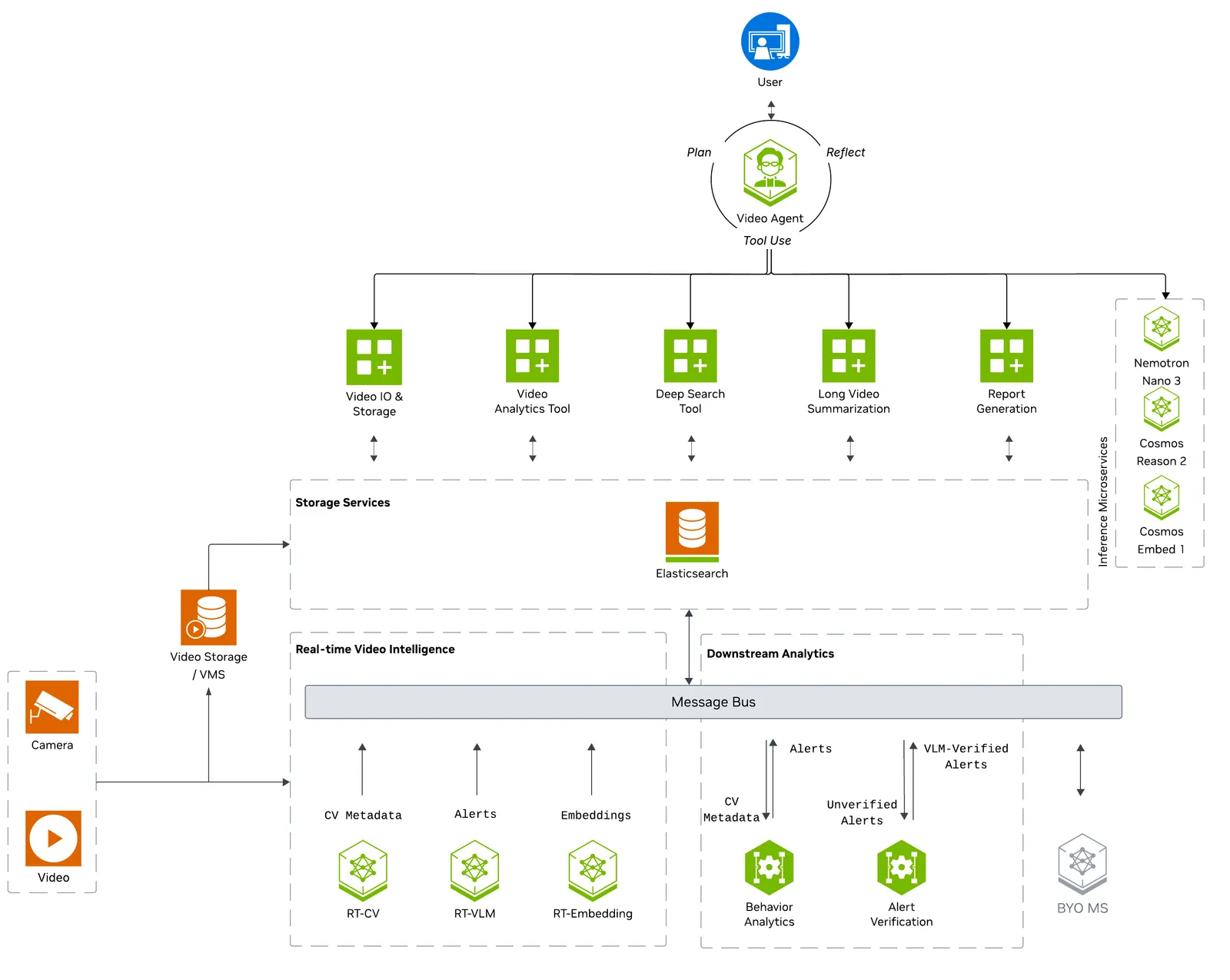
The diagram splits real-time extraction from analytics and agent workflows. Locate the shared records and video evidence that connect them. Official figure source
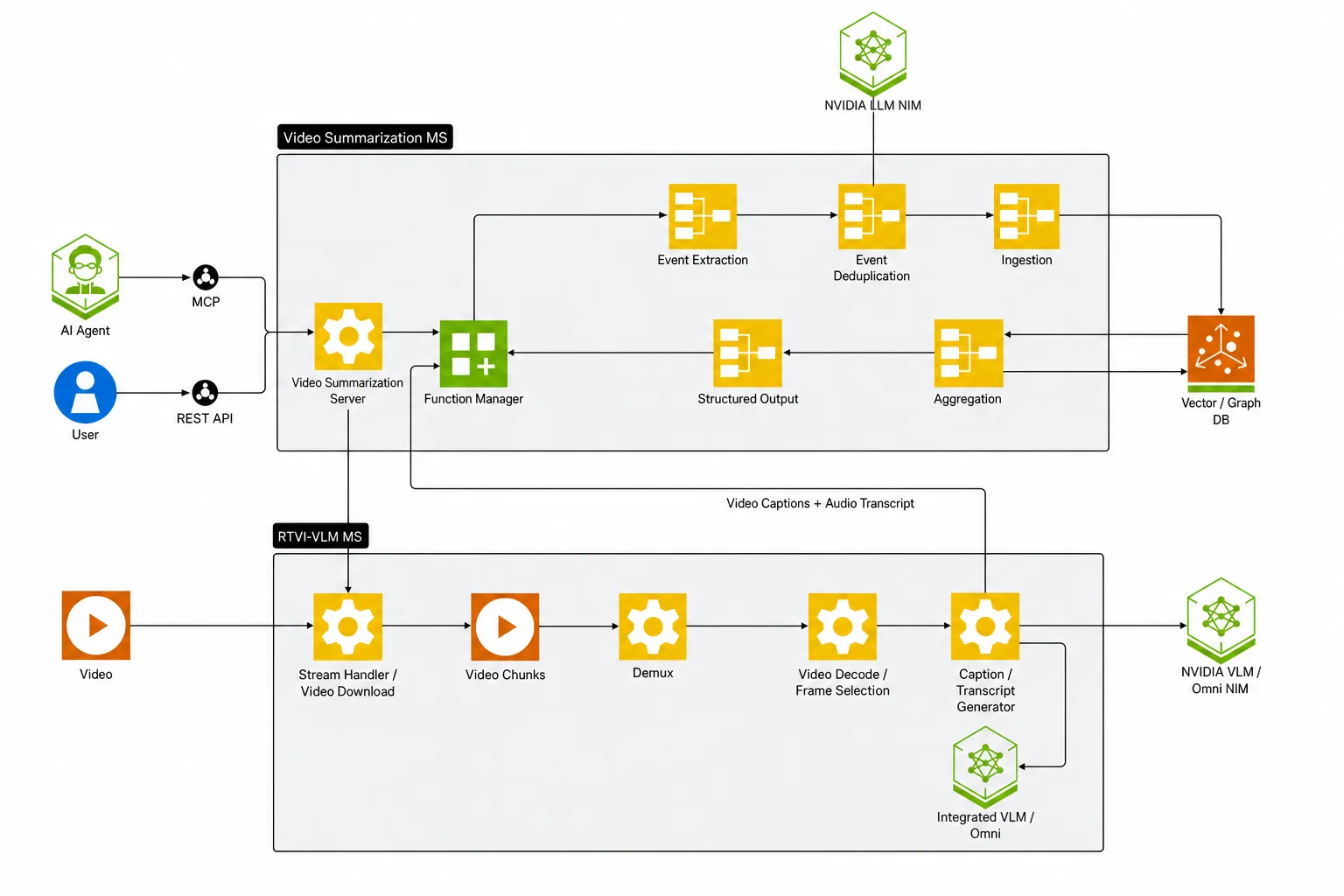
Follow a file upload to VLM events and the aggregated summary. The timestamps connect each event back to the source media. Official figure source
How does video evidence become part of an answer?
- InputRead the video
clip + source timestampsKeep offsets so results point back to the footage.
- ProcessIndex or analyze intervals
clip descriptions or visual evidenceVideo models and the configured pipeline extract evidence.
- OutputAnswer a question
retrieved interval → answer + timestampConfirm that the cited interval supports the answer.
Align a clip’s time with the source video
Splitting a long recording into intervals lets you retrieve footage for a question like “When did the part stop on the conveyor?” Depending on the pipeline, use indexed clip descriptions or a model that analyzes the retrieved frames. A source file and time range let a reviewer replay the evidence.
If a clip starts 32 seconds into the source and the event appears 2.4 seconds into that clip, the illustrative source timestamp is 34.4 seconds. Try several questions and replay the cited interval to check that the timestamp supports the answer. For routing downstream text requests, see the Switchyard guide. Official VSS documentation
How it works
VSS separates real-time extraction, downstream analytics and agent/offline processing. DeepStream can emit detections and tracks, while a real-time VLM can produce captions or event candidates. Consumers retrieve records and video clips using timestamps. In the file summarization profile, a service chunks the file, calls the VLM, stores timestamped events and aggregates them with a summarization model. The streaming profile can add message-bus components.
Component interfaces
| Component | Input | Output |
|---|---|---|
| Real-time CV or VLM | Video stream, processing profile and models | Detections, tracks, captions or event candidates |
| Event storage and verification | Timestamped events and relevant clips | Searchable events with source references |
| Agent and summarization | Question or summary request and retrieved evidence | Answer, timestamped summary or clip reference |
A practical workflow
Index a short facility video and ask for a timestamped summary of an event. Use the returned timestamps to retrieve the original clip and compare the claim with visible evidence. Start with a file before adding a continuous RTSP workload.
What to verify
Measure event recall, false positives, clip timestamp alignment and processing latency separately. Keep raw detections, model explanations and verified events distinguishable in downstream records. Check supported service images and deployment profiles.
License and availability
Platform and services; individual SDKs and models have separate terms. Verify the exact version and the terms of any models, datasets, binaries and dependencies before use.
Official references
- Architecture and workflow documentation
- Video summarization deployment profiles
- Related official resource · developer.nvidia.com
Related tools
For a documented VSS and document RAG example, see NemoClaw. NeMo Retriever Library describes a separate document evidence pipeline. NeMo Switchyard illustrates how downstream model calls can be routed.