Cosmos Data Factory (CDF) packages reference pipelines and composable skills. The selected blueprint determines which tools retrieve, simulate, augment, label and evaluate the data.
What does a workflow add to a video generation model?
- InputChoose data and controls
source clip + generation conditionsPick a blueprint for the sample you need.
- ProcessRun stages
curation → generation → evaluationThe workflow connects the selected tools and models.
- OutputExport traceable samples
generated files + provenanceKeep originals, settings, and checks linked to each sample.
Decide what stays fixed and what changes
To expand a rare nighttime case, choose a source scene and vary the lighting. A blueprint joins source selection, conditional generation, and evaluation. For example, select a suitable source clip, generate a variant with changed lighting while retaining the camera path, and inspect whether lanes and objects stayed in place.
Make generated samples traceable
Record the source ID, prompt or controls, model version, generated file, and review checks so you can compare runs after changing the criteria. Keep generated variants from the same source in one data split. Official Cosmos Data Factory blueprints · Cosmos world models
How the blueprints fit together
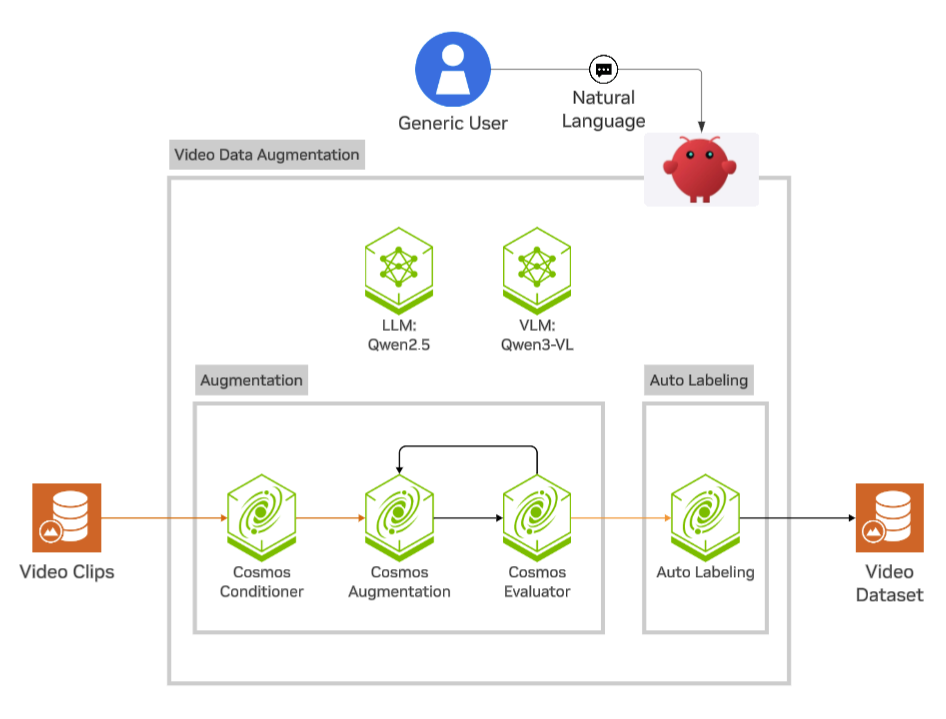
This figure shows the video augmentation blueprint, where existing footage supplies the scene. An AV retrieval workflow can start with search. A PCB defect workflow can start from a rendered component. CDF blueprint overview
| Layer | Boundary |
|---|---|
| Blueprint | Defines input data, execution order and configuration for AV, event, attribute, video or defect generation |
| Execution | CDF Orchestration schedules Airflow tasks and GPU services. The documented event-video and video-augmentation paths can also use OSMO |
| Processing | Curator and CDS find clips. Augmentation calls generation endpoints. Simulation renders 3D scenes. Auto Labeling exports annotations |
| Evaluation | Cosmos Evaluator returns checker results. Your training export defines which variants qualify |
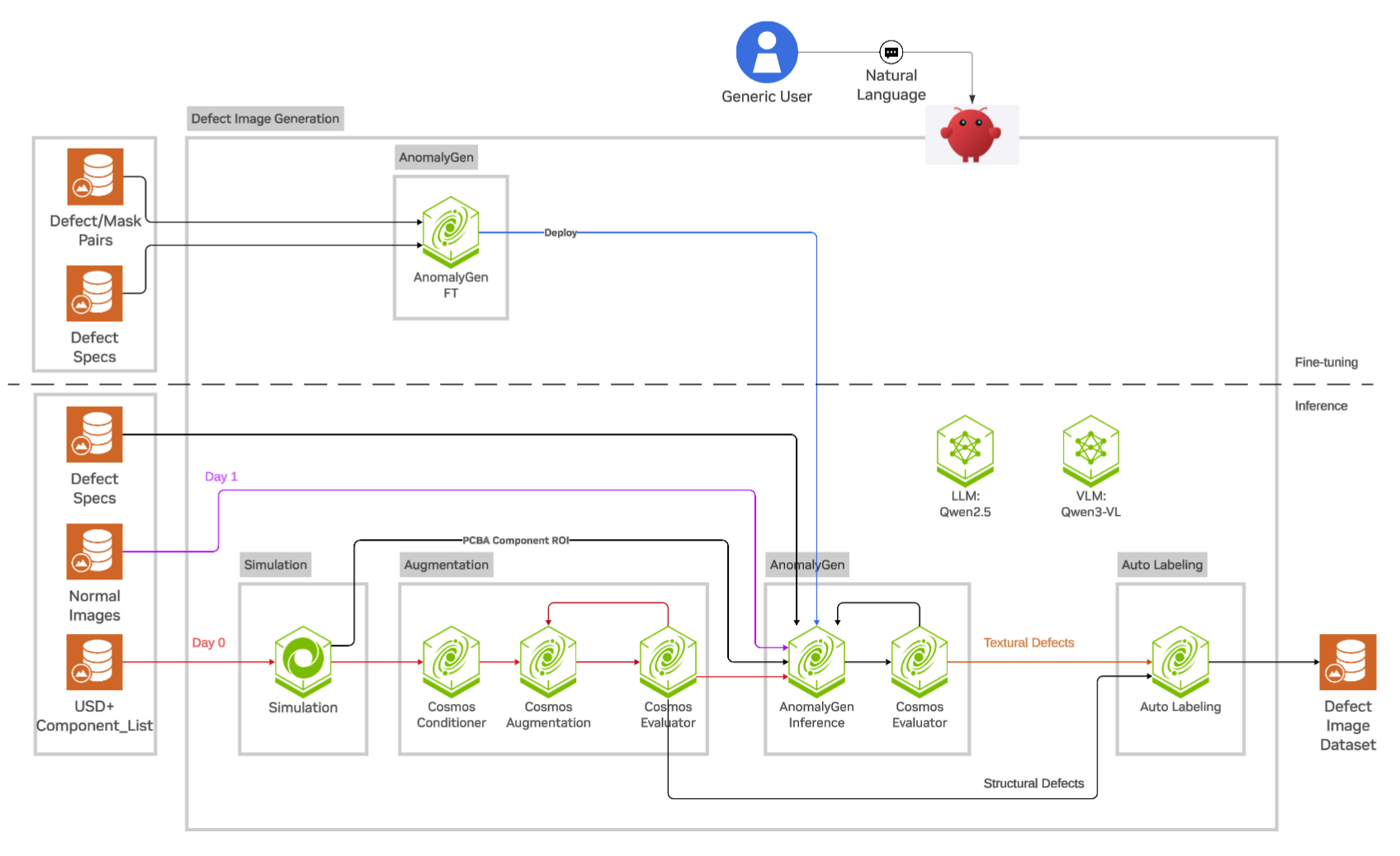
The red Day 0 path starts with USD and a component list, then renders and augments the board. The purple Day 1 path uses normal component photos as the image input to AnomalyGen. The upper fine-tuning path uses defect/mask pairs and defect specifications. Follow the separate structural and textural defect arrows into Auto Labeling to see which generator produced each label candidate. Official defect image generation guide
Worked example — expand a rare driving scenario
Start with a clip that illustrates the event. Retrieve similar clips, then optionally generate weather variants conditioned on RGB footage or prepared world scenario controls. Preserve each original drive ID and split by source drive before adding variants. Review actor motion and lane geometry before training, and keep the model, control input and evaluation result with accepted and rejected candidates. Official AV blueprint
The entry repository specifies Apache-2.0 for code and CC-BY-4.0 for documentation and skills. Each component, dataset and model endpoint has its own terms and prerequisites. Official license
Related tools
NeMo Data Designer can generate candidate structured records or questions using clip metadata. CDF workflows cover video generation, augmentation and labeling.