Omniverse NuRec reconstructs a captured scene as a neural representation so a simulator can render sensor observations from new viewpoints. An AV pipeline typically converts driving logs into NCore, trains or initializes a Gaussian representation and exports a USDZ artifact for rendering.
How can we render a drive from a new camera position?
- InputRecorded observations
images + calibration + sensor posesThe scene reconstruction needs aligned times and known viewpoints.
- ProcessReconstruct the scene
3D Gaussians + scene metadataFit a scene representation to the observations.
- OutputRender a new view
scene asset + requested camera → imageUse a new camera pose or the next simulated ego position.
Calibration and 3D Gaussian splatting
Intrinsics, such as focal length and the image center, determine where a 3D point projects into the image. Extrinsics describe where the camera sits and points relative to the vehicle or world. Known viewpoints let the reconstruction fit a scene to observations from several frames.
3D Gaussian splatting represents a scene with many ellipsoid-like Gaussians with positions, shapes, color, and opacity. Rendering projects them into the requested view and composites the image. To study a camera moved 0.2 m upward, first check that the reconstructed view matches the original footage at its original pose. Then compare the lane markings and objects in the two rendered views. NuRec documentation · AlpaSim closed-loop guide
Reconstruction from sensor logs
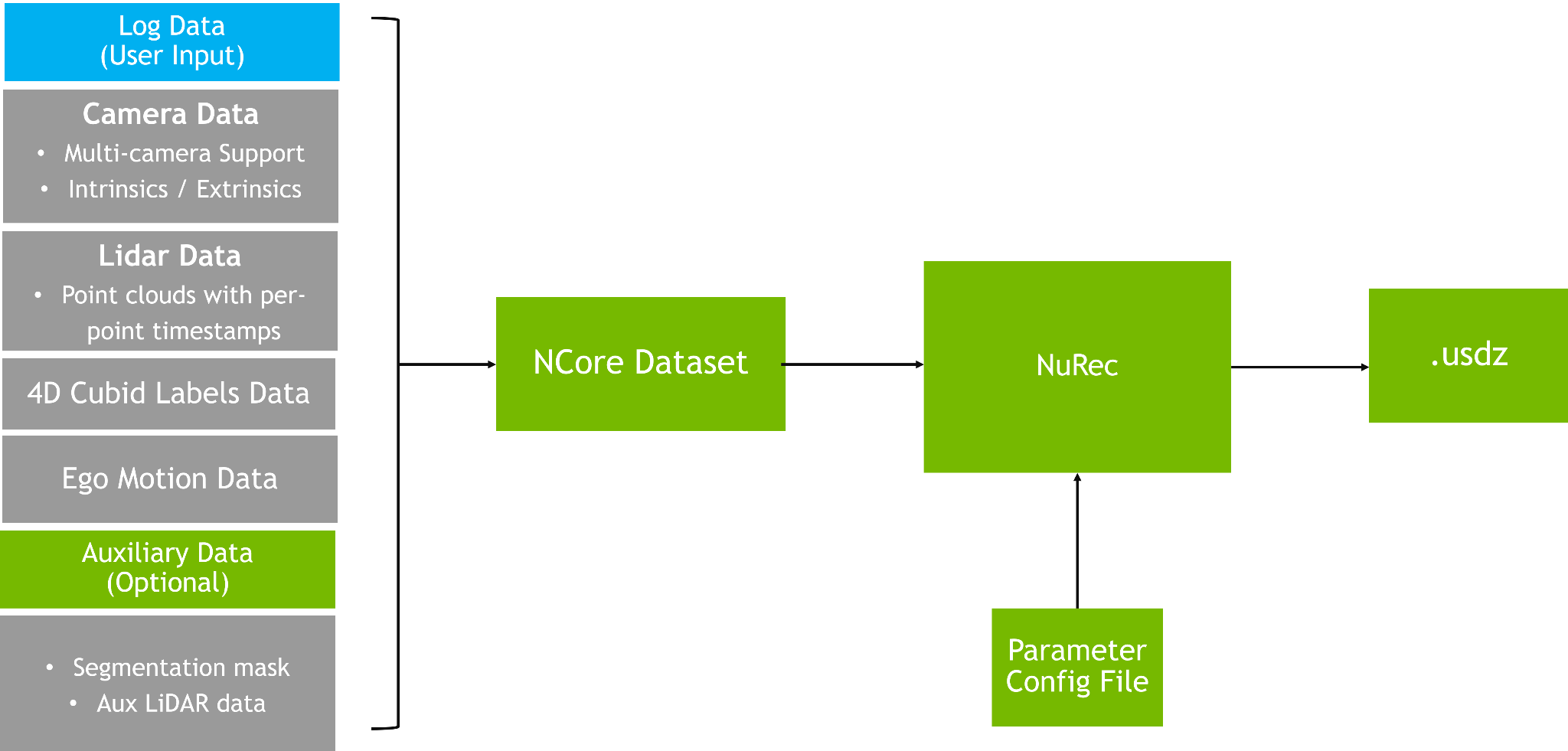
The official pipeline separates conversion, reconstruction and packaging. In the published layered example, fixed background, moving rigid actors, pedestrians and road use distinct Gaussian layers, while sky uses an environment map. Tracking and semantic labels help assign observations to layers. Official scaling and layering guide
Read the official sensor adaptation workflow

Start at the reconstructed USDZ scene. A target camera rig defines the sensor geometry for re-rendering. The illustrated workflow can run NVIDIA Harmonizer on generated frames before training a perception model. In a live simulator integration, NuRec gRPC receives a scene and camera or LiDAR render request. The client receives the requested observation product. Official carline adaptation walkthrough · gRPC API guide
| Boundary | Check |
|---|---|
| Capture to NCore | Calibration, synchronized timestamps and ego motion are consistent |
| Reconstruction to USDZ | Confirm the artifact and reference render load with the expected scene ID |
| Runtime to client | Match camera intrinsics, requested pose and output format |
| Synthetic to validation | Check occlusion, moving objects and appearance for positions outside recorded coverage |
Worked example — assess a new camera placement
Re-render one reconstructed drive with its original pose first, then with the new rig. Compare the source view and original-rig render for lane-edge alignment and dynamic actor timing before interpreting the new view. New perspectives can expose occluded regions never captured by the source sensors. Flag those samples during dataset review. Official reconstruction guide · Scaling neural reconstruction
Access, runtime, trained artifacts and data terms vary by distribution. Official NuRec overview
Source and runtime distribution
The public NuRec SDK contains reconstruction and rendering libraries, training systems, and application entry points under Apache-2.0. Runtime containers are distributed through NGC under the terms on their catalog pages. Model checkpoints and scene data have separate terms. NCore provides an Apache-2.0 format and conversion tooling for the sensor recordings that enter the pipeline. NuRec SDK and distribution matrix · SDK license · NCore
Follow a closed-loop AlpaSim evaluation using a prepared NuRec scene.