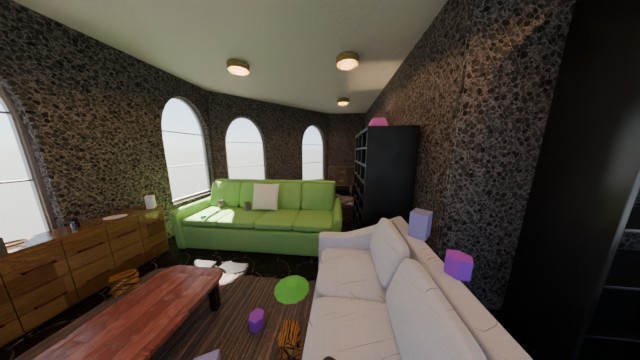
What does a scene generator create?
- InputChoose generation rules
random seed + room count + furniture generatorsInfinigen constructs a new furnished house from procedural rules.
- ProcessPlan a camera tour
mesh geometry → RRT camera path + transformsThe example selects a path through connected rooms. This is camera navigation, not a robot policy.
- OutputRender the geometry
.blend + camera.npz → Cycles RGBCPU rendering and OpenImageDenoise produce the preview. The 48-frame path is played at 8 fps.
This example uses Infinigen, outside Isaac Sim, to create a house with rooms, furniture, materials and lighting. A seed chooses parameters and placement rules; Blender stores actual geometry. This is procedural scene generation, not a neural model inventing a world from a prompt. It complements the generative 3D worlds comparison and the measured 3DGS reconstruction.
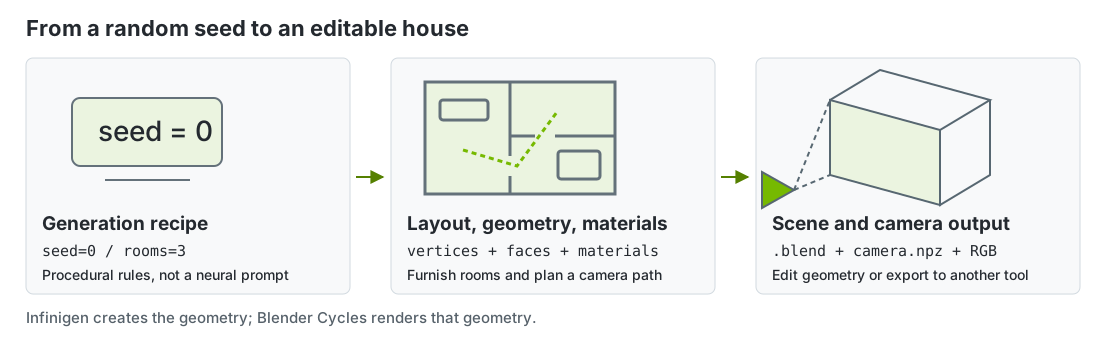
Follow the data through the generator
seed=0 and room_count=3 produce a connected layout, then furnishing generators place sofas, storage and small objects. The official house-tour example plans an RRT camera path through selected rooms. This is a camera-navigation example, not a trained robot controller. Infinigen house-tour source
Seed + room rules
    → floor plan and meshes
    → furniture + materials + lights
    → collision-aware RRT camera path
    → .blend + camera transforms
    → Cycles RGB frames
A mesh consists of vertex coordinates and indexed faces. Materials tell the renderer how the surface reflects light. Camera matrices define the viewpoint for each frame. The saved .blend keeps these editable components, unlike a flattened MP4. camera.npz records camera information for checking or downstream reconstruction. It is not a control-policy checkpoint.
How to read the recording
The clip renders 48 distinct viewpoints at 640 × 360, with 16 Cycles samples per pixel and OpenImageDenoise. We play these at 8 FPS for a six-second tour, one third of the original 24 FPS timeline speed. The room is static; only the camera moves. Low-sample, denoised rendering is a preview, with softer details than a converged render. Original frames and the .blend remain on an RTX workstation.
First time? Get the lab files
Open a terminal on the Isaac Sim machine for GPU labs, or on your own computer for CPU-only steps. Press Enter after each line. You can copy a multi-line command block as a whole.
cd "$HOME"
git clone https://github.com/james-joobs/awesome-nvidia-physical-ai.git
cd awesome-nvidia-physical-ai
pwd
This example clones into your home folder. If you already cloned the repo, skip git clone and enter your project folder. In each new terminal, check that pwd ends in awesome-nvidia-physical-ai so commands can find the labs/ files.
Generate, save and render your own house
1. Install a separate environment
Use the official installation instructions. The source used here requires Python 3.11 and Blender's bpy==4.2.0. Do not install it into Isaac Sim's Python environment. With uv available:
git clone https://github.com/princeton-vl/infinigen.git runs/infinigen-source
git -C runs/infinigen-source checkout 53033dd55c7191cbc436be6ffbb63c026935a509
cd runs/infinigen-source
uv venv --python 3.11
INFINIGEN_MINIMAL_INSTALL=True uv pip install -e .
cd ../..
On Linux, install system build dependencies listed by the project if needed. This is the Infinigen 2 preview API at a fixed commit; the older infinigen_examples.generate_indoors commands are a different pipeline. Our helper deliberately renders on the CPU and caps Cycles at 12 threads, avoiding Blender 4.2 GPU compatibility issues on Blackwell. Our fVDB and CARLA experiments use the RTX GPU separately.
2. Generate the house and save the scene
From this repository, use the Python interpreter of the new Infinigen environment:
runs/infinigen-source/.venv/bin/python labs/scene-generation/run.py \
  --source runs/infinigen-source --seed 0 --frames 1 48 \
  --room_count 3 --resolution 640 360 --samples 16 \
  --save_blend runs/house.blend --output runs/house-build
Wait for Saved ...house.blend. The official example's --save_blend saves and exits; it does not render video. Change the seed to generate another layout. A rejected layout is possible: inspect the message and try another seed rather than assuming every random house supports a camera tour.
3. Render the saved geometry
runs/infinigen-source/.venv/bin/python labs/scene-generation/run.py \
  --source runs/infinigen-source --seed 0 --frames 1 48 \
  --resolution 640 360 --samples 16 \
  --load_blend runs/house.blend --output runs/house-render
ffmpeg -framerate 8 -start_number 1 -i runs/house-render/Camera/%04d.png \
  -c:v libx264 -crf 23 -pix_fmt yuv420p -movflags +faststart runs/house-tour.mp4
Each frame is ray-traced from the saved camera path. Our helper changes the RGB pass to the denoised pass; it does not alter the generation or path-planning logic. Rendering takes longer than video playback. For a sharper result, increase sample count and render resolution after checking a few frames.
Inspect the saved result
No GPU is needed to watch the recording or check the bundled hashes and camera-path summary:
python3 labs/scene-generation/check.py
recorded.json records the actual source revision, Blender version, frame count, camera motion and edit settings. A generated mesh is not automatically a simulation-ready robot environment. Check scale, collision shapes, joints and materials before an export. Official simulator export guide · Media credits · Explore the 3DGS plaza.
Example run and recording
Source code
run.py
View files on GitHub"""Run the pinned Infinigen house-tour example with explicit CPU rendering and denoising.
Usage after installing the official source in its own Python 3.11 environment:
python run.py --source /path/to/infinigen --seed 0 --frames 1 48 --save_blend runs/house.blend
python run.py --source /path/to/infinigen --seed 0 --frames 1 48 --load_blend runs/house.blend --output runs/house
"""
import argparse
import importlib.util
import os
from pathlib import Path
import sys
def main():
parser=argparse.ArgumentParser(add_help=False)
parser.add_argument("--source",type=Path,required=True)
args,remaining=parser.parse_known_args()
os.environ.setdefault("OMP_NUM_THREADS","12")
from infinigen2.exporters.render_cycles import DenoiseMode
from infinigen2.exporters.util.format import ExportType, RenderPass
path=args.source/"examples/house_tour/render.py"
spec=importlib.util.spec_from_file_location("official_house_tour",path)
module=importlib.util.module_from_spec(spec)
spec.loader.exec_module(module)
original=module.render_cycles
def render(**kwargs):
import bpy
bpy.context.scene.render.threads_mode="FIXED"
bpy.context.scene.render.threads=12
kwargs["render_passes"]=[RenderPass(ExportType.IMAGE_DENOISED,p.path,p.data_type) if p.type==ExportType.IMAGE else p for p in kwargs["render_passes"]]
return original(**kwargs,device_type="CPU",denoise_mode=DenoiseMode.OPENIMAGEDENOISE)
module.render_cycles=render
sys.argv=[str(path),*remaining]
module.main()
if __name__=="__main__":
main()
check.py
View files on GitHub"""Verify the published procedural house tour without Blender or a GPU."""
import hashlib
import json
import math
from pathlib import Path
def main():
root=Path(__file__).resolve().parents[2]
data=json.loads((root/"labs/scene-generation/recorded.json").read_text())
assert data["mode"]=="procedural geometry generation; not neural world-model inference"
assert data["seed"]==0 and data["room_count"]==3 and data["frames"]==48
assert data["render"]["device"]=="CPU" and data["render"]["denoiser"]=="OpenImageDenoise"
assert data["camera"]["unique_poses"]==48
assert all(math.isfinite(n) for point in data["camera"]["centers_m"] for n in point)
centers=data["camera"]["centers_m"]
distance=sum(math.dist(a,b) for a,b in zip(centers,centers[1:]))
assert distance>.1 and math.isclose(distance,data["camera"]["path_length_m"],abs_tol=1e-5)
movie=root/"site/public/showcase/scene-generation.mp4"
assert hashlib.sha256(movie.read_bytes()).hexdigest()==data["video_sha256"]
assert data["playback_fps"]==8 and data["frames"]/data["playback_fps"]==6
print(f'{data["frames"]} rendered views, {distance:.2f}m camera path, 6-second slowed preview, video hash OK')
if __name__=="__main__":
main()