How it works
- InputTell the robot how to walk
target speed + observed robot stateEach simulated robot gets a requested velocity and information about its current motion.
- ProcessAct and learn from rewards
policy → joint targets → Newton → rewardNewton moves the robot. RSL-RL updates the policy using how well the robot follows the task.
- OutputSave a policy to replay
model_499.pt · training logThe checkpoint saves the learned weights. The log records the reward and how long episodes lasted.
Repeat with the new robot state, and reset when an episode ends.
What does the policy observe before it moves a foot?
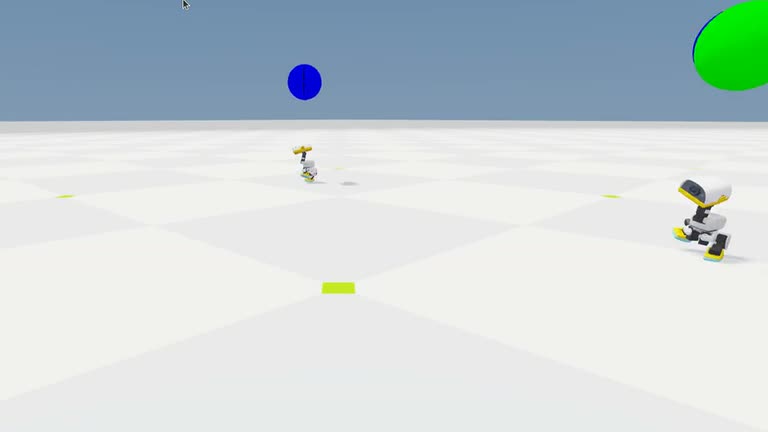
The Isaac Lab task supplies a velocity command and observations about the robot’s pose and motion. The policy maps those numeric observations to joint actions. Newton simulates the contact between feet and ground and the robot’s resulting motion. That new state becomes the next observation. Isaac Lab Microduck setup
How one policy learns across 512 environments
The lab runs one shared policy across 512 environments and collects observations, actions, and rewards. A reward measures how the simulated movement meets task objectives such as following the requested speed. RSL-RL uses the collected experience to update the policy. The task resets an episode when it terminates or reaches its time limit. NVIDIA’s Microduck training workflow
{ "iteration": 499, "mean_reward": 32.69, "mean_episode_length": 421.18 }
These are selected fields from the last iteration in the training record. mean_reward is the task’s reward score and mean_episode_length is a mean in steps. Neither gives a speed or a time in seconds. Replay loads the learned weights from model_499.pt to choose new actions, and the ONNX file is an exported policy. The replay evaluates simulated walking.
First time? Get the lab files
Open a terminal on the Isaac Sim machine for GPU labs, or on your own computer for CPU-only steps. Press Enter after each line. You can copy a multi-line command block as a whole.
cd "$HOME"
git clone https://github.com/james-joobs/awesome-nvidia-physical-ai.git
cd awesome-nvidia-physical-ai
pwd
This example clones into your home folder. If you already cloned the repo, skip git clone and enter your project folder. In each new terminal, check that pwd ends in awesome-nvidia-physical-ai so commands can find the labs/ files.
Run it
Before you start · Train on an RTX machine. Follow the NVIDIA Microduck setup for the Isaac Lab d7e49f0 environment and uv. The commands below assume your Isaac Lab checkout is in your home folder.
1. Train a walking policy
Open a terminal in this repository. Change the first path if you cloned Isaac Lab elsewhere. Watch the terminal for iteration counts and rewards. The example uses 512 simulated environments and runs for 500 iterations.
ISAAC_LAB_DIR="$HOME/IsaacLab"
bash labs/microduck/train.sh "$ISAAC_LAB_DIR"
2. Replay the learned policy
When the prompt returns, find the model_499.pt path in the training output. Replace the example path with the full path to that file, then run both lines in the same terminal. The viewer will use the learned policy to make the robot walk.
CHECKPOINT="/actual/training/path/model_499.pt"
bash labs/microduck/play.sh "$ISAAC_LAB_DIR" "$CHECKPOINT"
The ONNX export carries the policy to another runtime. Use the training .pt checkpoint for the Isaac Lab replay above. The published model includes its weights in one file; debug metadata has been removed. It maps 61 observations to 14 joint targets. For a CPU interface check in a separate environment with onnxruntime==1.32.0, run python labs/microduck/check_policy.py. The publication record documents the comparison with the original export.
Check the result
Check whether the reward rises during training and whether the robot follows the requested speed when you replay it. Reward is the score for following the task.
Check the saved training log on a CPU. From this repository, run the command below to compute averages for the first and last 50 iterations.
python3 labs/microduck/read_training.py labs/microduck/training-metrics.txt ./runs/microduck-metrics
In the filmed run, mean reward rose from 0.65 to 23.46, and mean episode length from 35.50 to 320.94 steps. Recorded training measurements
Example run and recording
Source code
train.sh
View files on GitHub#!/usr/bin/env bash
set -euo pipefail
if [[ $# != 1 ]]; then
printf 'Usage: bash %s ISAAC_LAB_CHECKOUT\n' "$0" >&2
exit 2
fi
cd "$1"
uv run --no-sync isaaclab train --rl_library rsl_rl \
--task IsaacContrib-Velocity-Flat-MicroDuck --num_envs 512 --max_iterations 500 \
--seed 17 --run_name showcase_microduck presets=backlash
play.sh
View files on GitHub#!/usr/bin/env bash
set -euo pipefail
if [[ $# != 2 ]]; then
printf 'Usage: bash %s ISAAC_LAB_CHECKOUT CHECKPOINT_PT\n' "$0" >&2
exit 2
fi
checkpoint="$(cd "$(dirname "$2")" && pwd -P)/$(basename "$2")"
test -s "$checkpoint"
cd "$1"
uv run --no-sync isaaclab play --rl_library rsl_rl \
--task IsaacContrib-Velocity-Flat-MicroDuck --checkpoint "$checkpoint" --num_envs 4 \
--viz newton_gl presets=backlash 'env.viewer.eye=[2.1,-2.3,1.35]' 'env.viewer.lookat=[0,0,0.24]'
read_training.py
View files on GitHub"""Summarize the warm-up and final training windows from the GPU workstation Microduck run."""
import argparse
import json
import re
import statistics
from pathlib import Path
ANSI = re.compile(r"\x1b\[[0-?]*[ -/]*[@-~]")
ITERATION = re.compile(r"Learning iteration\s+(\d+)/\d+")
SECTIONS = {
"mean_reward": re.compile(r"Mean reward:\s+(-?\d+\.\d+)"),
"mean_episode_length": re.compile(r"Mean episode length:\s+(\d+\.\d+)"),
}
def main():
parser = argparse.ArgumentParser(description=__doc__)
parser.add_argument("log", type=Path)
parser.add_argument("output", type=Path)
args = parser.parse_args()
args.output.mkdir(parents=True, exist_ok=True)
log = ANSI.sub("", args.log.read_text())
blocks = ITERATION.split(log)
rows = []
for step, block in zip(blocks[1::2], blocks[2::2], strict=True):
entry = {"iteration": int(step)}
for key, pattern in SECTIONS.items():
match = pattern.search(block)
if match is None:
raise ValueError(f"Missing {key} for training iteration {step}")
entry[key] = float(match.group(1))
rows.append(entry)
assert [row["iteration"] for row in rows] == list(range(500))
windows = {"first_50": rows[:50], "last_50": rows[-50:]}
aggregate = {name: {key: statistics.mean(row[key] for row in selected) for key in SECTIONS} for name, selected in windows.items()}
print(f"Microduck | {len(rows)} iterations | {aggregate}", flush=True)
(args.output / "result.json").write_text(json.dumps({
"scope": "training statistics logged by RSL-RL for one run",
"environments": 512, "iteration_count": len(rows), "windows": aggregate, "iterations": rows,
}, indent=2) + "\n")
if __name__ == "__main__":
main()