How it works
- InputParticles and starting motion
positions (x, y, z) + velocitiesThe example starts with a collection of particles, including their locations and speeds.
- ProcessFind neighbors and compute contacts
nearby pairs → contact force → next positionWarp groups particles by location so only nearby ones need contact checks on the GPU.
- OutputCheck what moved
result.json · optional OpenGL viewerThe report stores counts and mean displacement. The viewer draws a subset of the computed particles.
Why search only the nearby particles?
Each particle has a position [x, y, z] and a velocity. Warp’s DEM example bins the particles into a spatial grid, then searches nearby bins for each particle’s potential contacts. It computes contact forces from the relative positions and motion. GPU kernels compute the forces across particles, then integrate velocity and position over a time step. Official Warp DEM source
Compare the simulation array with the viewer
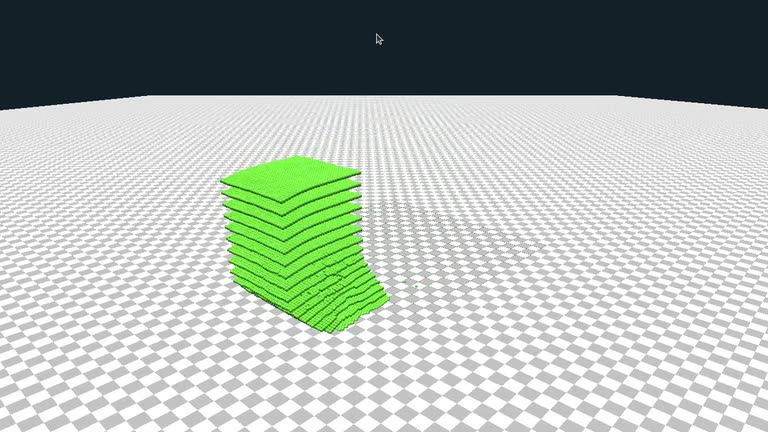
After copying positions for inspection, the array shape is [65536, 3]. One row is one particle, with columns for scene X, Y, and Z. The viewer draws points[::4]. Accordingly, the record shows particles: 65536 and displayed_particles: 16384.
The script calculates mean_particle_displacement_m by finding each particle’s straight-line displacement from its starting position, then averaging. It does not accumulate distance along the full paths. The same calculation runs with the viewer disabled. Reporting code
First time? Get the lab files
Open a terminal on the Isaac Sim machine for GPU labs, or on your own computer for CPU-only steps. Press Enter after each line. You can copy a multi-line command block as a whole.
cd "$HOME"
git clone https://github.com/james-joobs/awesome-nvidia-physical-ai.git
cd awesome-nvidia-physical-ai
pwd
This example clones into your home folder. If you already cloned the repo, skip git clone and enter your project folder. In each new terminal, check that pwd ends in awesome-nvidia-physical-ai so commands can find the labs/ files.
Run it
Before you start · On an NVIDIA GPU machine, check that Linux sees the GPU. Enter this repository in a terminal.
1. Install Warp in an isolated Python environment
Run these three lines in the same terminal. The examples extra installs the dependencies for the example and viewer.
python3 -m venv .venv-warp
source .venv-warp/bin/activate
python -m pip install "warp-lang[examples]==1.17.0"
2. Move the particles and read the report
Run the first command below on a machine with a display. If you connected without a desktop, add --headless to the first line. The GPU still computes the simulation. When it finishes, run the second command to format the report in your terminal.
python labs/warp-particles/run_dem.py ./runs/warp
python -m json.tool ./runs/warp/result.json
frames is how many frames Warp computed. The same report gives the number of particles and their mean displacement. NVIDIA Warp particle example
Check the result
The recorded run advanced 65,536 particles across 200 frames, about 3.33 seconds of simulated time. The viewer drew 16,384 particles. The mean displacement was 17.05 m in our setup. The output result.json reports the particle count, frame count, measured displacement and timing on your GPU. Recorded result
Example run and recording
Source code
run_dem.py
View files on GitHubimport argparse
import json
import time
from pathlib import Path
import numpy as np
import warp as wp
from warp.examples.core.example_dem import Example
from warp.render import OpenGLRenderer
parser = argparse.ArgumentParser(description="Run the Warp DEM sample and measure particle motion.")
parser.add_argument("output", type=Path)
parser.add_argument("--headless", action="store_true", help="Skip creating the OpenGL window.")
args = parser.parse_args()
output = args.output
output.mkdir(parents=True, exist_ok=True)
with wp.ScopedDevice("cuda:0"):
example = Example(stage_path=None)
renderer = OpenGLRenderer(
title="Warp DEM | RTX 5090",
screen_width=1280,
screen_height=720,
camera_pos=(31.0, 20.0, 35.0),
camera_front=(-0.64, -0.34, -0.69),
camera_fov=43.0,
far_plane=150.0,
background_color=(0.08, 0.12, 0.16),
draw_sky=False,
draw_axis=False,
show_info=False,
) if not args.headless else None
first = example.points.astype(np.float32)
selection = slice(None, None, 4)
if renderer:
renderer.render_ground(size=120.0)
def render(points):
if not renderer:
return
renderer.begin_frame(example.sim_time)
renderer.render_points("particles", points[selection].copy(), 0.13, (0.41, 0.85, 0.24))
renderer.end_frame()
render(first)
print(f"CUDA device: {wp.get_device().name}", flush=True)
print(f"DEM particles: {len(first):,} (viewer renders every fourth particle)", flush=True)
(output / "viewer-ready").touch()
deadline = time.monotonic() + 1.4
while renderer and time.monotonic() < deadline:
render(first)
time.sleep(0.02)
times = []
for frame in range(200):
if renderer and not renderer.is_running():
raise RuntimeError("Viewer closed before the simulation completed")
start = time.perf_counter()
example.step()
wp.synchronize_device()
times.append((time.perf_counter() - start) * 1000)
current = example.x.numpy()
render(current)
if frame % 30 == 0:
print(f"Frame {frame + 1:3d}/200 | sim time {example.sim_time:.2f}s | DEM step {times[-1]:.2f} ms", flush=True)
if renderer:
time.sleep(max(0, (1 / 24) - (time.perf_counter() - start)))
if not np.isfinite(current).all():
raise RuntimeError("Non-finite particle positions")
displacement = np.linalg.norm(current - first, axis=1)
result = {
"warp": wp.__version__,
"device": wp.get_device().name,
"particles": len(current),
"displayed_particles": len(current[selection]) if renderer else 0,
"frames": len(times),
"simulated_seconds": round(example.sim_time, 3),
"median_step_ms_after_first_frame": round(float(np.median(times[1:])), 3),
"mean_particle_displacement_m": round(float(np.mean(displacement)), 3),
}
(output / "result.json").write_text(json.dumps(result, indent=2) + "\n")
print(json.dumps(result, indent=2), flush=True)
deadline = time.monotonic() + 7
while renderer and time.monotonic() < deadline and renderer.is_running():
render(current)
time.sleep(0.028)
if renderer:
renderer.close()