Use this guide to check an Ubuntu 24.04 RTX workstation or server before installing Isaac Sim. If you are using a Mac as your main computer, run the GPU commands on the Linux machine over SSH. The workbench recording can be checked on a CPU.
Identify the machine and driver
- InputStart with the machine
Linux + NVIDIA GPUCheck the device and operating system on the host.
- ProcessCheck access from the lab
driver → runtime or containerCheck GPU visibility in the environment that will run the lab.
- OutputRun a workload
Python or simulator processStart the application to confirm it can perform GPU work.
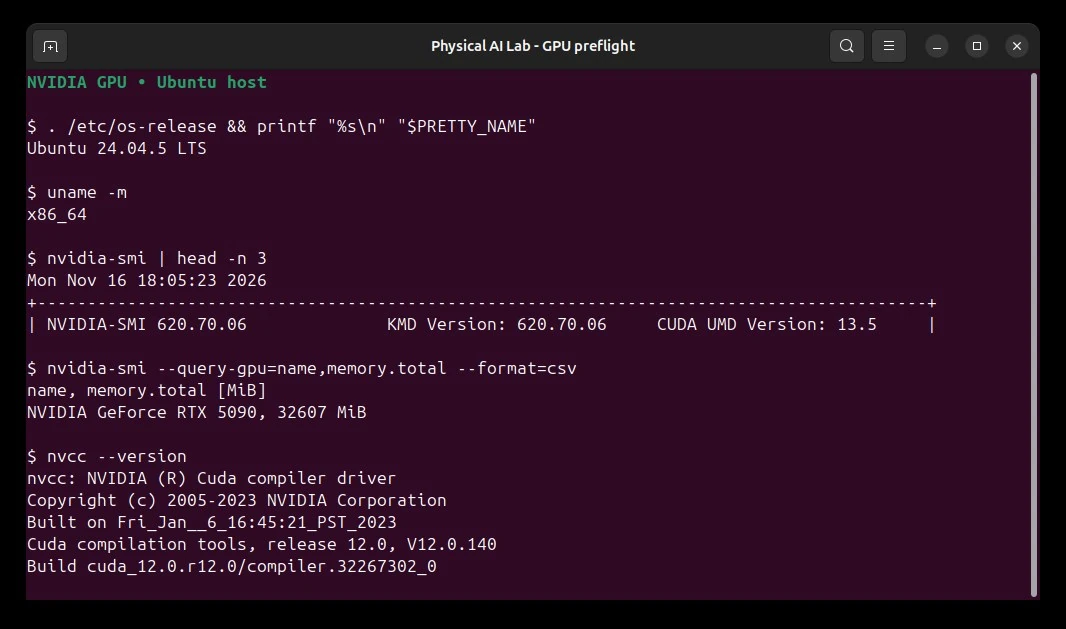
. /etc/os-release && printf '%s\n' "$PRETTY_NAME"
uname -m
nvidia-smi
nvidia-smi --query-gpu=index,name,driver_version,memory.used,memory.total,utilization.gpu --format=csv
Look for the expected GPU and driver, then note the VRAM already in use. x86_64 and aarch64 need different packages. Check the exact OS, GPU, driver, and DGX Spark notes for your Isaac Sim release.
What layer does each command check?
Application libraries reach the GPU through the host driver. Docker adds a step that exposes the GPU device to the container.
| Check | What it establishes |
|---|---|
Host nvidia-smi |
The driver sees the GPU. Its CUDA field describes driver support. |
nvcc --version |
The CUDA compiler version available in this shell. |
Container nvidia-smi |
The container can access the device and driver. |
| Run a lab with its own Python | The installed runtime and packages can start the actual workload. |
If the host sees the GPU and the container does not, start with how the GPU is passed into the container. CUDA Linux installation guide · NVIDIA Container Toolkit sample
Install only the layers your workflow needs
| Layer | What it does | How to check it |
|---|---|---|
| NVIDIA host driver | Gives Linux access to the GPU. Isaac Sim also needs supported graphics and RTX capabilities. | nvidia-smi, then the Isaac Sim Compatibility Checker |
| CUDA runtime in an app or wheel | Runs that application’s CUDA code with a compatible host driver. | Check the application's own GPU test or framework runtime version. |
| CUDA Toolkit | Provides nvcc, headers, and development tools for building CUDA code. |
nvcc --version |
| NVIDIA Container Toolkit | Exposes the host GPU and driver libraries to compatible containers. | Run nvidia-smi inside a GPU-enabled container. |
The CUDA UMD Version field in the screenshot (called CUDA Version by older releases) reports the newest CUDA version the driver supports. This machine shows 13.5 there and 12.0 in nvcc --version, which reports the toolkit on PATH. A valid driver and application runtime can work without a system-wide toolkit. NVIDIA SMI field reference · CUDA compatibility matrix
On a fresh Ubuntu workstation with no working driver, start with the distro's driver selection. Choose a branch supported by the GPU and the Isaac Sim release. On an existing shared machine, have its administrator handle driver changes and reboots.
sudo apt update
sudo apt install ubuntu-drivers-common
sudo ubuntu-drivers list
sudo ubuntu-drivers install
# After rebooting the workstation:
nvidia-smi
A workstation running Isaac Sim should use the graphics-capable driver setup. A compute-only server has a separate path in the Ubuntu driver guide and NVIDIA driver guide.
If your project compiles CUDA code, use the CUDA Linux install guide to add the repo for your distro and architecture, then install the cuda-toolkit-X-Y package for the version the project requires. Versions in NVIDIA's package repo, the host driver, and prebuilt apps have separate lifecycles. Verify the compiler that the shell finds.
command -v nvcc
nvcc --version
For PyTorch, run this inside the project's own environment. Follow its platform installer when choosing a wheel.
python -c 'import torch; print("Build CUDA:", torch.version.cuda); print("CUDA usable:", torch.cuda.is_available())'
Use the machine over SSH
Connect to a host where you have an account. Replace gpu-lab with its address or SSH alias. Use one terminal to run the experiment and another to monitor it.
ssh gpu-lab
tmux new -s isaac-lab
# In a second SSH terminal:
watch -n 2 nvidia-smi
df -h .
Detach from tmux with Ctrl+B, then D. Use tmux attach -t isaac-lab after reconnecting. Plain SSH works for CLI and headless runs. For the Isaac Sim viewport use a desktop session or the NVIDIA WebRTC client on a network you control.
Copy the small verification report back from your laptop terminal. Replace the remote path with your clone's location.
scp gpu-lab:awesome-nvidia-physical-ai/runs/workbench-live/check/report.json .
Check a GPU container
With Docker and the host driver working, add the NVIDIA Container Toolkit. For rootful Docker on a machine you administer, configuring the runtime writes to the Docker configuration. Restarting Docker can interrupt workloads. The official guide has a separate rootless setup.
sudo nvidia-ctk runtime configure --runtime=docker
sudo systemctl restart docker
sudo docker run --rm --runtime=nvidia --gpus all ubuntu nvidia-smi
If the host sees the GPU and the sample container does not, check Docker's runtime and the toolkit before changing the CUDA version inside the image. For the simulator image and license setup, follow the Isaac Sim container guide.
Diagnose the first failed check
| Observation | What to check next |
|---|---|
nvidia-smi does not communicate with the driver |
Confirm this is the Linux GPU host. Check your distro's driver install, kernel module, Secure Boot, and pending reboot. |
nvidia-smi works and nvcc is missing |
Install or locate the toolkit only when compiling CUDA. Isaac Sim has its own application prerequisites. |
PyTorch reports CUDA usable: False |
Check the active interpreter, wheel build, driver compatibility, and whether the GPU is visible to that process or container. |
| Simulator starts but the viewport is blank or crashes | Run the Compatibility Checker for RTX, graphics driver, display, and available VRAM. For remote use check how you launched the window or stream. |
| A course asks for NGC or Hugging Face access | Sign in through the provider's instructions and check the specific artifact's permissions. Keep tokens out of shell history and public logs. NGC Catalog guide |
Continue to the Isaac Sim GUI and CLI · Try the workbench project