Replicator generates labeled synthetic datasets from simulated scenes. The application defines what changes between captures, which cameras render the scene, which labels to compute and how to write the records.
How does a camera view become RGB and label files?
- InputConfigure the view
camera prim + resolutionA render product represents the image to sample.
- ProcessRead channels
annotators → RGB · depth · label IDsEach annotator returns a different view of the same frame.
- OutputSave matching outputs
writer or Python → frame filesKeep the frame index and label lookup together.
Render products, annotators, and writers
The advanced lab pairs /World/SensorCamera with a 960 × 540 resolution to create a render product. RGB, camera-plane depth, and semantic annotators read different information from that same frame. You can delegate persistence to a writer or, as in this lab, save the results with Python as PNG, NumPy, and JSON files.
Match scene state to each output
In folder 03/, rgb.png stores color, depth_m.npy stores per-pixel depth in meters, and semantic_ids.npy stores class IDs. Use semantic_labels.json to identify which IDs belong to the cube. When varying the camera, light, or object pose, retain the configuration alongside the frame index. It gives you a way to investigate why the visible area changed. Advanced 12-frame lab · Official Replicator examples
Architecture
| Component | Responsibility and data boundary |
|---|---|
| USD stage and semantic labels | Objects, materials and cameras live on the stage. Semantic labels map objects to the classes used by annotators. Physics can settle scattered or dropped assets before capture. |
| Randomizers and orchestrator | The tutorial mixes direct pose/scatter updates with event-triggered graph randomizers. Orchestrator stepping controls when the renderer captures the modified scene. |
| Render product and annotator | A render product connects a camera to the capture pipeline. Annotators obtain data such as RGB, boxes or segmentation from render products and scene metadata. |
| Writer | The writer attaches to render products and serializes selected streams in the chosen format. Multiple cameras can produce synchronized views for each capture step. |
Guide diagram based on the official references below.
flowchart LR
    stage["USD scene and semantic labels"]
    rand["Pose, light and material randomizers"]
    render["Camera render products"]
    anno["RGB and annotation streams"]
    writer["Dataset writer"]
    qa["Visual overlays and dataset checks"]
    rand --> stage
    stage --> render
    render --> anno
    stage --> anno
    anno --> writer
    writer --> qa
Official figures and examples

The scene-based tutorial shows the warehouse capture workflow and its rendered data. Original figure and context
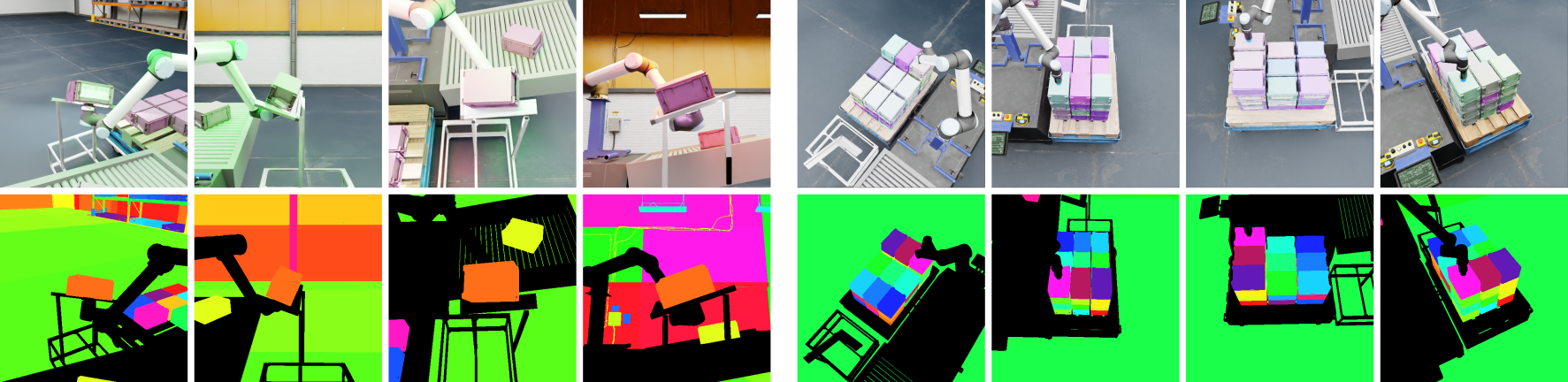
The palletizing example shows data captured for the randomized UR10 scene. Original figure and context
Walkthrough
- Follow the scene-based warehouse tutorial with a forklift, pallet, boxes and several cameras. Assign semantic classes and place objects within task-relevant camera bounds.
- Seed the randomizer and vary pose, lighting and materials. Advance physics for newly placed objects, trigger a capture, then write RGB and box labels.
- Overlay labels on a small sample before generating a larger dataset. Split by scene or configuration to reduce correlation between training and evaluation.
Validation
- Check missing labels, fully occluded targets, camera coverage and writer output format. The warehouse example’s KITTI annotations may require conversion for the chosen trainer.
- Record random seeds and capture timing. Compare a synthetic validation set and real images when measuring a detector’s deployment behavior.
License and scope
Replicator is distributed as an Omniverse/Isaac Sim component. Check extension, renderer, asset and output terms for the exact distribution.
Related guides
Isaac Sim · SimReady · CDF Simulation · TAO Toolkit