Isaac Sim is a robotics simulation application that composes OpenUSD scenes, advances robot and object dynamics, and exposes simulated sensors. The same scene can be used for a ROS 2 integration test, a Replicator dataset job, or an Isaac Lab task with the appropriate setup.
New to Isaac Sim? Try the falling-cube exercise to see how a rigid body and a collider work together.
How do physics and a camera share one scene?
- InputDescribe the stage
USD prims + physics and camera propertiesGeometry, colliders, and sensors live in the stage.
- ProcessAdvance and render
PhysX state → RTX camera viewAdvance body state and render it from the camera pose.
- OutputUse the outputs
viewport · captured images · scene dataInspect the animation or capture files for downstream checks.
From stage to rendered view
A USD stage contains the robot, objects, colliders, and cameras as prims. When the simulation runs, PhysX advances contacts and joint motion. RTX renders that state from the camera, and Replicator can read color, depth, and labels for the same view.
Read the saved state and camera data
The workbench USD contains /World/Workbench/Tabletop and /World/InspectionCamera. In the recorded run, the cube center moves from about 1.154 m to 0.862 m in Z. Physics positions are measured in world-space meters, while the captured RGB array has image-space shape [720, 1280, 3]. Check the visual result alongside the saved Z positions to confirm the drop. Official Isaac Sim documentation · Workbench lab
Release tracks
Isaac Sim 6.2.0 is the latest general-availability release as of November 13, 2026 and the Isaac Sim version targeted by Isaac Lab 3.0. It bundles Newton 1.6.1 and Warp 1.17.0, adds a startup timeout for asset-server checks, fixes Newton substep and actuator behavior, and removes Cortex. The general-availability tag is the reproducible reference for this guide and its exercises. GitHub release · 6.2 release notes
Isaac Sim 7.0.0 Alpha 1 previews standalone simulation libraries with C, C++, and Python APIs. NVIDIA labels the libraries as early evaluation and notes that APIs and packages can change between milestones. The repository’s release/6.3 branch has no corresponding general-availability tag as of the same check. 7.0 Alpha 1 release · Alpha overview · 6.3 branch
Architecture
| Component | Responsibility and data boundary |
|---|---|
| Geometry and scene authoring | Import robot geometry and composition data from formats such as URDF or USD, then define articulation, collider and drive settings. Reference environment assets as separate scene components. |
| Physics and time | The physics engine advances body poses and contacts at the physics timestep. Application logic can use different update or capture rates, so simulation time must be carried across interfaces. |
| Sensors and renderer | Camera and RTX sensor pipelines consume the composed scene and poses. Camera imagery, LiDAR outputs and physics-derived contact measurements represent different sensor paths. |
| External consumers | ROS 2 can exchange commands and publish observations. Replicator combines render products with annotators and writers. Isaac Lab reads simulator state and applies actions inside a learning environment. |
Guide diagram based on the official references below.
flowchart LR
    usd["Robot and environment USD stage"]
    physics["Physics stepping and contacts"]
    render["Camera and RTX sensors"]
    bridge["ROS 2 bridge and controller"]
    sdg["Replicator dataset writer"]
    lab["Isaac Lab environment"]
    usd --> physics
    usd --> render
    physics --> render
    render --> bridge
    bridge --> physics
    render --> sdg
    physics --> lab
    lab --> physics
Official figures and examples
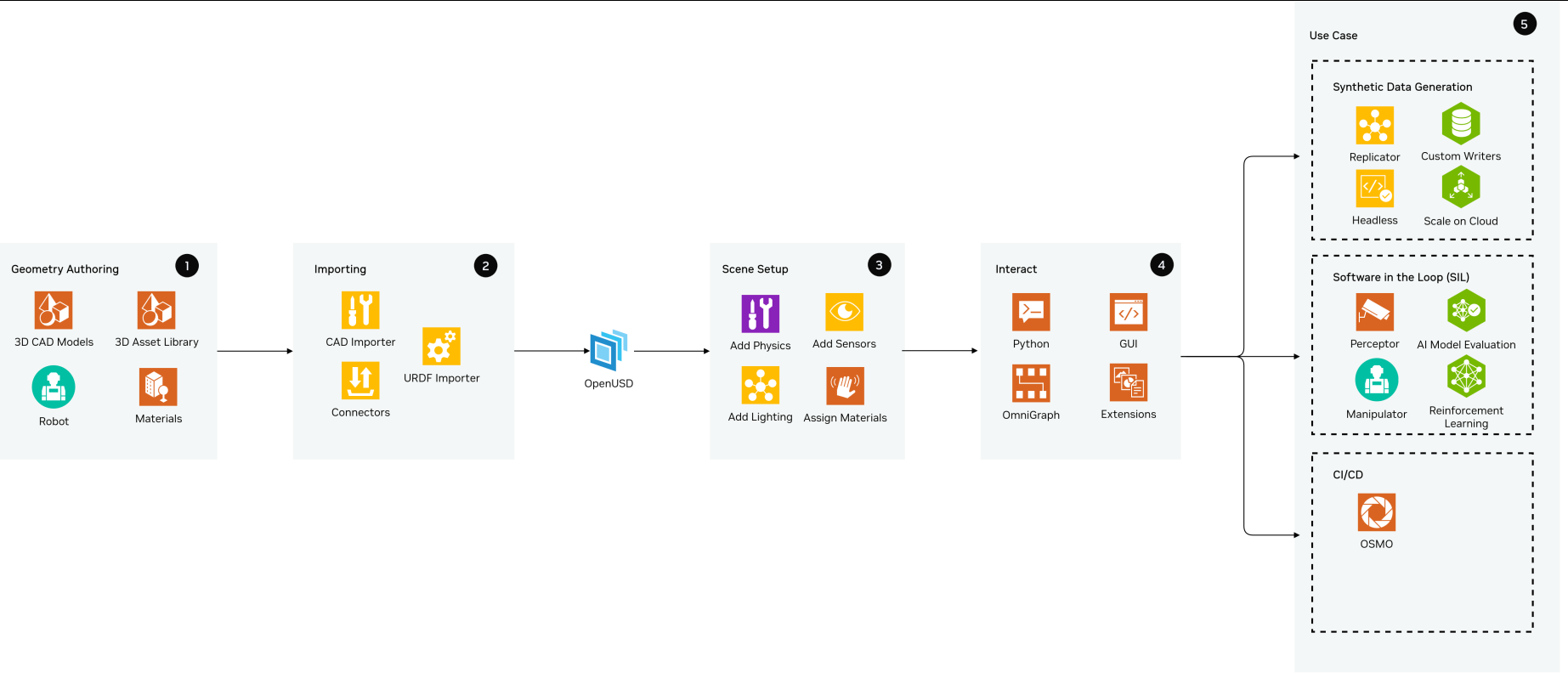
NVIDIA’s reference architecture groups robot and scene authoring, interaction, data generation, and evaluation into distinct workstreams. Original figure and context
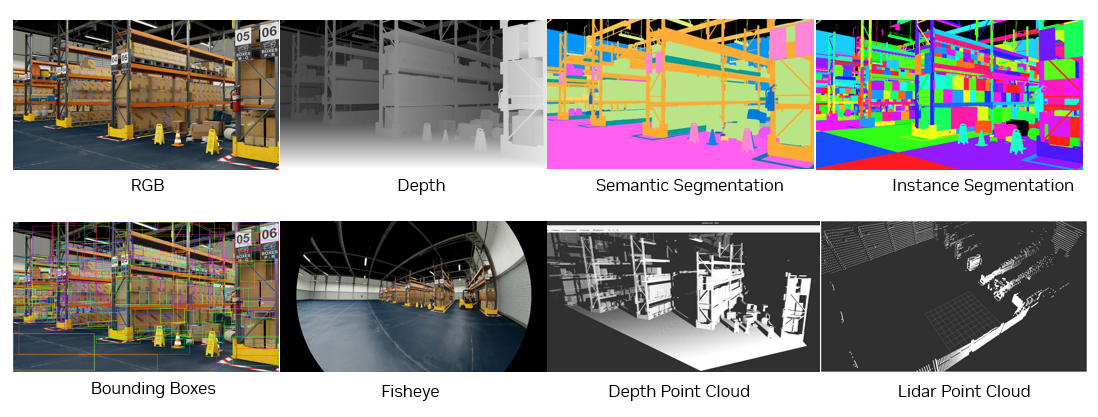
The Replicator panel shows annotations generated alongside rendered views, giving a concrete example of the dataset path. Original figure and context
Walkthrough
- To test obstacle avoidance, place a wheeled robot and shelves in an OpenUSD warehouse scene. Inspect collision geometry and add a LiDAR at the same pose as the physical mount.
- Connect the ROS 2 bridge to publish sensor data and accept motion commands. Start with a scripted route and a fixed obstacle. Save point clouds, transforms and simulated time along with the robot path.
- Introduce shelf position or lighting changes, then replay the same command sequence. For perception training, attach Replicator annotators and a writer to capture a separate labeled dataset.
Validation
- Check the scan frame, topic timestamp and unit scale against the scene before interpreting a navigation failure.
- Record release, sensor configuration, physics timestep and update rates in experiment metadata. Inspect a sensor sample at rest before moving the robot.
License and scope
The repository code uses Apache-2.0. The Omniverse Kit SDK, some distributed components, and assets have separate terms. Isaac Sim 6.2 LICENSE
Related guides
OpenUSD · PhysX · Isaac Lab · Replicator · ROS 2