Isaac Lab organizes batched simulation into robot learning environments. It provides task interfaces for observations, actions, rewards and resets, and delegates stepping, articulation state and sensors to the selected backend.
How does one policy learn from 512 simulated robots?
- InputTask and state
robot model + command + observationsThe task defines sensors, controls, and success criteria.
- ProcessStep many environments
policy action → physics → rewardEach environment produces its next observation.
- OutputUpdate and replay
rollouts → RL update → checkpointThe training library updates shared policy weights.
Connect the environment and policy one step at a time
The task defines what counts as an observation and how to apply an action. The policy outputs a joint action and physics advances the state. The environment returns a new observation, a reward, and termination information. The training algorithm updates the policy using sequences collected across many environments.
Read the first array dimension
Microduck uses 512 environments. If observations are stacked by row, one step can be read as [512, observation features]. If environment 7 times out, its episode resets while the others continue their own rollouts. The checkpoint holds the learned policy state. Follow the Isaac Lab task, Newton simulation, and RSL-RL update separately to find the relevant logs. Microduck lab · Isaac Lab documentation
Isaac Lab 3.0
The 3.0.0 general-availability release targets one task API across interchangeable physics, rendering, and visualization backends. The base installation can run supported tasks with Newton without Omniverse Kit. Add the Isaac Sim 6.2 extra for workflows that need the full PhysX and RTX stack, the ROS bridge, or Kit tooling. OvPhysX and OVRTX are separate backend options for compatible tasks. Isaac Lab 3.0.0 release · Backend presets
The release targets Python 3.12, PyTorch 2.11 with CUDA 13.0, Newton 1.6.1, and Warp 1.17.0. For reproducible installs, use the tested dependency overrides in the installation guide, especially when enabling the Isaac Sim extra. Isaac Lab 3.0 installation
Architecture
| Component | Responsibility and data boundary |
|---|---|
InteractiveScene and backend |
Scene configuration declares assets and sensors and organizes copies across environments. Backend presets determine the physics, rendering and scene tools available to the task. |
ManagerBasedRLEnv |
Managers resolve actions into actuator targets and build observations, rewards, terminations and events from task configuration. They let a task reuse terms or change a sensor without rewriting the entire environment. |
DirectRLEnv |
Task code supplies explicit routines for applying actions, forming observations and rewards, and resetting environments. This gives the task tighter control of its execution loop. |
| Policy runner | The learning stack consumes the batched environment interface and writes policy checkpoints. The simulator substep and policy step can run at different rates. |
Guide diagram based on the official references below.
flowchart LR
    task["Task terms and scene configuration"]
    env["Isaac Lab environment and scene"]
    sim["Selected simulation backend"]
    policy["Policy or training runner"]
    ckpt["Policy checkpoints and metrics"]
    task --> env
    env --> sim
    sim --> env
    env --> policy
    policy --> env
    policy --> ckpt
Official figures and examples
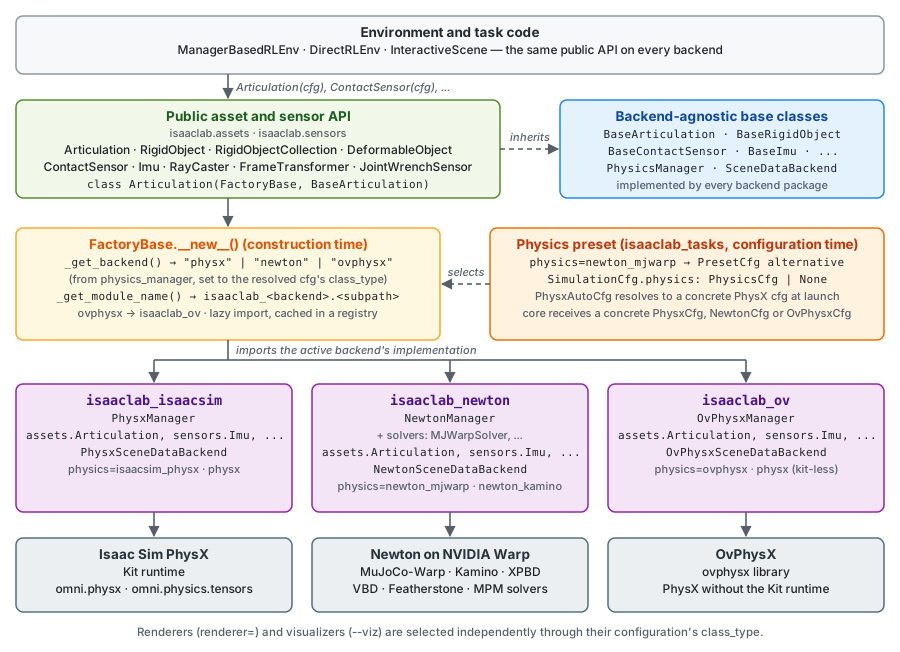
Isaac Lab’s official backend diagram explains where backend-specific implementations connect to the environment-facing interfaces. Original figure and context
Walkthrough
- Use the manager-based cartpole example to map a state observation and an actuator action. Run a single environment first and inspect reset behavior and joint units.
- For an arm reach task, replace the scene and define the target-pose observation, joint action and distance reward. Add a termination condition and reset distribution before increasing the number of environments.
- Replay a checkpoint with fixed seeds, then vary target poses and physical parameters. Evaluate success and action smoothness across held-out conditions before a real robot trial.
Validation
- Check the backend matrix before swapping PhysX, Newton, or another preset. Availability of sensors, actuators and constraints can differ by backend and release.
- Match observation order, normalization, joint convention and control rate when moving a policy to a new simulation or hardware runner.
License and scope
Isaac Lab code is BSD-3-Clause. Backends, policy weights and assets have separate terms. Isaac Lab 3.0 LICENSE
Related guides
Isaac Sim · Newton · Isaac Lab-Arena · Isaac RLPT · Microduck