PhysX provides scene queries and physical simulation for collision shapes, rigid bodies, and articulated mechanisms. In Isaac Sim, authored USD physics settings become objects managed by the physics backend.
Where do friction and contact show up in the data?
- InputInitial state
rigid body + geometry + gravityDefine which objects can move and how they contact.
- ProcessSolve contacts
collision candidates → contact responseAdvance motion with the step size and material parameters.
- OutputRead the body state
physx-poses.npyCompare positions at matching times.
What the physics properties do
A rigid body has position, rotation, and velocity. The collider supplies the boundary used to test contact. Friction affects sliding along the contact surface, while restitution affects the bounce after a collision.
Compare friction and measured displacement
The recorded friction runs use coefficients [0.16, 0.35, 0.75] and move about [0.570, 0.255, 0.114] meters in the same order. These are measured distances in those cases. The separate rigid-body comparison stores poses in physx-poses.npy by time and body. Read poses[t, i, :3] to select the XYZ location of body i at time index t. PhysX source · Physics lab
Architecture
| Component | Responsibility and data boundary |
|---|---|
PxScene and actors |
The scene groups static and dynamic actors, shapes, materials, filters, and solver settings. Broad phase identifies likely overlapping pairs before narrow phase constructs contacts. |
| Constraints and articulations | Contacts and joints constrain rigid-body motion. A reduced-coordinate articulation models connected links through joint coordinates and exposes drives for robot control. |
| GPU dynamics and broad phase | The scene can enable GPU rigid-body dynamics and GPU broad phase independently. The supported shapes and feature behavior are version specific. |
simulate / fetchResults |
The simulation advances actor state and collects results and callbacks for the application. Geometry queries such as raycasts read the scene through a separate interface. |
Guide diagram based on the official references below.
flowchart LR
    s["Scene shapes and filters"]
    pairs["Broad phase candidates"]
    contacts["Narrow phase contacts"]
    j["Joint and drive constraints"]
    step["Dynamics solve and integration"]
    report["Poses and contact reports"]
    s --> pairs
    pairs --> contacts
    contacts --> step
    j --> step
    step --> report
Official figures and examples
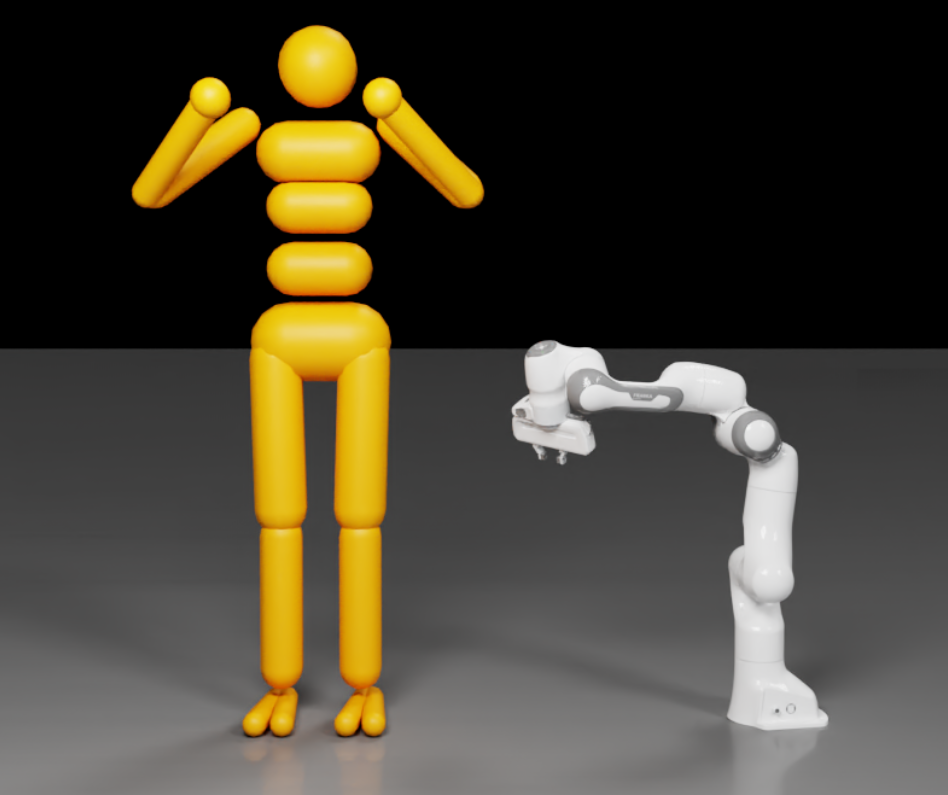
PhysX’s articulation guide shows example assemblies that can be represented as jointed link trees. Original figure and context
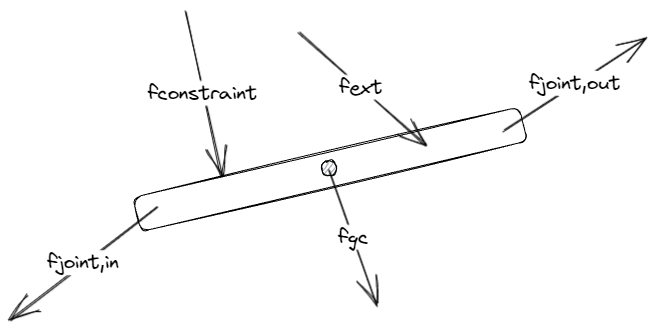
The free-body diagram helps interpret the incoming joint force reported on an articulation link. Original figure and context
Walkthrough
- Build a two-finger gripper articulation and place a rigid workpiece on a static table. Define link mass and inertia, collider geometry, drive limits and friction materials.
- Advance the scene with a fixed timestep and a joint-position target. Record workpiece pose and contact reports while closing and lifting the gripper.
- Vary friction and the collider approximation independently to identify whether grip failure is dominated by materials or the contact shape.
Validation
- Start with simple colliders and check center of mass, joint axes and drive units. A correct-looking mesh can still have an unsuitable physical representation.
- Check the GPU buffer and collision support notes for your SDK version before scaling to many environments or heavy contact workloads.
License and scope
PhysX SDK code is BSD-3-Clause. The surrounding application and extra components have separate terms.
Related guides
Isaac Sim · Isaac Lab · Newton