SimReady describes what an OpenUSD asset must provide for a specific simulation use. A robot arm may need correct articulation and joint limits, a manipulation prop needs usable collision and mass data, and a perception asset may need semantic labels.
When is a good-looking asset ready to simulate?
- InputVisual asset
USD mesh and materialsThese describe the shape and its appearance.
- ProcessAuthor simulation properties
collider · mass · class labelAdd the properties the solver and camera annotators will read.
- OutputTest it in a scene
contact position · class pixelsDrop a probe and check what the camera labels.
What do the renderer, solver, and camera read?
| Property | Consumer | Role in a workbench scene |
|---|---|---|
| Mesh and visual material | Renderer | Draw the tabletop's shape and color. |
| Collision shape | Physics engine | Determine where a falling object contacts the table. |
| Class label | Semantic annotator | Mark the corresponding camera pixels as workbench or another authored class. |
SimReady specifies how simulation properties are authored and validated for a use case. A short contact test reveals whether the physics geometry lines up with the rendered asset.
Measure the difference in a recorded run
The recorded comparison shows final probe-center heights of about 0.844 m and 0.984 m. Compare the world coordinates and inspect the collision overlay to explain the 0.14 m gap. If you will generate a labeled dataset, check that the expected class also lands on the correct pixels. Collider lab · NVIDIA SimReady specification
Architecture
| Component | Responsibility and data boundary |
|---|---|
| Authored USD content | Source CAD supplies geometry. Asset authoring adds hierarchy, scale, materials and domain data such as physics schemas or semantic labels. |
| Profile and features | A named profile defines the required feature set for an intended runtime use. Pin the profile version when deciding what the asset must contain. |
| Validation and runtime | A validator checks authored USD properties against the selected profile. A simulation test checks whether the asset behaves as expected in its actual scene and runtime. |
Guide diagram based on the official references below.
flowchart LR
    cad["Source CAD or OpenUSD geometry"]
    author["Author colliders, joints and materials"]
    profile["Select a target SimReady profile"]
    check["Validate USD and test behavior"]
    asset["Versioned asset for scene composition"]
    cad --> author
    profile --> author
    author --> check
    check --> asset
Official figures and examples
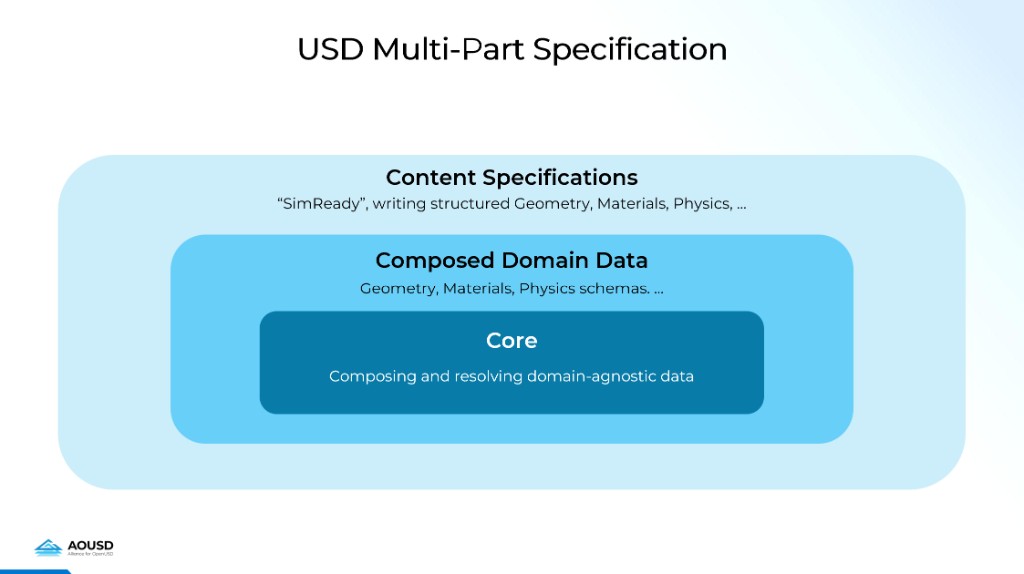
NVIDIA’s specification diagram places SimReady content requirements around OpenUSD core and domain data. Original figure and context

NVIDIA’s YuMi physics overlay exposes collision shapes and joint axes. Those authored properties can be checked separately from the visible mesh. Original figure and context
Walkthrough
- Follow NVIDIA’s YuMi walkthrough from CAD import through visual materials, joint axes, collider approximations, mass and inertia. Decide which properties need authoritative manufacturer data.
- Validate the asset against the appropriate robot profile, then load it into Isaac Sim. Exercise joint limits and use a simple pick-and-place task to check finger coupling and contacts.
- Reference the validated asset in the task stage. Record the asset revision, profile version and simulator used for the check.
Validation
- Choose a profile for the actual use case. A visually detailed asset can still lack the collision, units or joint data needed for robot control.
- Treat static validation and runtime testing as separate checks. Inspect contact response, control axes and pose conventions in the final scene.
License and scope
Specification, validation tooling and individual assets have distinct terms. Check the Foundation and the exact asset card.
Related guides
SimReady Foundation · SimReady Central Library · Isaac Sim · OpenUSD