Video to Data (V2D) turns a human demonstration video into inspectable 3D artifacts and a robot-learning workflow. Each stage writes intermediate results, so a clip can be reselected, reconstructed or retargeted without rerunning unrelated stages.
How does a human video become robot training data?
- InputFind task clips
video → selected time intervalsChoose clips that show a coherent manipulation task.
- ProcessRecover motion in 3D
camera and motion estimatesUse the selected pipeline to recover spatial observations.
- OutputPrepare training examples
robot-compatible observation/action pairsReview the reconstruction and match the target robot’s action space.
Select the clip, recover motion, and adapt it to a robot
Start by finding a clip that shows the target task. Reconstruction estimates where the person and objects were in 3D. Retargeting converts the motion into a form the robot can execute. The official reconstruction-based workflow can use the recovered motion as a tracking reference to train a policy in simulation.
Follow an event through the intermediate artifacts
If frame 180 of a constant-30-fps clip shows a cup grasp, it occurs about six seconds after frame 0. At that time, compare the decoded frame, reconstructed object pose, and corresponding robot motion. Depth behind an occluding object is estimated. Review those intervals and check physical contact when the trajectory runs in simulation. Video-to-Data project
Architecture and data flow
| Component | Inputs, processing and outputs |
|---|---|
| Video Ingestion Agent | A LangGraph workflow divides video into action clips, extracts entities and their relations and embeds frames with SigLIP 2. The graph and vector databases let users retrieve candidate clips by natural-language queries. |
| Reconstruction | Containerized vision modules take selected RGB or stereo video and estimate artifacts such as depth, masks, textured meshes, object poses and human body parameters. Multi-view examples also use camera calibration and recorded sensor streams. |
| Robotic Grounding | Motion is retargeted onto a robot embodiment and used as a tracking reference in a reconstructed Isaac Lab scene. A reference policy can be learned with PPO and rolled out to produce expert demonstrations. |
| Downstream fine-tuning | The reference E2E workflow converts expert rollouts to LeRobot-format data, fine-tunes GR00T N1.7 and evaluates the resulting policy in a closed loop. |
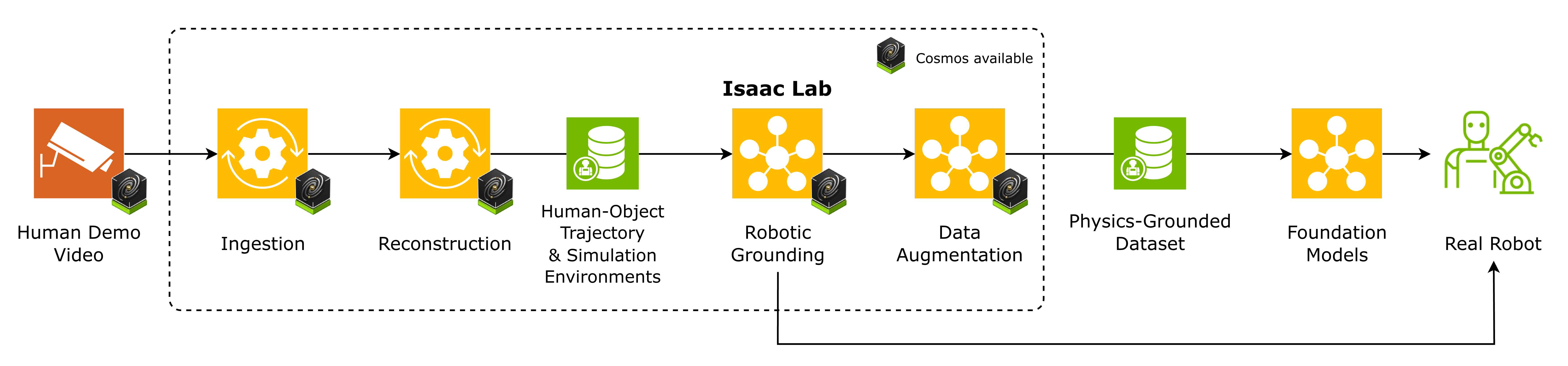
Follow the official overview from video to selected clips, 3D reconstruction and robotic grounding. The arrows represent concrete artifacts that can be checked before training or deployment. Official figure source
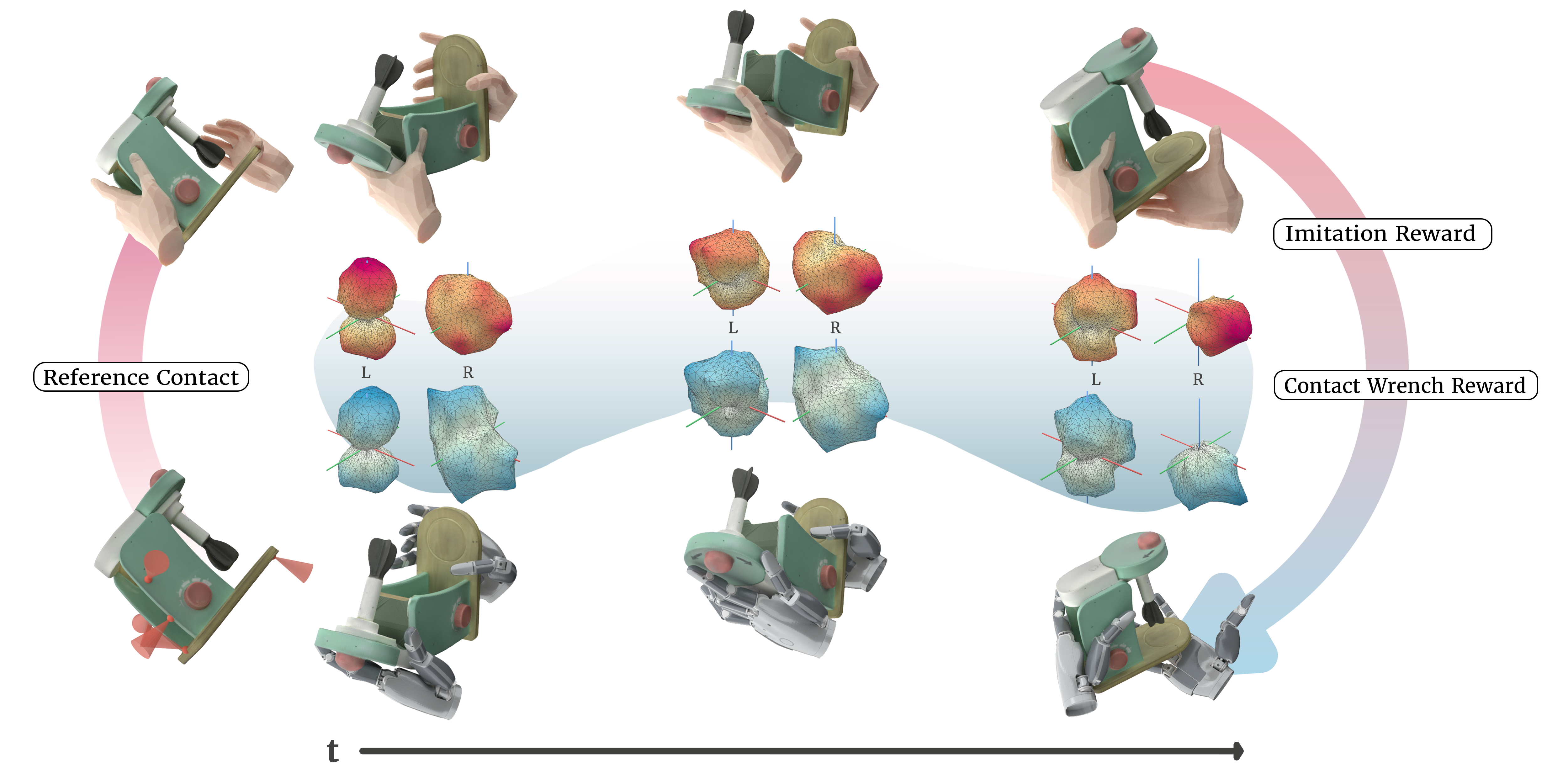
The CHORD research figure zooms in on robotic grounding, with reconstructed motions and contacts contributing to the learning objective. Official project figure
Worked example
- Use the reference tissue-box workflow, which starts with a raw iPhone egocentric demonstration. First inspect the scene and motion reconstruction before running the robotic stages.
- Retarget onto the supported Sharpa embodiment and train or load the reference expert. Capture rollouts and convert the dataset for the GR00T stage.
- Run closed-loop evaluation and compare the final task completion with the quality of intermediate reconstruction and tracking.
What to verify
- Check scale and camera/world frames before retargeting. A visually convincing reconstruction can still misplace contact surfaces.
- Check dependencies and hardware per stage. Retrieval, reconstruction and robot learning use different environments and may have separate model terms.
Official references and terms
The code uses Apache-2.0. The documentation and skills use CC BY 4.0. Dependent models and data carry their own terms.